
LUCKYTOWN PLUS USDT Topup - LUCKYTOWN Complete TRC20 Crypto Deposit Guide
LUCKYTOWN PLUS USDT Topup: LUCKYTOWN Teaching Step Solutions
Introduction to LUCKYTOWN PLUS USDT Topup
The LUCKYTOWN PLUS USDT topup feature gives members a modern and secure way to add funds using cryptocurrency. With support for Binance, Huobi, and other major crypto platforms, you can deposit USDT on the TRC20 network and have it converted to MYR at competitive, transparent rates. This guide walks you through every step, from opening the deposit menu to entering your TXID and receiving final confirmation. LUCKYTOWN verifies every crypto deposit on-chain, and the finance department processes completed transactions within 10 minutes.
Step-by-Step Guide to LUCKYTOWN PLUS USDT Topup: LUCKYTOWN Member Instructions

Step 1: Access Your Account Dashboard
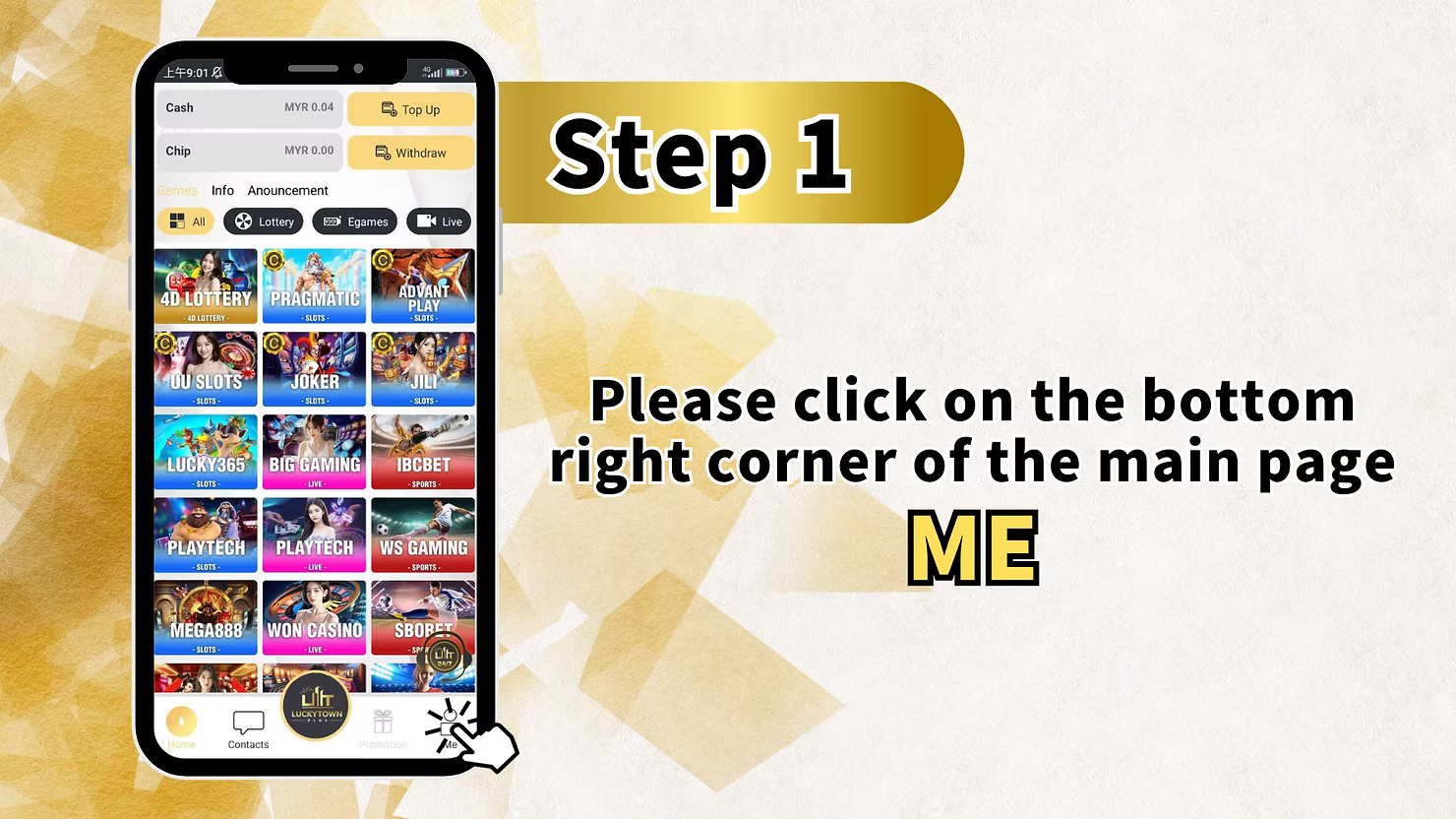
To begin your LUCKYTOWN PLUS USDT topup, open the app and tap the account icon in the bottom right corner of the main screen. This section displays your current balance, recent activity, and transaction history. It also gives you quick access to deposit and withdrawal options before you return to the game lobby.
Step 2: Enter the Financial Transaction Center
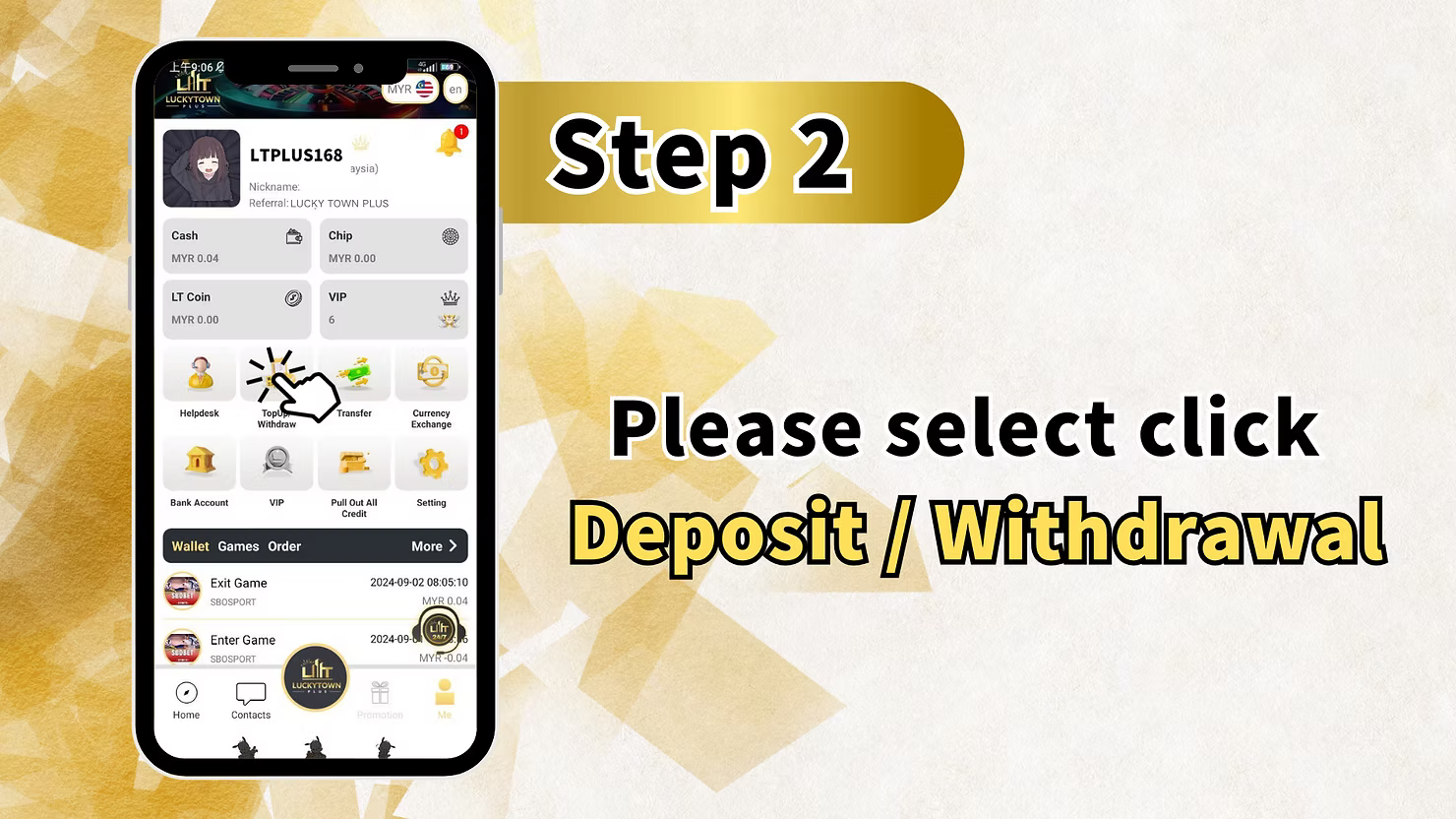
From your account dashboard, tap the "Deposit / Withdrawal" option. This opens LUCKYTOWN PLUS's centralized transaction hub where all financial activities are managed. The interface separates deposit and withdrawal functions clearly for straightforward navigation.
Step 3: Select USDT as Your Deposit Method
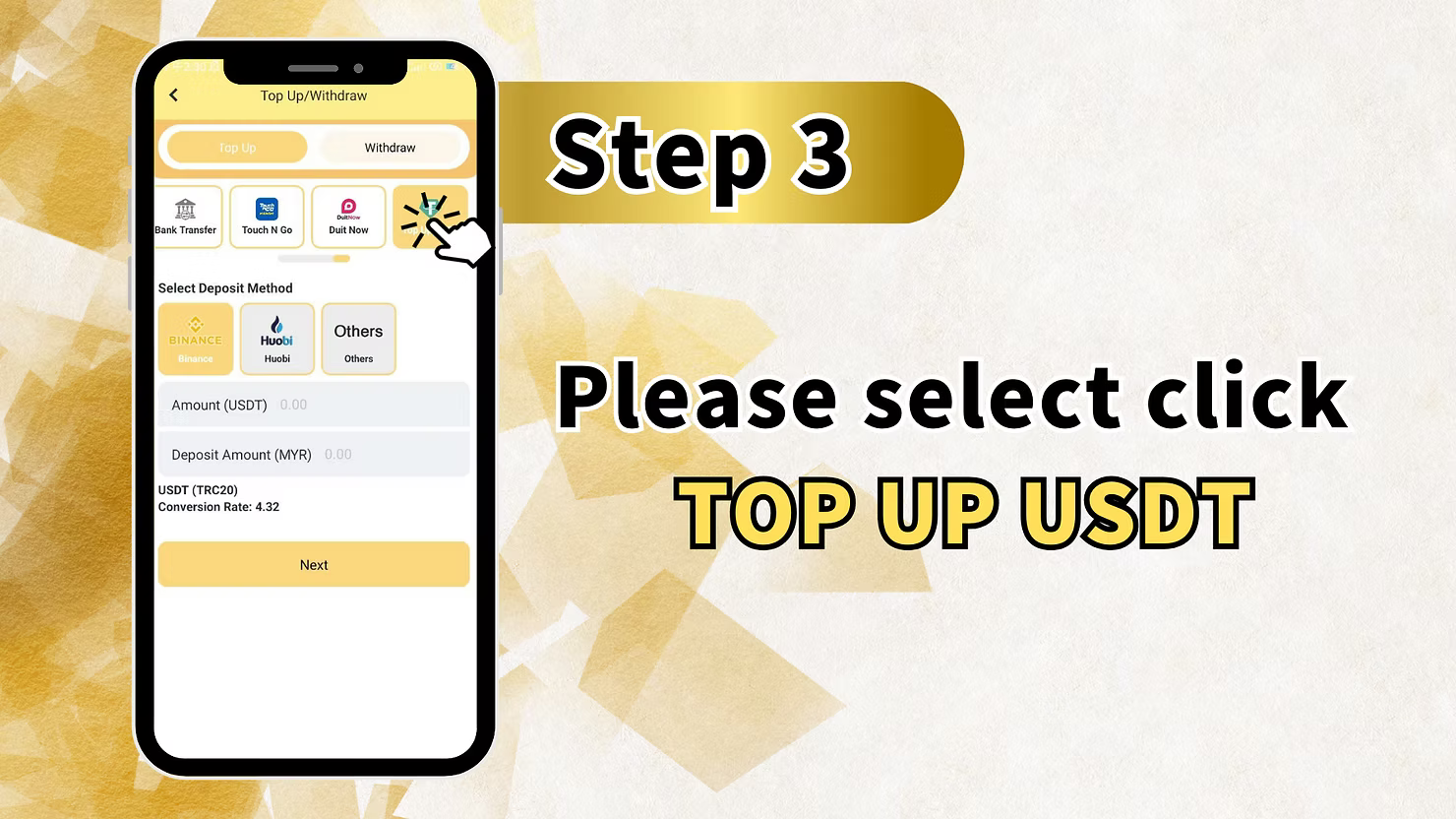
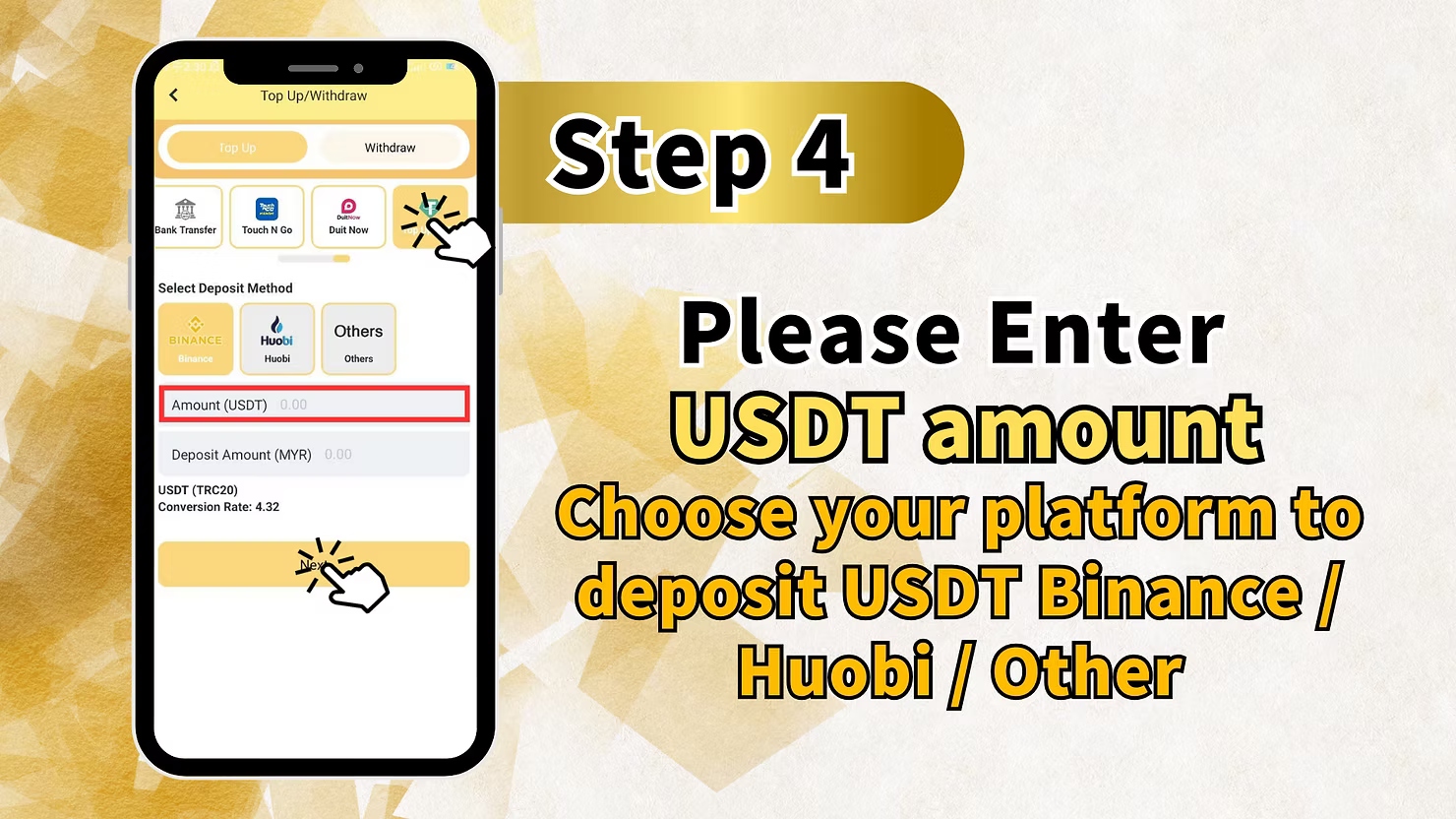
On the deposit screen, you will see several options including Bank Transfer, Touch N Go, and Duit Now. For cryptocurrency deposits, locate the USDT section. Here you can choose Binance, Huobi, or "Others" for alternative platforms. Select the platform you want to use for your LUCKYTOWN PLUS USDT topup.
Amount and Conversion Information
The screen shows an Amount (USDT) field and a Deposit Amount (MYR) field displaying the Ringgit equivalent. Below this, you will also see the USD/T (TRC20) network label and the current conversion rate. This rate determines how much MYR you receive for your USDT deposit. Enter your preferred USDT amount, verify the displayed MYR equivalent, then tap "Next" to continue.
Step 4: Enter Your USDT Deposit Amount
Input the USDT amount you want to deposit for your LUCKYTOWN PLUS USDT topup. Choose your platform from Binance, Huobi, or Other. Make sure you have enough USDT in your selected crypto wallet before proceeding, and double-check that your wallet supports TRC20 network transfers because this is the only accepted network.
Step 5: Scan QR Code and Enter TXID
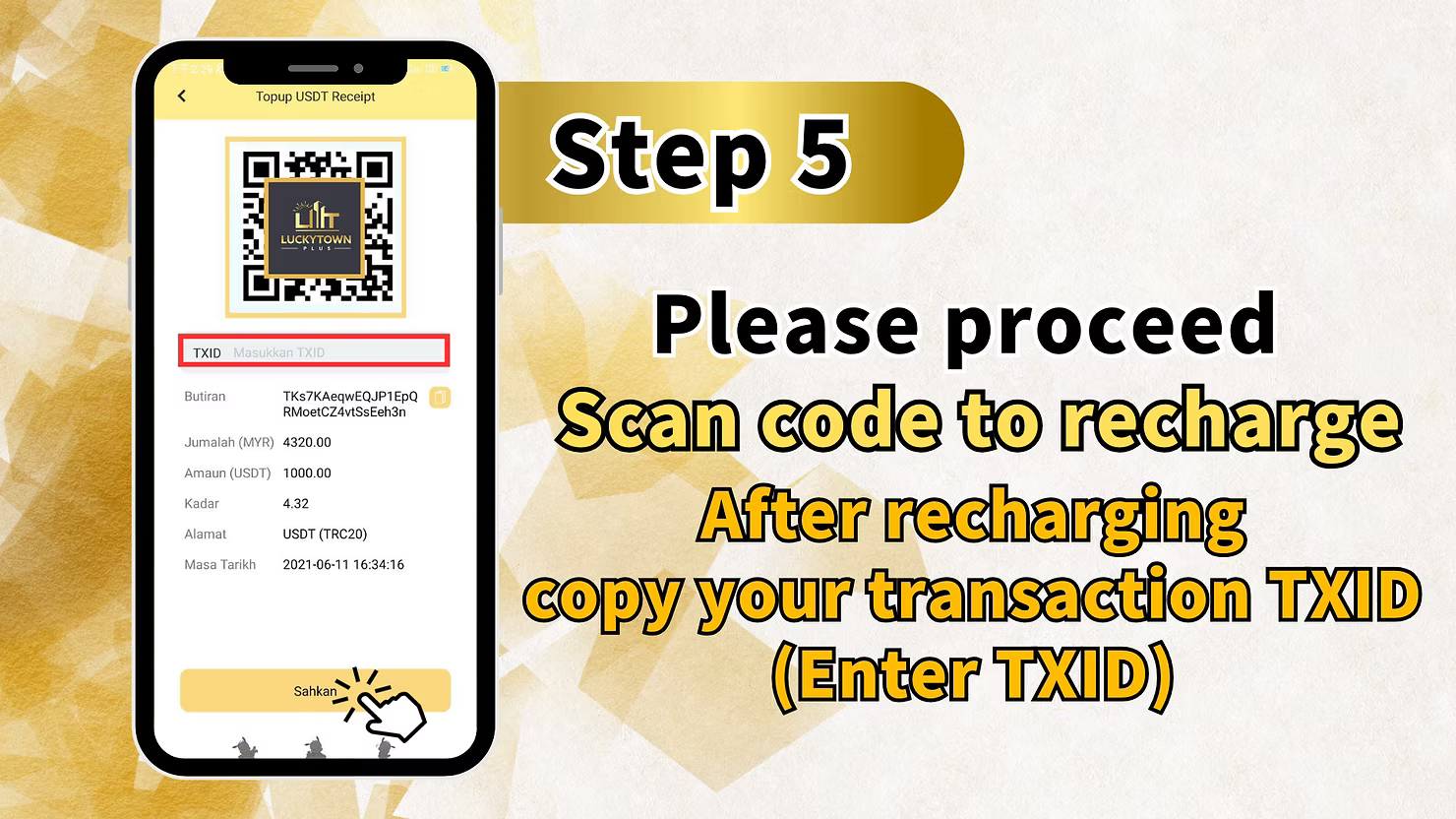
The system displays a QR code containing the LUCKYTOWN PLUS USDT wallet address. Open your Binance, Huobi, or other crypto app, use the scan function, and scan the QR code to start your USDT transfer. Complete the transfer on the TRC20 network. After you send the USDT successfully, copy your transaction TXID (Transaction ID) from your crypto wallet app.
Enter TXID and Verify Transaction Details
Return to the LUCKYTOWN PLUS app and paste your TXID into the field labeled "TXID" or "Transaction ID." The system will display transaction details for verification, including the TRC20 network, USDT amount, MYR equivalent based on the current conversion rate, wallet address used, and your transaction timestamp. Review everything carefully, then click "Confirm" to submit your LUCKYTOWN PLUS USDT topup for processing.
Step 6: Confirmation and Processing
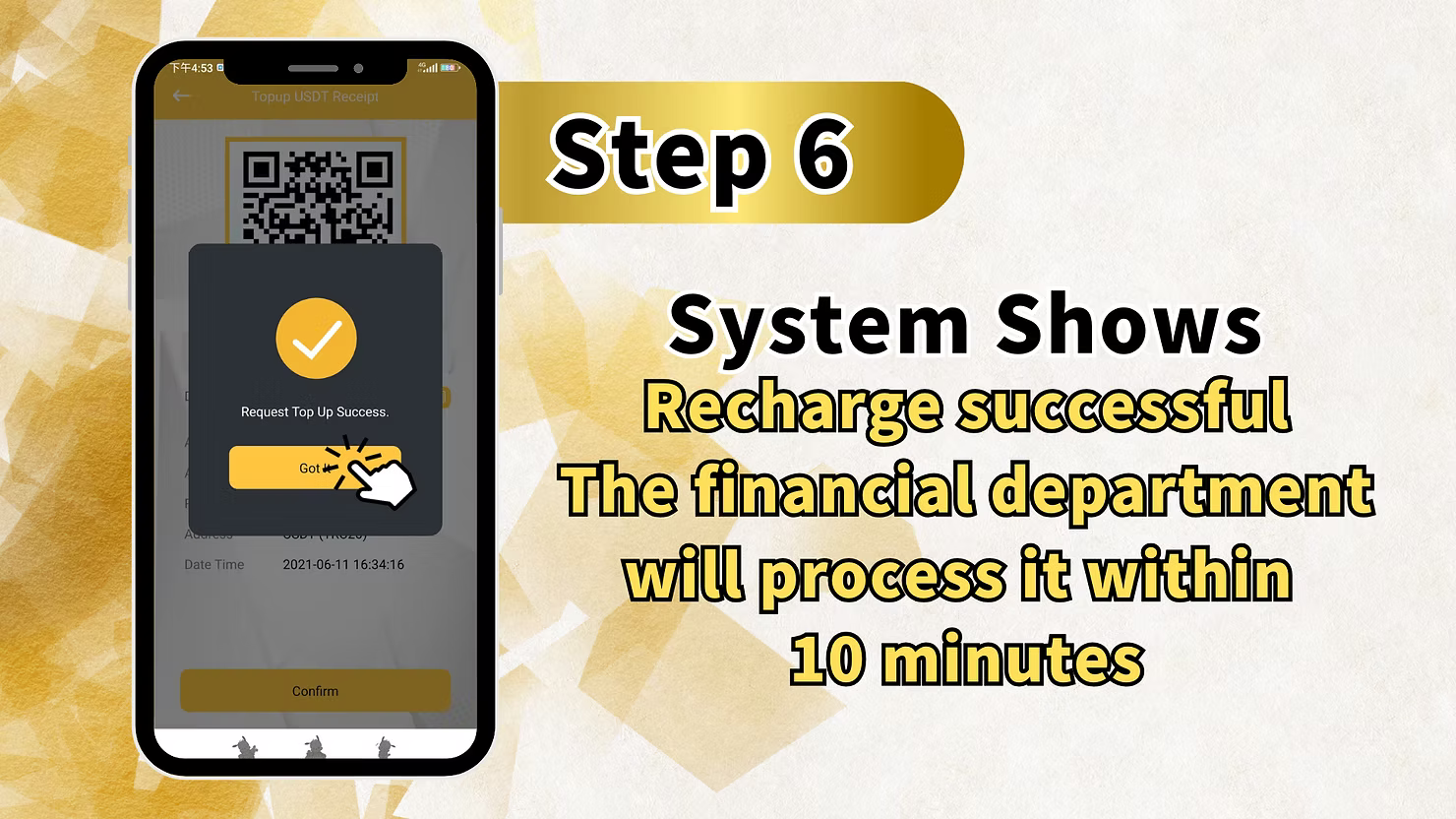
After submitting your TXID and confirming the details, the system shows a "Recharge Successful" or "Request Top Up Success" confirmation message. This indicates that the finance department will process your LUCKYTOWN PLUS USDT topup within 10 minutes. You will also see the date and time of the successful request while your deposit waits for final on-chain verification.
LUCKYTOWN PLUS USDT Topup: LUCKYTOWN Important Guidelines
USDT TRC20 Network Only
LUCKYTOWN PLUS USDT topup accepts deposits only on the TRC20 network. This is the sole supported network for USDT deposits. Sending USDT through other networks such as ERC20, BEP20, or SOL can result in permanent loss of funds because those transactions cannot be recovered or credited.
Current Conversion Rate Transparency
The conversion rate for LUCKYTOWN PLUS USDT topup is shown clearly before you confirm your transaction. Rates update according to market conditions, and the rate displayed at the time of your deposit determines how much MYR you receive.
TXID Requirement for Verification
After completing your USDT transfer, you must copy your transaction TXID and enter it in the LUCKYTOWN PLUS app. This TXID is essential for the finance department to verify your deposit on the blockchain. Without a valid TXID, your LUCKYTOWN PLUS USDT topup cannot be processed.
Processing Timeframe
After successful TXID submission, the finance department processes your LUCKYTOWN PLUS USDT topup within 10 minutes. Funds are usually credited quickly during active operating hours. If your deposit has still not arrived after this period, contact customer support with your TXID.
Supported Crypto Platforms
LUCKYTOWN PLUS USDT topup supports Binance, Huobi, and other major cryptocurrency platforms. If your preferred exchange is not listed, choose "Others." The process remains the same: scan the QR code, send USDT through TRC20, and submit your TXID.
Frequently Asked Questions About LUCKYTOWN PLUS USDT Topup: LUCKYTOWN Member Support
What cryptocurrency does LUCKYTOWN PLUS accept?
LUCKYTOWN PLUS USDT topup accepts USDT (Tether) only on the TRC20 network. This is the only supported cryptocurrency and network combination for this deposit method because it offers low fees and fast confirmations.
Which platforms can I use for USDT deposit?
LUCKYTOWN PLUS USDT topup supports Binance, Huobi, and other major cryptocurrency platforms. If your exchange is not listed, choose "Others" and follow the same QR code and TXID submission process.
What is the current USDT to MYR conversion rate?
The conversion rate for LUCKYTOWN PLUS USDT topup appears on the deposit screen before confirmation. Rates follow current market conditions and update regularly. The displayed rate at the time of your deposit is the one applied to your transaction.
What is TXID and why do I need it?
TXID, or Transaction ID, is the unique identifier for every cryptocurrency transfer. After making your USDT payment, copy the TXID from your wallet app and enter it in LUCKYTOWN PLUS so the finance team can verify your deposit on the blockchain.
How long does USDT topup processing take?
After successful TXID submission, the finance department processes your LUCKYTOWN PLUS USDT topup within 10 minutes. Funds are then credited to your account so you can start using them on the platform quickly.
What if I send USDT on the wrong network?
LUCKYTOWN PLUS USDT topup only accepts TRC20 network deposits. Sending USDT on other networks such as ERC20, BEP20, or SOL can cause permanent loss of funds because those wallet routes are incompatible and cannot be recovered.
Can I deposit other cryptocurrencies besides USDT?
At the moment, LUCKYTOWN PLUS USDT topup supports only USDT. Other cryptocurrencies such as Bitcoin, Ethereum, or BNB are not accepted through this direct deposit flow.
Why Choose LUCKYTOWN PLUS USDT Topup: LUCKYTOWN Benefits for Members
Modern Cryptocurrency Deposits
LUCKYTOWN PLUS USDT topup gives members the convenience of funding through cryptocurrency. Using USDT helps you avoid many traditional banking delays and supports fast transfers from your crypto wallet to your gaming account.
Competitive, Transparent Conversion Rates
With conversion rates shown clearly before confirmation, LUCKYTOWN PLUS USDT topup lets you know exactly how much MYR you will receive for your USDT deposit. The process stays transparent without hidden conversion surprises.
Fast 10-Minute Processing
After TXID submission, the finance department processes LUCKYTOWN PLUS USDT topup within 10 minutes. This reduces waiting time and lets you return to the platform's full game range faster.
Major Platform Support
LUCKYTOWN PLUS USDT topup supports Binance, Huobi, and other major crypto platforms, which keeps the flow compatible with wallets many Malaysian crypto users already use. The "Others" option also supports TRC20-compatible wallets outside the main listed platforms.
Secure On-Chain Verification
The TXID requirement ensures your LUCKYTOWN PLUS USDT topup is verified properly on the blockchain. This gives each transaction a clear audit trail and allows the finance team to confirm deposits independently on the TRC20 network.
Complete Your LUCKYTOWN PLUS USDT Topup Today
Use Binance, Huobi, or other supported platforms to deposit USDT on the TRC20 network. Follow the step-by-step guide, scan the QR code, enter your TXID, and receive processing within 10 minutes. LUCKYTOWN PLUS keeps crypto deposits simple and secure for members.
Start USDT Topup Now