
LUCKYTOWN PLUS Add Bank Account - LUCKYTOWN Complete Withdrawal Account Setup Guide
LUCKYTOWN PLUS Add Bank Account: LUCKYTOWN Teaching Step Solutions

Introduction to LUCKYTOWN PLUS Add Bank Account
Adding a bank account to your LUCKYTOWN PLUS profile is an essential step for any member who wants to withdraw funds. This process links your gaming account to your personal bank account so winnings are transferred securely to the correct financial institution. LUCKYTOWN prioritizes fund security through strict name-matching rules and transaction PIN verification. This guide walks you through every step, from opening the account menu to completing the addition with your 6-digit transaction PIN.
Step-by-Step Guide to LUCKYTOWN PLUS Add Bank Account: LUCKYTOWN Member Instructions


Step 1: Access Your Account Dashboard
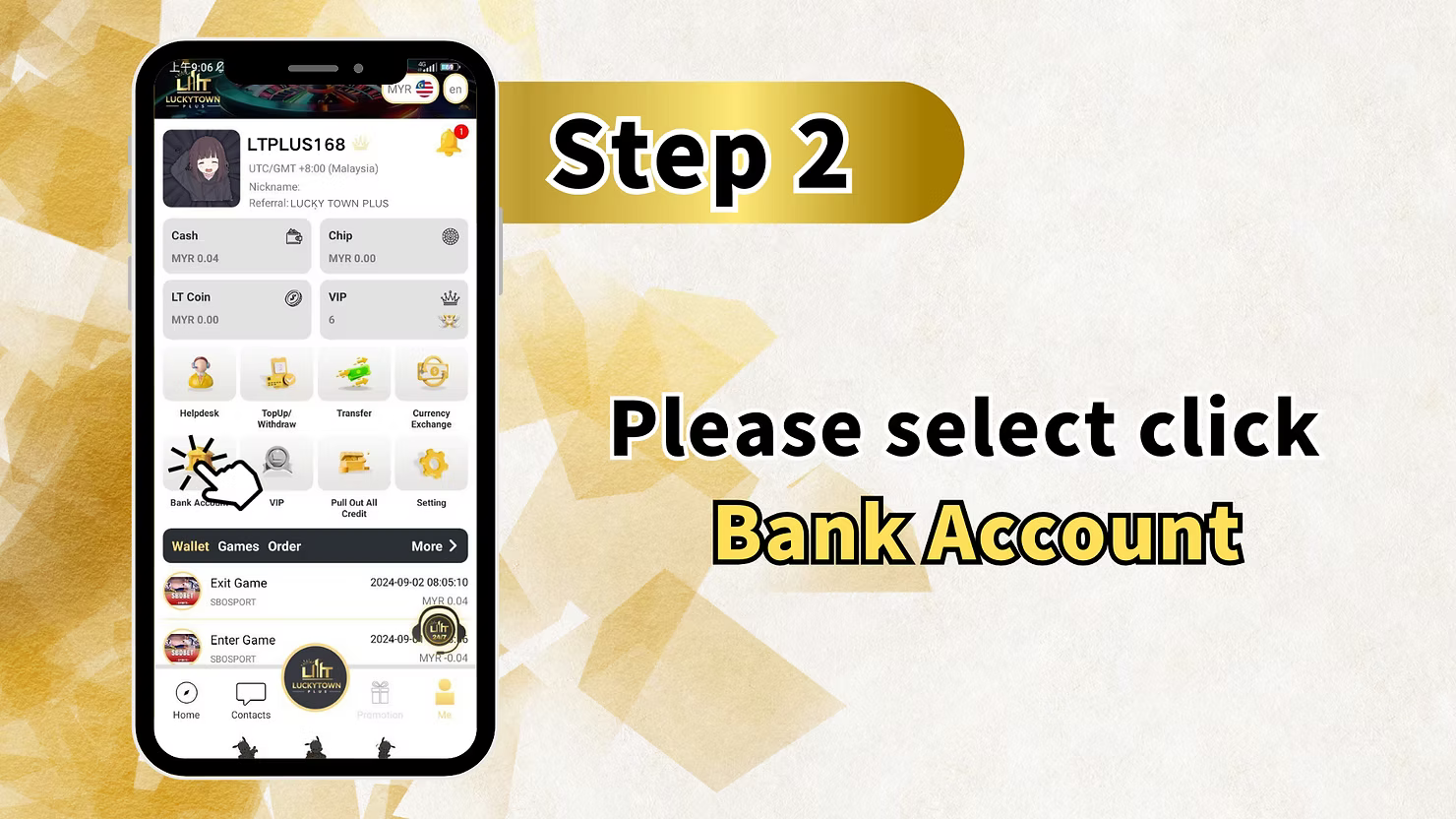
To begin adding your bank account, open the LUCKYTOWN PLUS app and tap the account icon in the bottom right corner of the main screen. This section, labeled "ME," contains your account management options, including current balance, transaction history, and key financial settings. The dashboard also provides quick access to deposits and withdrawals before you return to the game lobby.
Step 2: Enter the Bank Account Management Center
From your account dashboard, locate and tap the "Bank Account" option. This takes you to the bank account management center, where you can review any linked accounts or add a new one. For first-time users, this section will be empty until you complete the LUCKYTOWN PLUS add bank account process.
Step 3: Select Add Bank Account
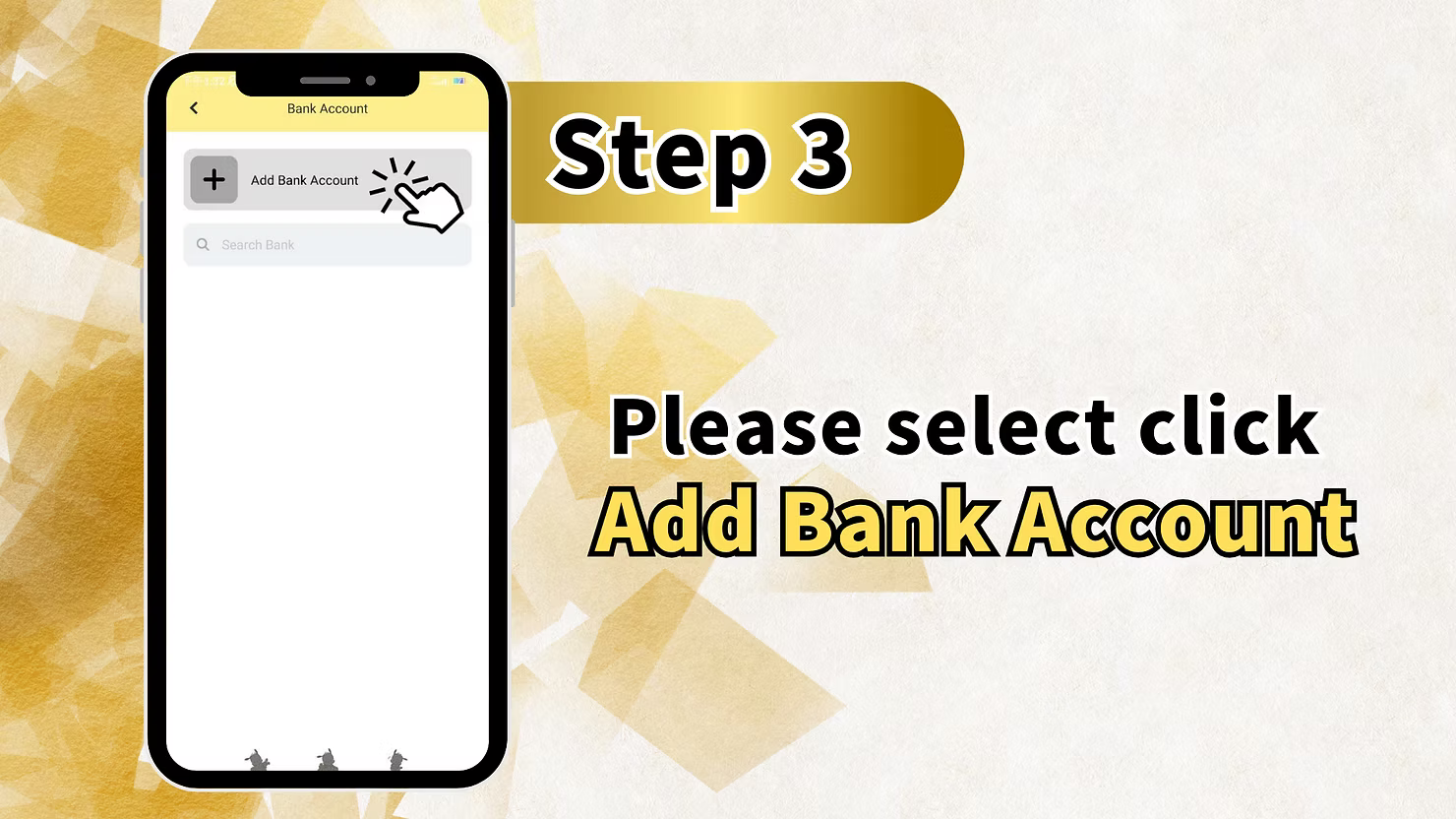
On the Bank Account screen, you will see an "Add Bank Account" option. A search bar helps you locate your bank quickly if it is not visible immediately. Tap "Add Bank Account" to begin entering your financial details.
Step 4: Fill in Your Bank Details
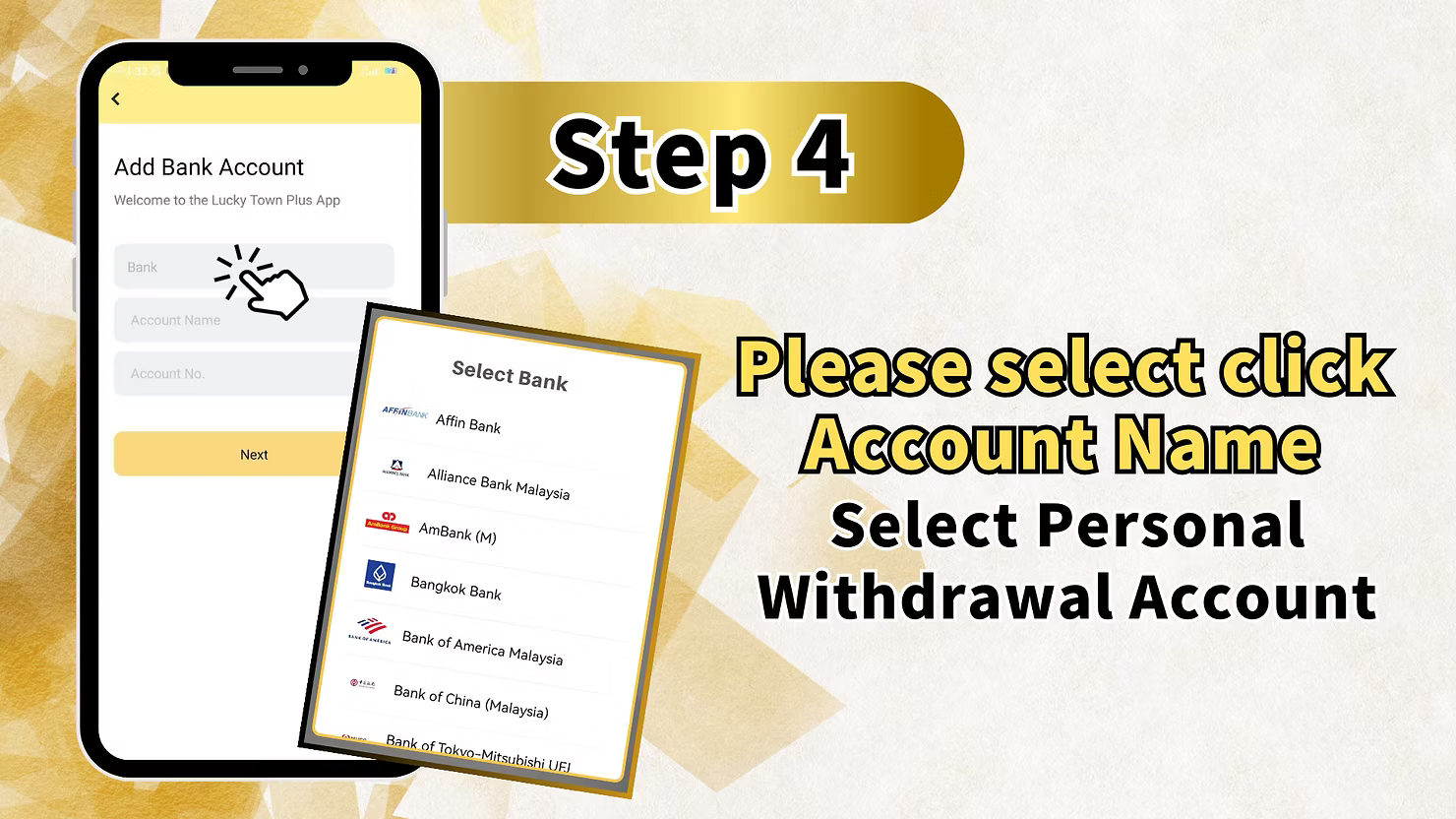
The Add Bank Account screen contains three essential fields: Bank, Account Name, and Account Number. Below these fields, you will find a broad list of Malaysian banks supported by LUCKYTOWN PLUS.
Available Banks at LUCKYTOWN PLUS
- Affin Bank
- Alliance Bank Malaysia
- AmBank (M)
- Bangkok Bank
- Bank of America Malaysia
- Bank of China (Malaysia)
- Bank of Tokyo-Mitsubishi UFJ
- CIMB Bank
- Hong Leong Bank
- Maybank
- Public Bank
- RHB Bank
- And more through the search function
After selecting your bank, enter your account name exactly as it appears on your bank statement. This must match your LUCKYTOWN PLUS verified real name. Then enter your account number carefully and double-check both entries before continuing.
Step 5: Review and Confirm Bank Details
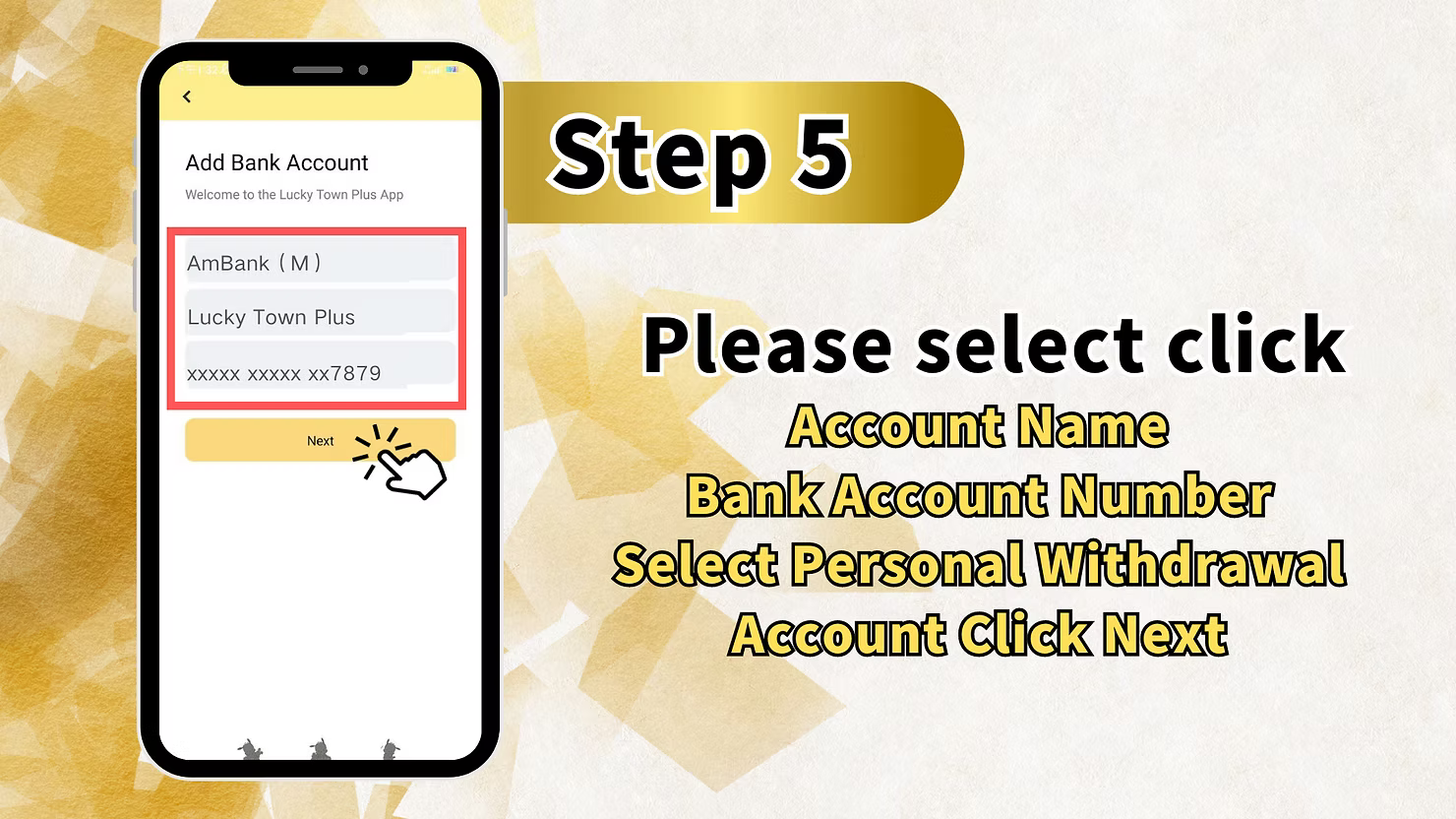
After entering your information, the screen displays a summary of your selected bank, account name, and a masked version of your account number such as xxxxxxxxxxxxxx7879. Review all details carefully and confirm that this is your Personal Withdrawal Account, the account that will receive future withdrawals. Tap "Next" to continue with your LUCKYTOWN PLUS add bank account request.
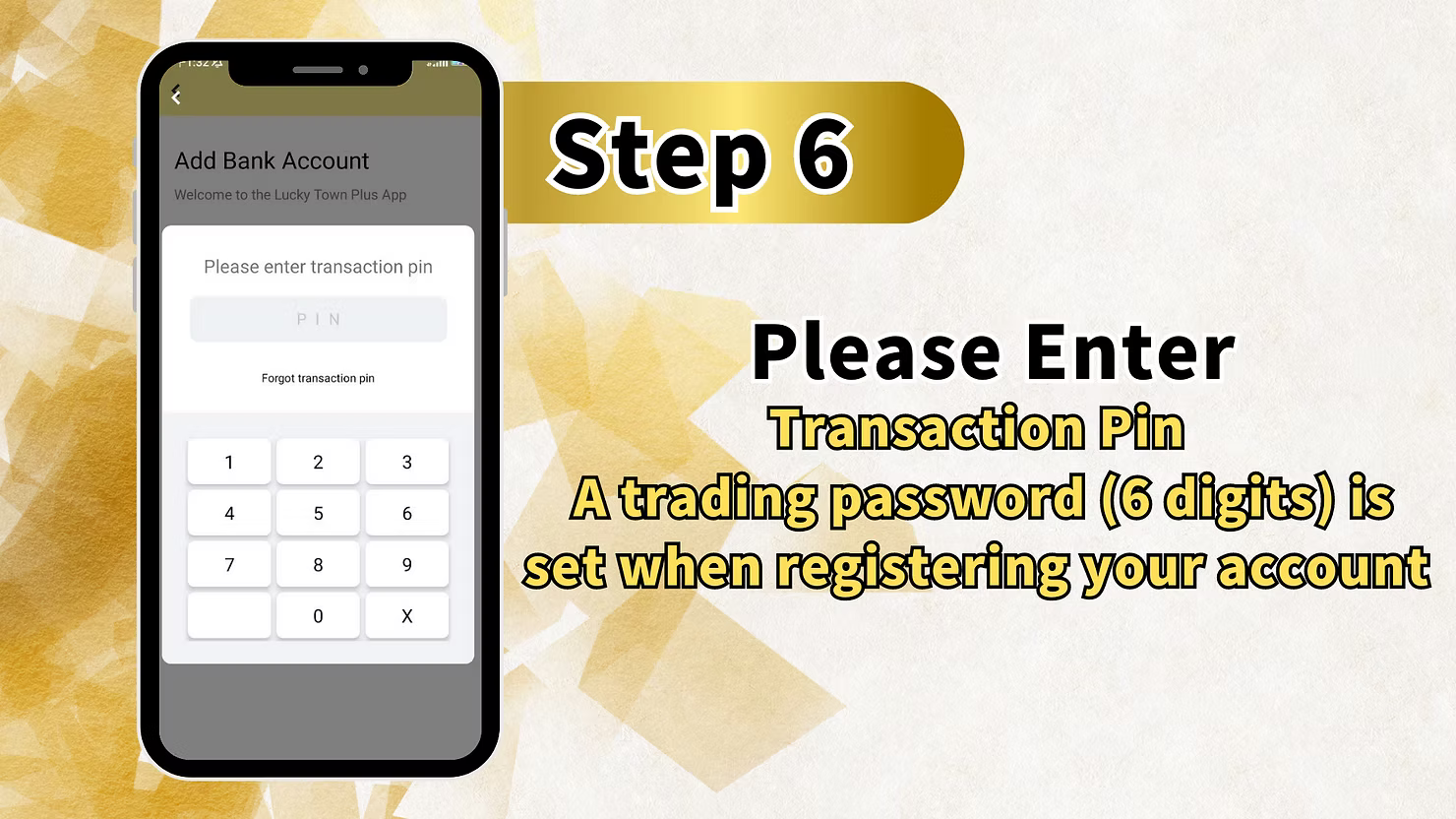
Step 6: Enter Your Transaction PIN
For security purposes, the final verification step requires your 6-digit transaction PIN. The screen displays a numeric keypad and includes a "Forgot transaction PIN" link if you need to reset it.
Important Transaction PIN Information
Your transaction PIN is a 6-digit trading password set when you registered your LUCKYTOWN PLUS account. It is required for sensitive actions, including adding bank accounts and making withdrawals. Enter your PIN using the keypad to complete the process. If you have forgotten it, use the secure reset link before continuing.
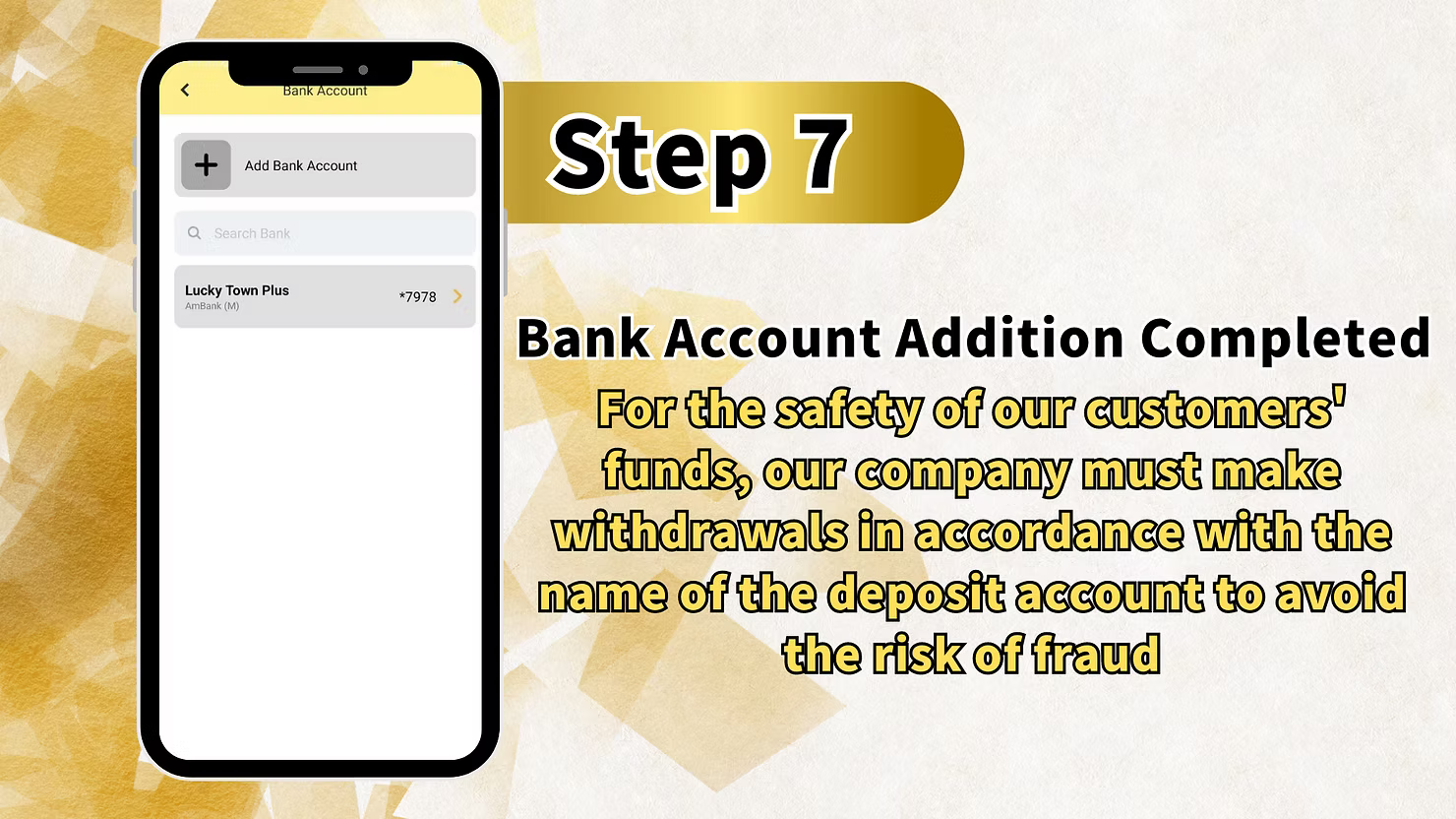
Step 7: Bank Account Addition Completed
After entering your transaction PIN successfully, you will see a confirmation screen stating "Bank Account Addition Completed." This confirms that your bank account is now linked to your LUCKYTOWN PLUS profile and ready for withdrawals. You can return to the Bank Account section to view the newly added account.
LUCKYTOWN PLUS Add Bank Account: LUCKYTOWN Important Security Notice
Customer Fund Safety Policy
After completing your LUCKYTOWN PLUS add bank account setup, you will see an important notice explaining that withdrawals must follow the name of the deposit account to avoid fraud risk. This policy ensures withdrawals are sent only to bank accounts matching the verified member identity.
What This Means for You
The name on your added bank account must match your LUCKYTOWN PLUS verified real name exactly. Any difference, even a small spelling variation or missing name part, can cause withdrawal delays or rejections. This requirement protects your funds from unauthorized access.
LUCKYTOWN PLUS Add Bank Account: LUCKYTOWN Important Guidelines
Name Matching Requirement
The account name you enter during LUCKYTOWN PLUS add bank account must exactly match your verified real name on file. Before proceeding, confirm the exact name format shown on your bank statement. LUCKYTOWN enforces this to prevent fraud and ensure withdrawals reach the correct recipient.
Transaction PIN Security
Your 6-digit transaction PIN is a critical security layer for all financial actions on LUCKYTOWN PLUS. Never share this PIN with anyone. If you suspect it has been exposed, change it immediately through the settings menu or use the secure reset flow.
Bank Selection Options
LUCKYTOWN PLUS add bank account supports many Malaysian banks, including Affin Bank, Alliance Bank, AmBank, Bangkok Bank, Bank of America Malaysia, Bank of China (Malaysia), Bank of Tokyo-Mitsubishi UFJ, CIMB, Hong Leong, Maybank, Public Bank, RHB Bank, and more through the search function.
Account Number Accuracy
Double-check your account number before submitting the LUCKYTOWN PLUS add bank account form. An incorrect number can delay withdrawals or route funds incorrectly. The masked summary helps you verify the final digits, but you should still confirm the full number before final submission.
Frequently Asked Questions About LUCKYTOWN PLUS Add Bank Account: LUCKYTOWN Member Support
Why do I need to add a bank account at LUCKYTOWN PLUS?
Adding a bank account is required for withdrawals. LUCKYTOWN PLUS uses this linked account to transfer your winnings securely. Without a registered bank account, you cannot withdraw funds from your gaming account.
What banks can I add to my LUCKYTOWN PLUS account?
LUCKYTOWN PLUS add bank account supports many Malaysian banks including Affin Bank, Alliance Bank Malaysia, AmBank (M), Bangkok Bank, Bank of America Malaysia, Bank of China (Malaysia), Bank of Tokyo-Mitsubishi UFJ, CIMB Bank, Hong Leong Bank, Maybank, Public Bank, RHB Bank, and more through the search function.
What information do I need to add a bank account?
To complete LUCKYTOWN PLUS add bank account, you need your bank name, account name matching your verified real name, account number, and your 6-digit transaction PIN. Prepare these details before starting the process.
What is the transaction PIN and how do I get it?
The transaction PIN is a 6-digit trading password created when you registered your LUCKYTOWN PLUS account. It is required for financial transactions, including adding bank accounts and making withdrawals. If you forgot it, use the "Forgot transaction PIN" link to reset it securely.
How do I know my bank account addition was successful?
After finishing all steps and entering your transaction PIN, you will see a confirmation screen stating "Bank Account Addition Completed." You can also verify it by returning to the Bank Account section where the newly added account should appear.
Can I add multiple bank accounts?
Yes, LUCKYTOWN PLUS allows multiple bank accounts. You can choose which one to use as your Personal Withdrawal Account during future transactions, giving you more withdrawal flexibility.
Is my bank information secure at LUCKYTOWN PLUS?
Yes. LUCKYTOWN PLUS applies strict security controls including transaction PIN verification, masked account number displays, and name-matching rules. Withdrawals are processed only to accounts matching your verified identity.
Why Complete LUCKYTOWN PLUS Add Bank Account: LUCKYTOWN Benefits for Members
Enable Withdrawals
The main reason to complete LUCKYTOWN PLUS add bank account is to activate withdrawals. Without a linked bank account, you cannot access your winnings. Setting it up now ensures you are ready when you want to cash out.
Fund Security Protection
The name-matching policy helps ensure that only you can withdraw funds to your personal bank account. This LUCKYTOWN PLUS security measure protects your winnings from unauthorized access.
Compliance with Regulations
Adding a bank account helps LUCKYTOWN PLUS comply with financial regulations and anti-fraud controls. Your cooperation supports a safer environment for all members and keeps withdrawal handling consistent.
Streamlined Future Transactions
Once you complete LUCKYTOWN PLUS add bank account, future withdrawals become faster because your bank details are already stored and verified. You do not need to re-enter the same information for every request.
Peace of Mind
Knowing that your bank account is linked correctly and protected by transaction PIN and name-matching rules gives you confidence that funds will move securely when you request a withdrawal.
Complete Your LUCKYTOWN PLUS Add Bank Account Today
Follow the step-by-step guide to link your bank account to LUCKYTOWN PLUS. Choose from Affin Bank, Alliance Bank, AmBank, and more, then verify your request with your transaction PIN. This setup is essential for secure withdrawals.
Add Bank Account Now