
LUCKYTOWN PLUS MEGA888 Game - LUCKYTOWN Complete Android Download & Login Guide
LUCKYTOWN PLUS MEGA888 Game Access: LUCKYTOWN Teaching Step Solutions

Introduction to LUCKYTOWN PLUS MEGA888 Game Access
The LUCKYTOWN PLUS MEGA888 game access guide provides members with complete instructions for enjoying one of Malaysia's most popular slot platforms. From downloading the Android app to copying your account credentials and transferring funds, this guide walks you through every step. LUCKYTOWN integrates MEGA888 directly into your account, making it easy to access hundreds of exciting slot games. Please note that MEGA888 access is currently supported on Android devices only, and test accounts are available for players who want to try the games before using real funds.
Step-by-Step Guide to LUCKYTOWN PLUS MEGA888 Game Access: LUCKYTOWN Member Instructions
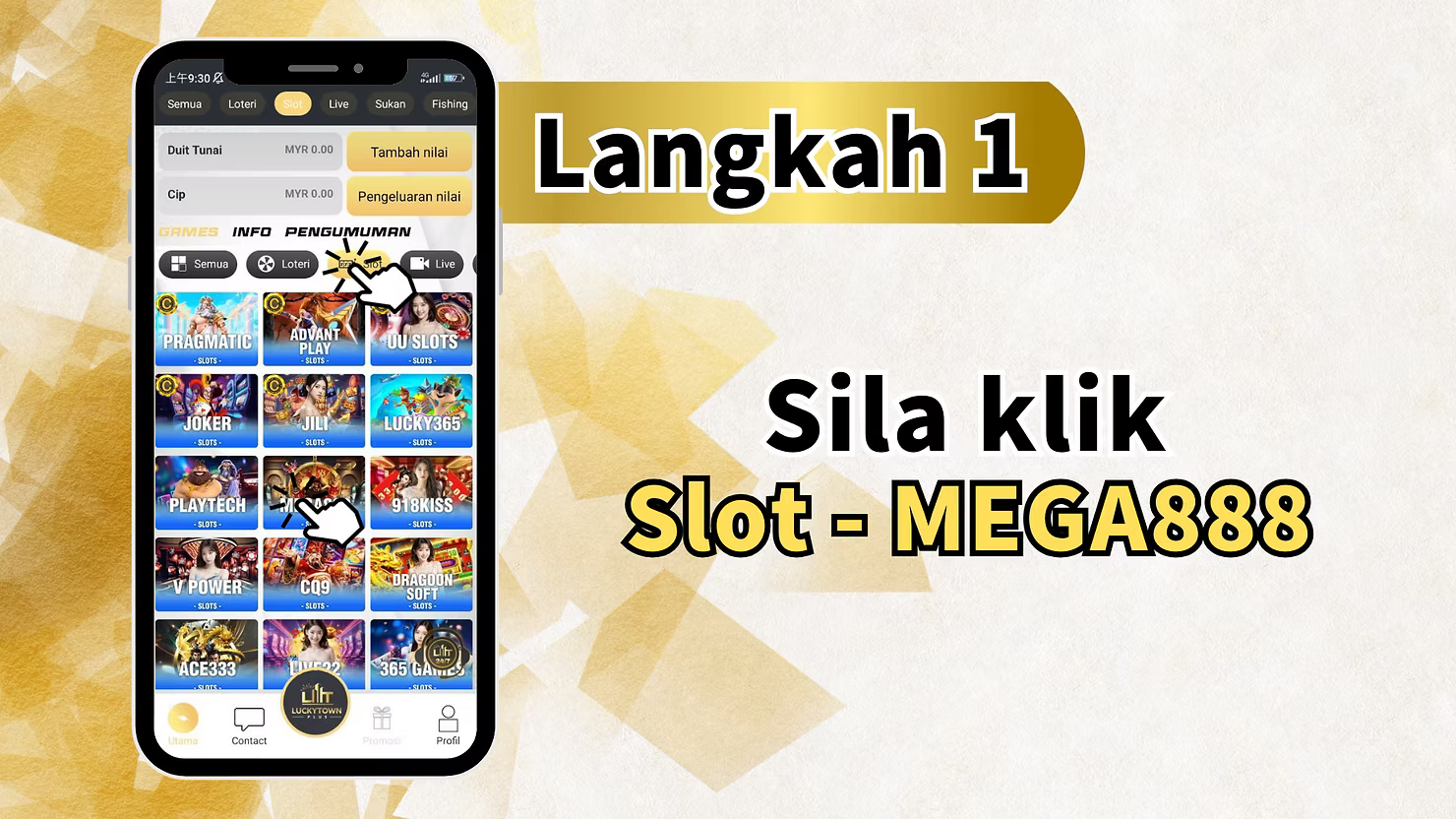
Step 1: Access the Slot Games Section
To begin your MEGA888 game access, log in to your LUCKYTOWN PLUS account. From the main dashboard, locate the game category menu which includes All Games, Lottery, Live Casino, Sports, and Fishing. Click on "Slot" then select "MEGA888" from the list of available slot providers. The main page also displays your current Cash balance, Chip balance, and quick-access buttons for deposits and withdrawals.
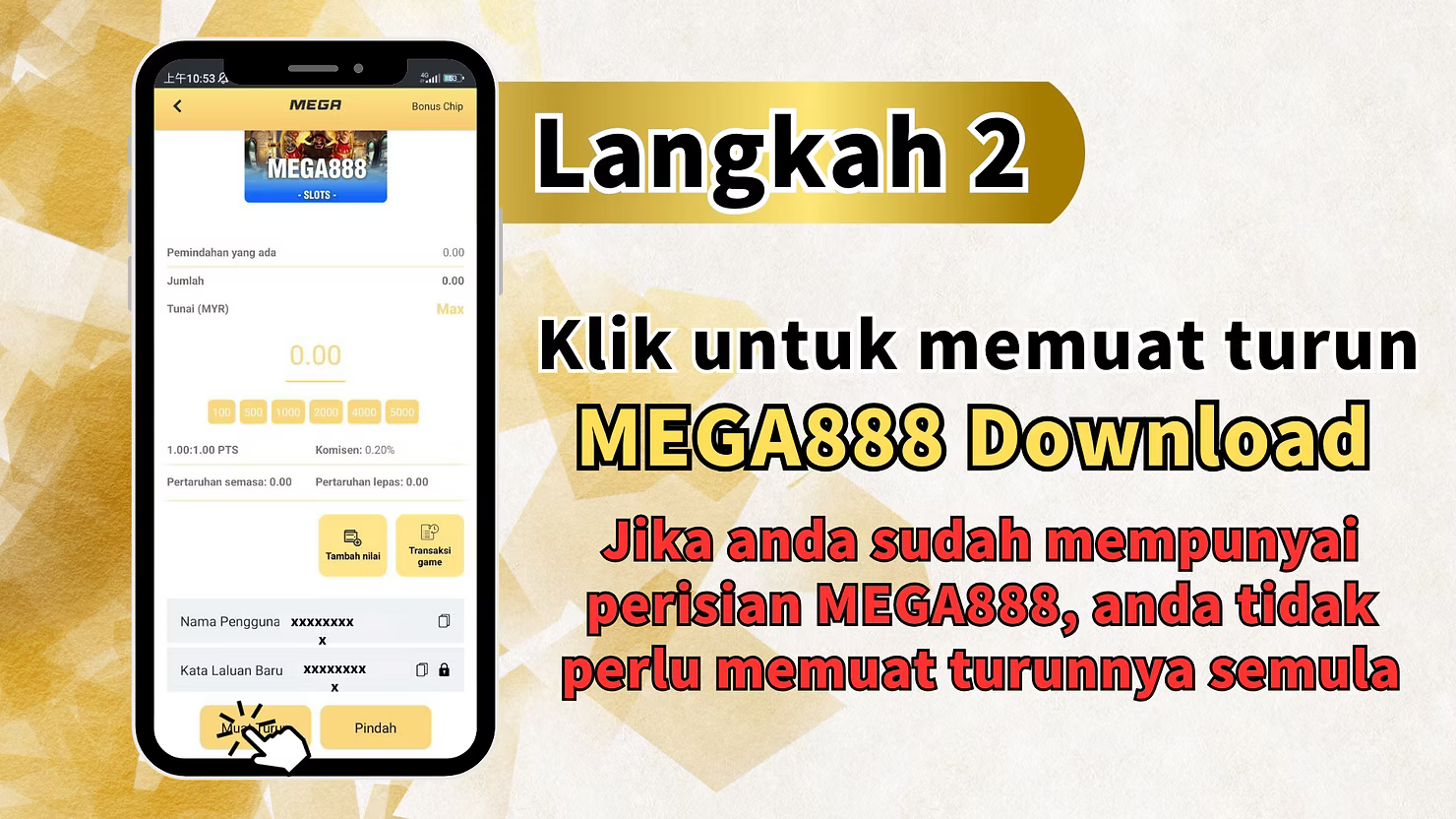
Step 2: Initiate MEGA888 Download
On the MEGA888 game page, you will see a "Download" button. Tap this button to begin downloading the MEGA888 Android application. Important: If you already have the MEGA888 software installed on your device, you do not need to download it again. Check your device for an existing installation before proceeding.
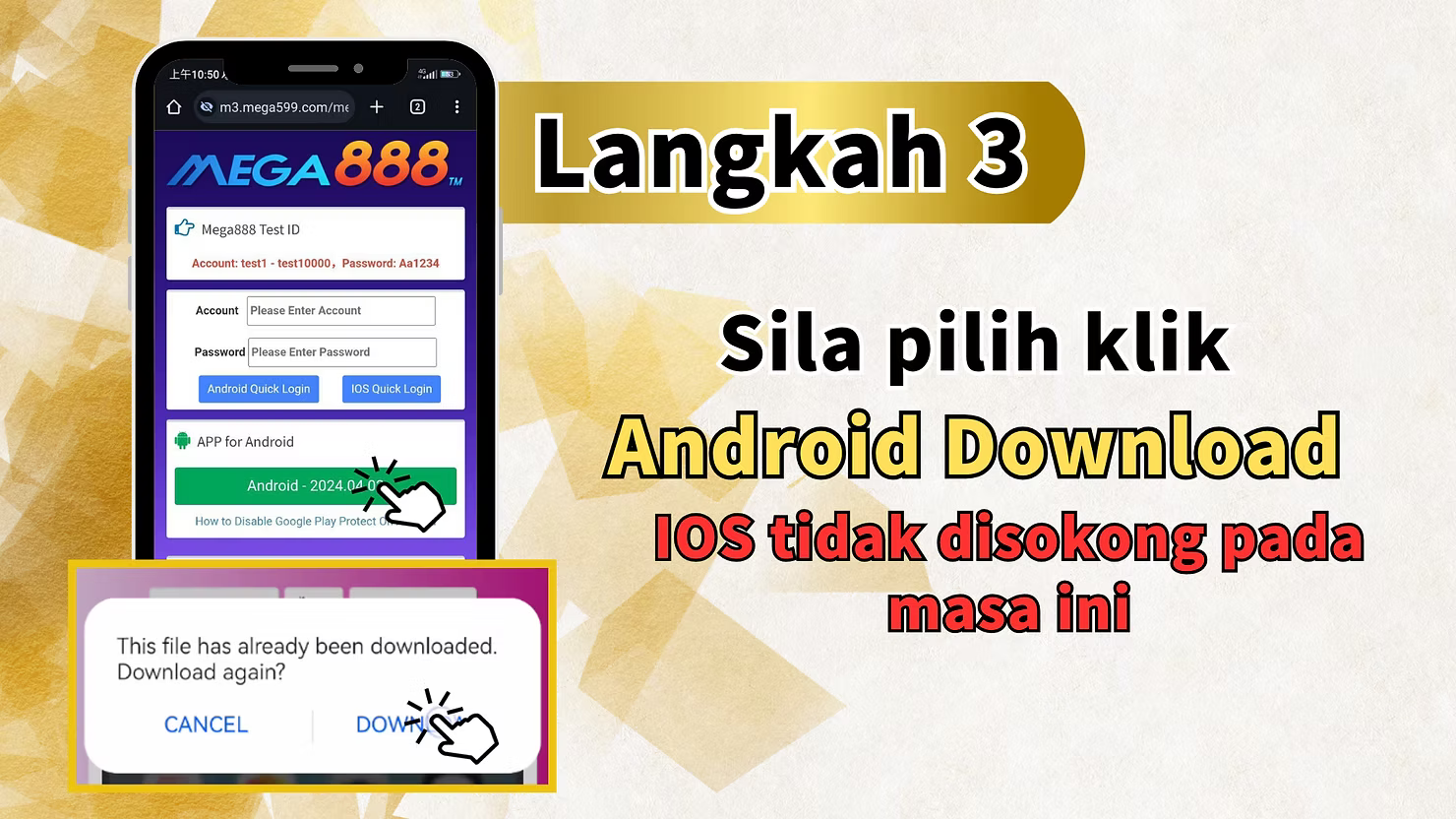
Step 3: Select Android Download
When prompted, select "Android Download" to proceed. Please note that iOS is not currently supported for MEGA888 game access on LUCKYTOWN PLUS.
MEGA888 Test Account Information
The download screen also displays MEGA888 test account information for players who want to try the game before using real funds. Test accounts range from `test1` to `test10000`, with password `Aa1234`. You can use these credentials to explore the game interface and features. The screen also shows Android Quick Login options, app version information such as `Android - 2024.04.01`, and a helpful guide: "How to Disable Google Play Protect." If you have already downloaded the file previously, the system will ask: "This file has already been downloaded. Download again?" with options to confirm or cancel.
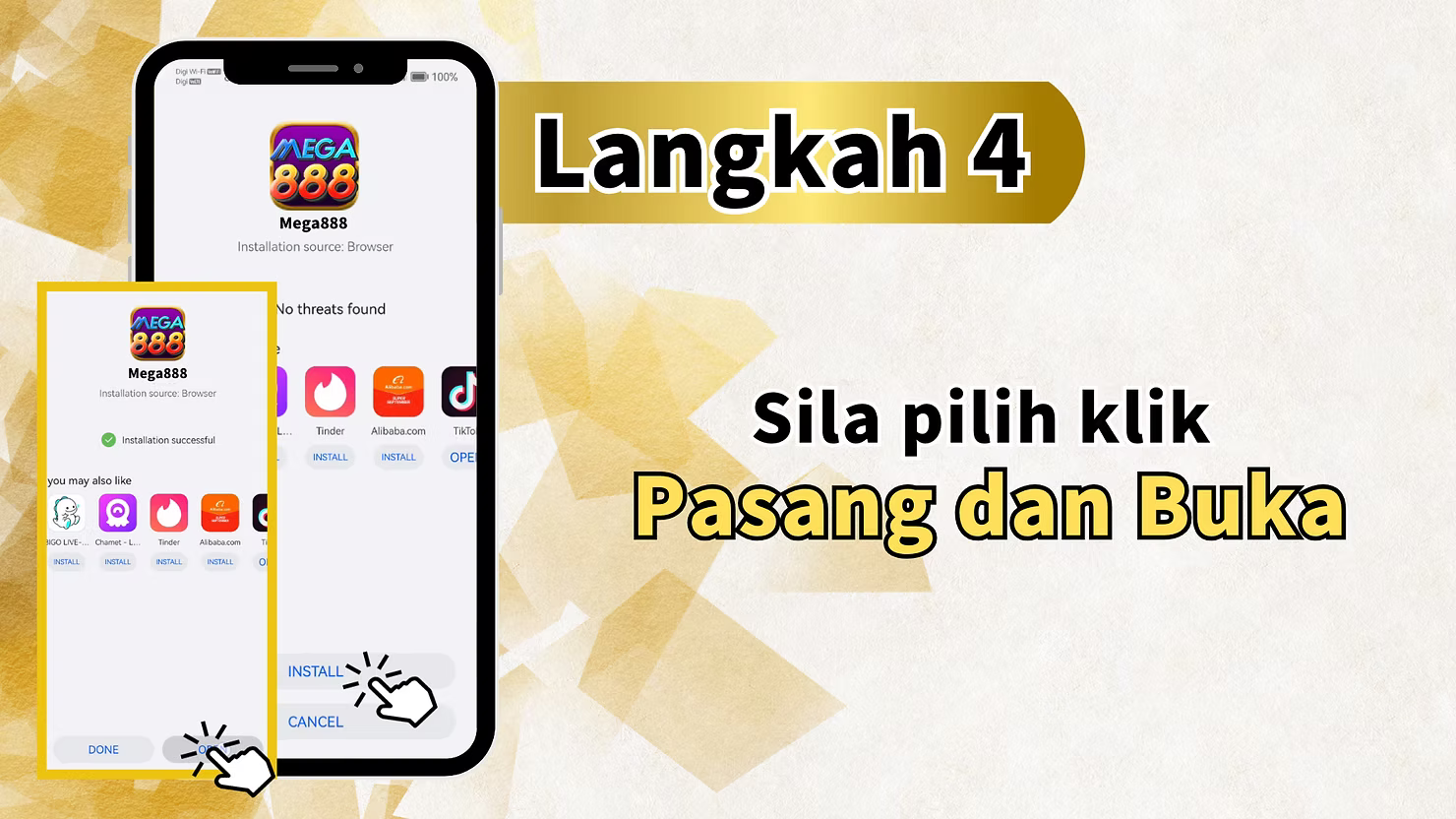
Step 4: Install and Launch the Application
After the download completes, locate the downloaded APK file on your Android device in the notification panel or downloads folder. Tap "Install" and follow any on-screen prompts to complete installation. Once installation is finished, tap "Open" to launch the MEGA888 application. This initial launch confirms the app is properly installed on your device.
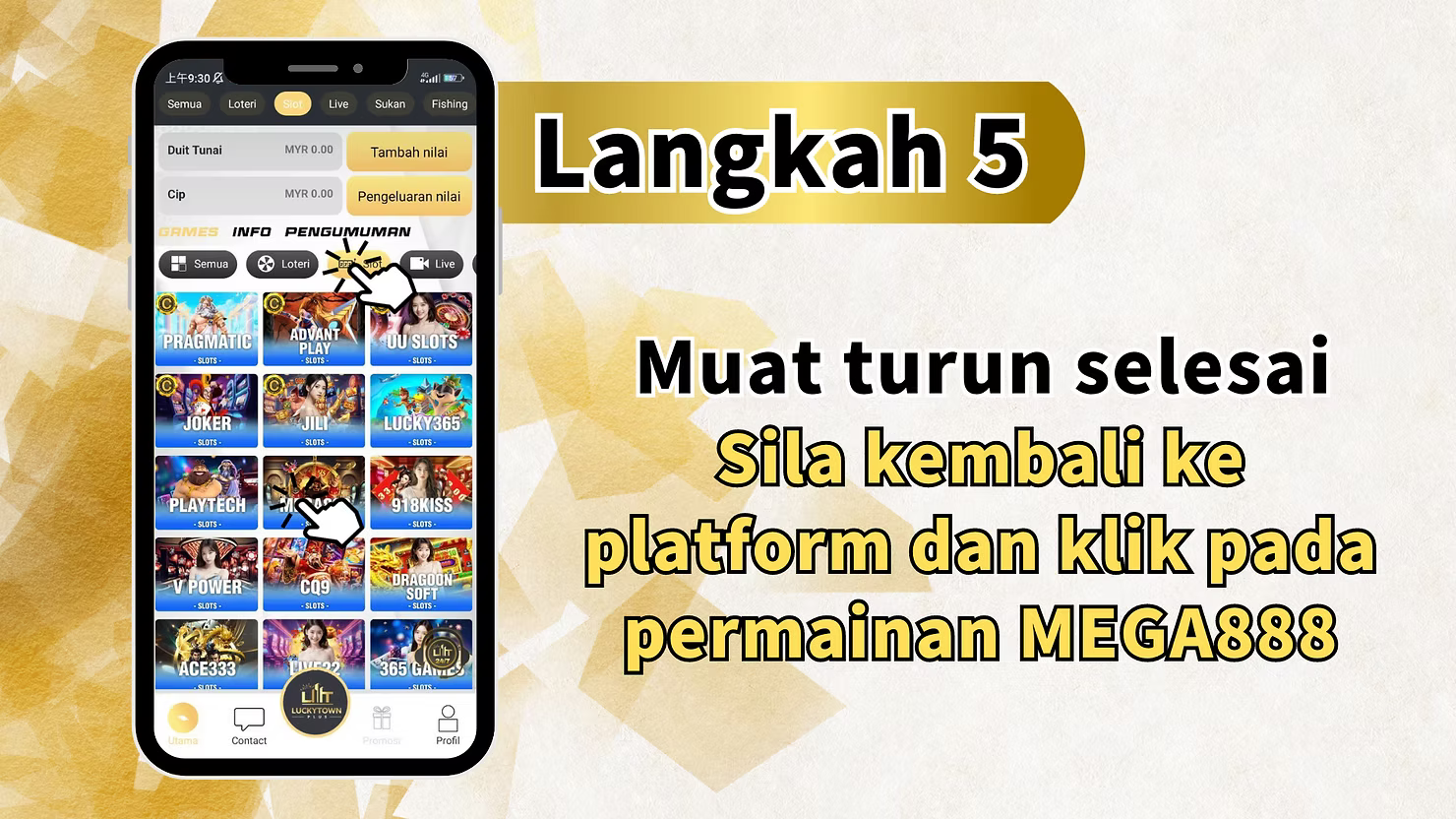
Step 5: Return to LUCKYTOWN PLUS Platform
After confirming that the MEGA888 app is successfully installed, return to the LUCKYTOWN PLUS platform. The instruction is: "Download completed. Please return to the platform and click on MEGA888 game." Navigate back to the Slot section and click on the MEGA888 game icon again to proceed with the login process.
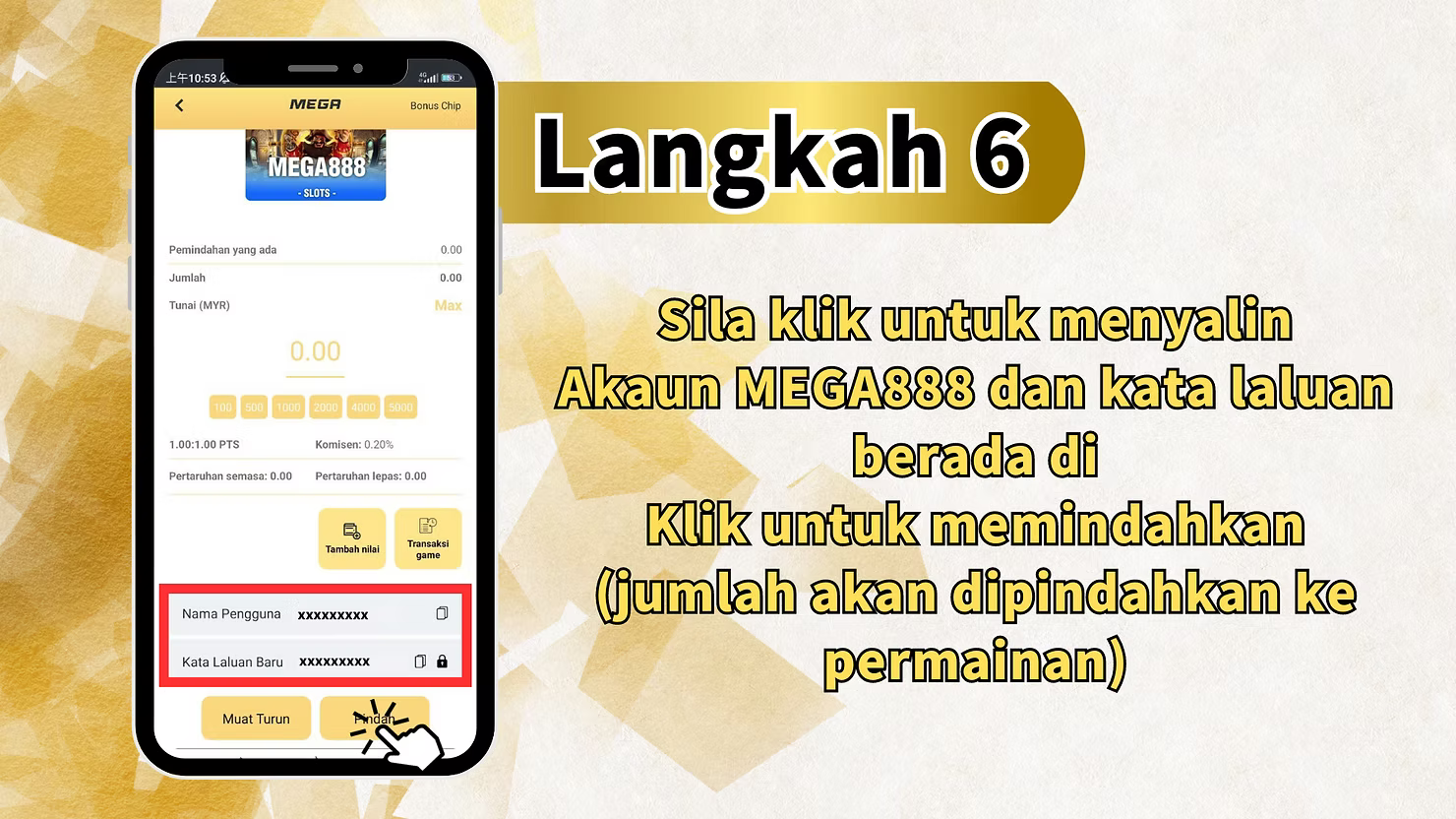
Step 6: Copy Your MEGA888 Account Credentials
At this step, you need to copy your MEGA888 account credentials. Click to copy your MEGA888 account and password, these are automatically generated from your LUCKYTOWN PLUS account. When you click "Transfer," the system will automatically transfer funds from your LUCKYTOWN PLUS balance to the MEGA888 game wallet. This seamless integration means you do not need to manually transfer funds or remember separate login details.
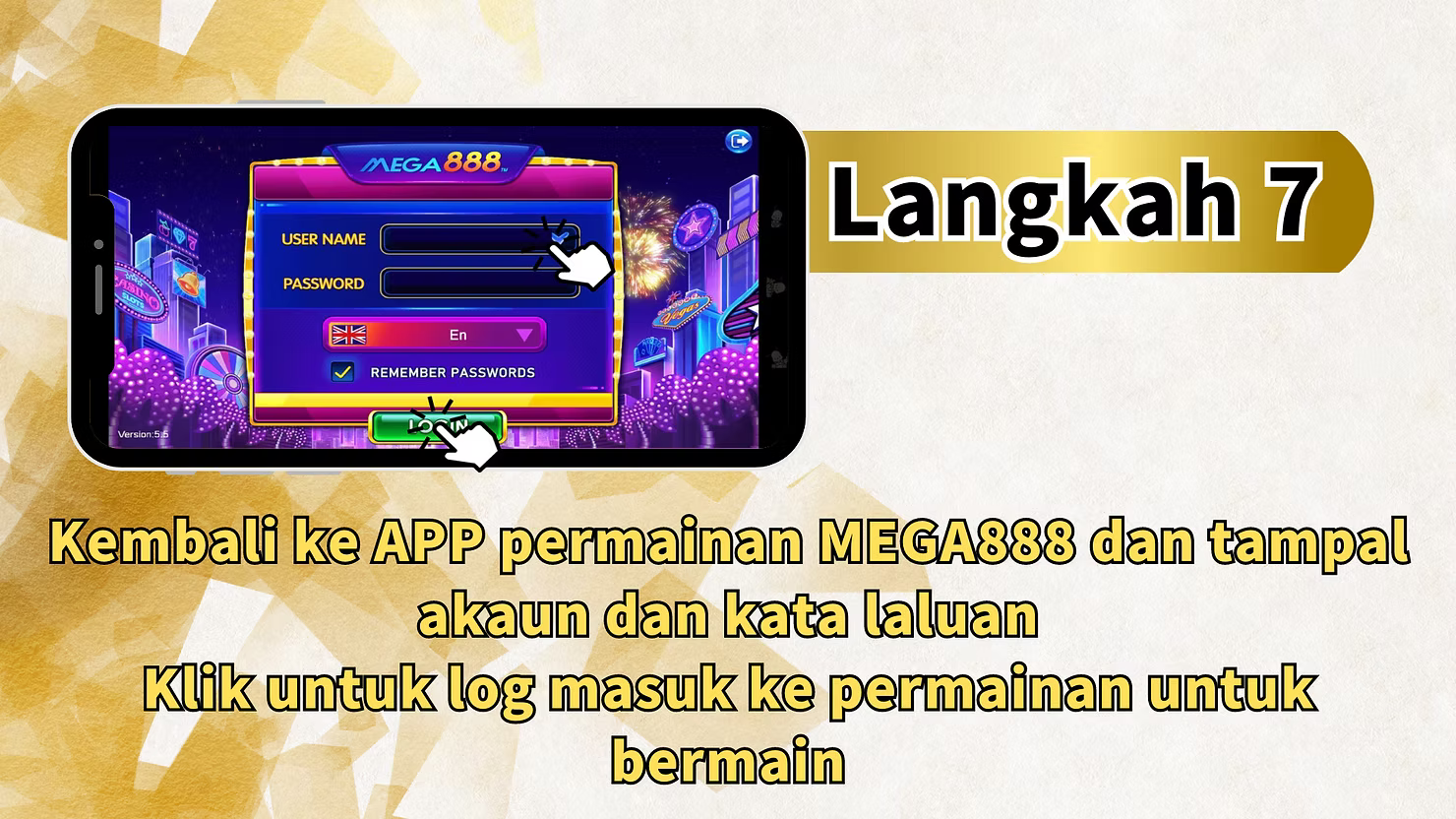
Step 7: Paste Credentials and Log In to MEGA888
Return to the MEGA888 game app that you launched earlier. Paste the copied account and password into the respective login fields. Tap to log in to the game. Once logged in, your funds will be available, and you can immediately start playing your favorite MEGA888 slot games. The auto-login feature ensures you can access the game quickly every time you return.
LUCKYTOWN PLUS MEGA888 Game Access: LUCKYTOWN Important Guidelines
Android Only Support
Currently, MEGA888 game access through LUCKYTOWN PLUS supports Android devices only. iOS is not currently supported for this platform. Android users can follow all steps above for full access to the complete MEGA888 game library.
Existing Software Check
Before downloading, check if you already have the MEGA888 software installed on your device. If you already have the MEGA888 software, you do not need to download it again. Simply proceed with the login process through LUCKYTOWN PLUS.
Test Account Availability
MEGA888 provides test accounts, `test1` through `test10000` with password `Aa1234`, for players who want to try the game before using real funds. This is a great way to familiarize yourself with the game interface and features without risking your balance.
Google Play Protect Configuration
Android users may need to temporarily disable Google Play Protect to install the MEGA888 app. Instructions for "How to Disable Google Play Protect" are provided during the download process. Remember to re-enable it after installation for continued device security.
Automatic Fund Transfer
When you click to transfer during the login process, your funds are automatically moved from your LUCKYTOWN PLUS balance to the MEGA888 game wallet. No manual transfer is required, and your balance is unified across platforms.
Frequently Asked Questions About LUCKYTOWN PLUS MEGA888 Game Access: LUCKYTOWN Member Support
Is MEGA888 available on iOS at LUCKYTOWN PLUS?
Currently, MEGA888 game access through LUCKYTOWN PLUS supports Android only. iOS is not currently supported. iOS users may explore other slot options available on LUCKYTOWN PLUS, including Pragmatic Play, JILI, and 918KISS.
Do I need to download MEGA888 if I already have it installed?
No. If you already have the MEGA888 software installed on your device, you do not need to download it again. Simply proceed with the login process through LUCKYTOWN PLUS.
What are the MEGA888 test account credentials?
MEGA888 test accounts range from `test1` to `test10000` with password `Aa1234`. These can be used to try the game interface and features before using real funds through your LUCKYTOWN PLUS account.
How do funds work with MEGA888 at LUCKYTOWN PLUS?
When you use LUCKYTOWN PLUS to access MEGA888 and click "Transfer," the amount is automatically transferred from your LUCKYTOWN PLUS balance to the MEGA888 game wallet. Your funds are seamlessly integrated across both platforms.
What if the download fails?
If your download fails, first check your internet connection and ensure you have sufficient device storage. You can attempt the download again through the Android Download option. If issues persist, contact LUCKYTOWN PLUS customer support for assistance.
How do I handle Google Play Protect during installation?
During MEGA888 installation, you may need to temporarily disable Google Play Protect to install the app. Follow the "How to Disable Google Play Protect" guide provided on the download screen. After installation, re-enable it to maintain device security.
Do I need separate MEGA888 credentials?
No. Your LUCKYTOWN PLUS account credentials are used for MEGA888 access. You will copy these during Step 6 and paste them in the MEGA888 app. The system handles everything automatically.
Why Choose LUCKYTOWN PLUS for MEGA888 Game Access: LUCKYTOWN Benefits for Members
Seamless Integration
LUCKYTOWN PLUS MEGA888 game access provides seamless integration between your LUCKYTOWN account and the MEGA888 gaming platform. Your credentials and funds work across both platforms without manual intervention.
Test Account Availability
With test accounts readily available, `test1` to `test10000` with password `Aa1234`, you can try MEGA888 before committing real funds. This is perfect for new players who want to explore the game interface.
Clear Step-by-Step Instructions
The seven-step teaching guide ensures even first-time users can complete MEGA888 setup successfully without confusion or errors. Each step is explained with the actual interface in mind.
Bilingual Support
Instructions are provided in both English and Malay, Bahasa Malaysia, to make MEGA888 game access accessible to a wider audience of LUCKYTOWN PLUS members.
Quick Access to Popular Games
MEGA888 is one of the most popular slot platforms in Malaysia, offering hundreds of exciting slot games. LUCKYTOWN PLUS MEGA888 game access gives you quick, one-click entry to this extensive library.
Start Your LUCKYTOWN PLUS MEGA888 Game Journey Today
Follow the seven-step guide to download, install, and access MEGA888 through LUCKYTOWN PLUS. Android only. Test accounts available for practice. Automatic fund transfer. Start playing Malaysia's favorite slots now!
Play MEGA888 Now