
LUCKYTOWN PLUS Duit Now Topup - LUCKYTOWN Complete QR Code Deposit Guide
LUCKYTOWN PLUS Duit Now Topup: LUCKYTOWN Teaching Step Solutions

Introduction to LUCKYTOWN PLUS Duit Now Topup
The LUCKYTOWN PLUS Duit Now topup feature offers members a fast, modern way to add funds using Malaysia's national QR payment standard. With support for both UPay and Go Pay, you can complete deposits by scanning QR codes directly from your preferred payment app without manual account number entry. This guide walks you through the complete process for both providers, from accessing the deposit menu to scanning the QR code and confirming successful processing. LUCKYTOWN ensures every DuitNow transaction is secure, with low minimum deposits starting at just RM10 for UPay.
UPay Duit Now Topup: LUCKYTOWN PLUS Step-by-Step Guide

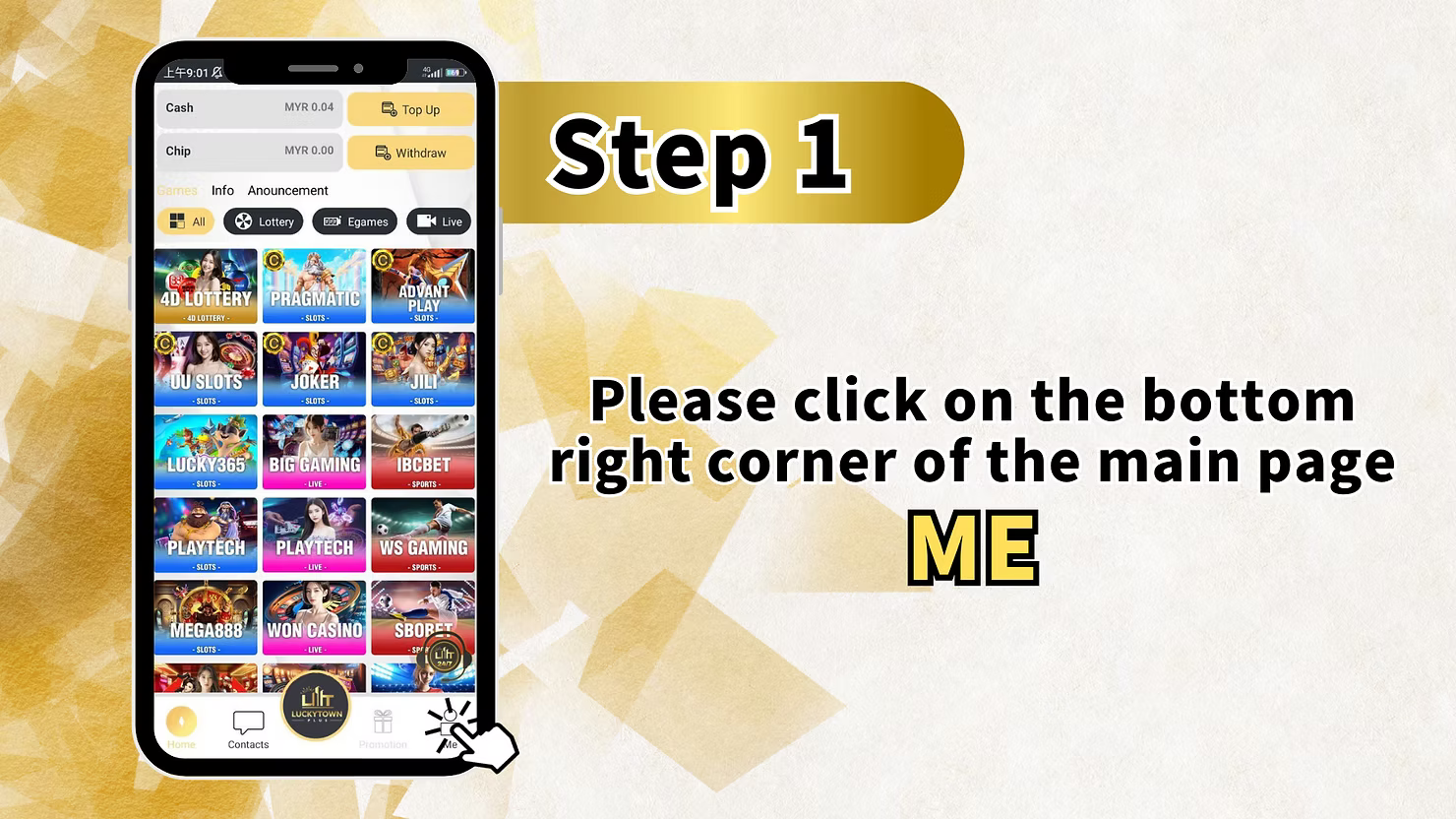
Step 1: Access Your Account Dashboard
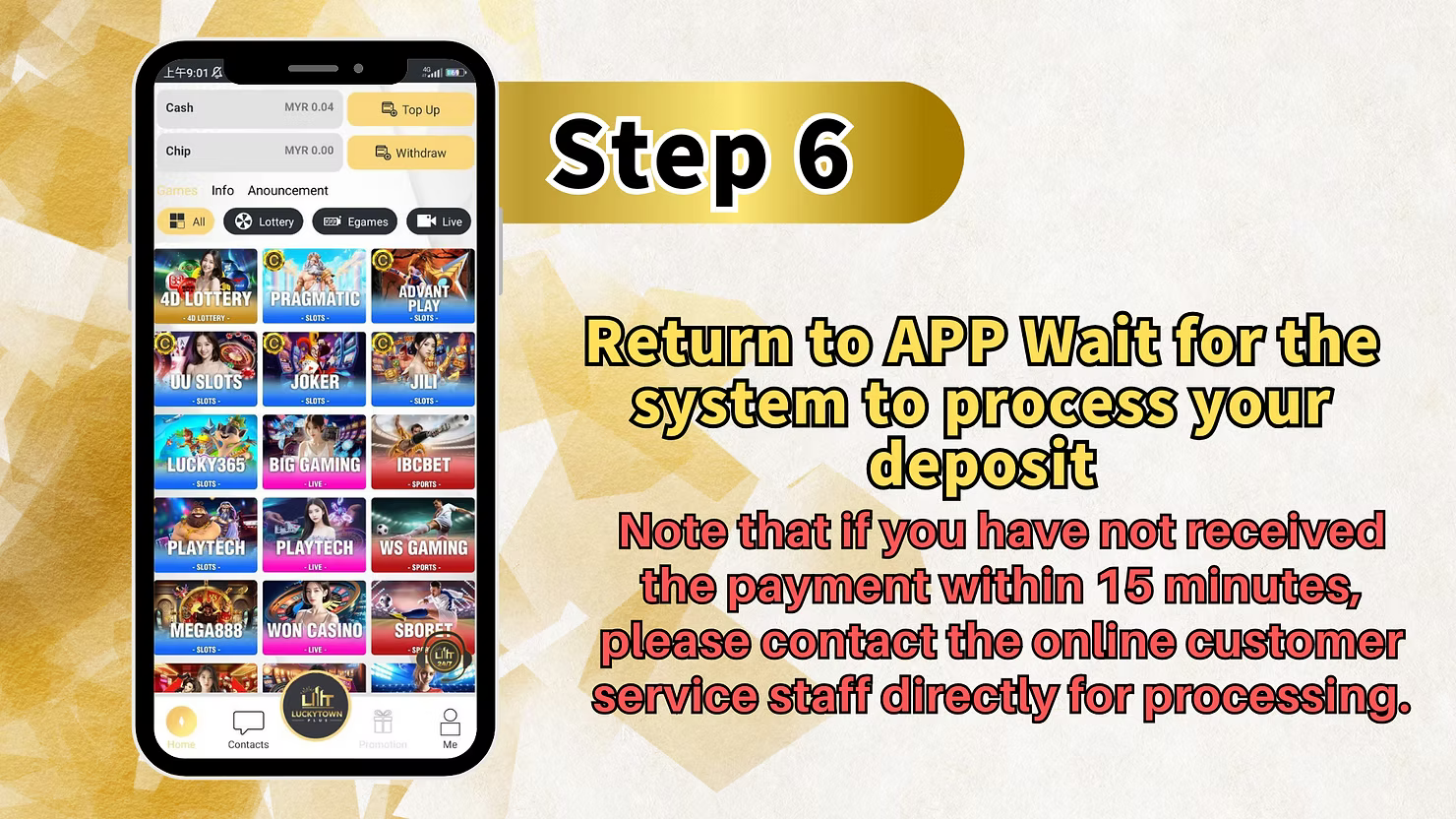
To begin your LUCKYTOWN PLUS Duit Now topup with UPay, open the app and locate the account icon in the bottom right corner of the main screen. This section displays your current balance, recent activity, and transaction history. The main dashboard also features quick-access buttons for deposits and withdrawals, along with the full LUCKYTOWN PLUS game library including 4D lottery, slots from Pragmatic and JILI, live casino games, and sportsbook options, all of which become playable once your DuitNow topup is credited.
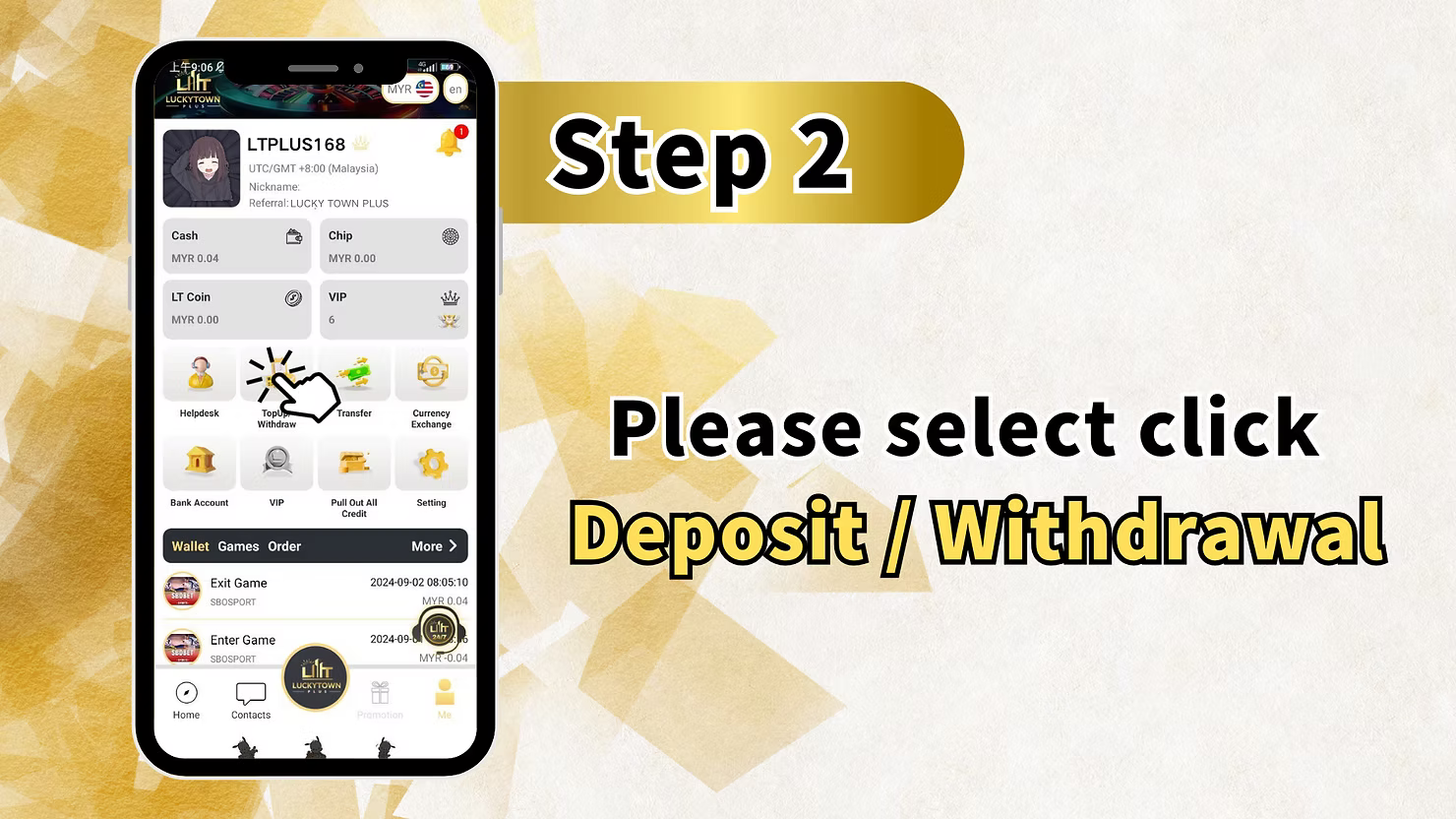
Step 2: Enter the Financial Transaction Center
From your account dashboard, tap the "Deposit / Withdrawal" option. This opens LUCKYTOWN PLUS's centralized transaction hub where all financial activities are managed. The interface clearly separates deposit and withdrawal functions for intuitive navigation.
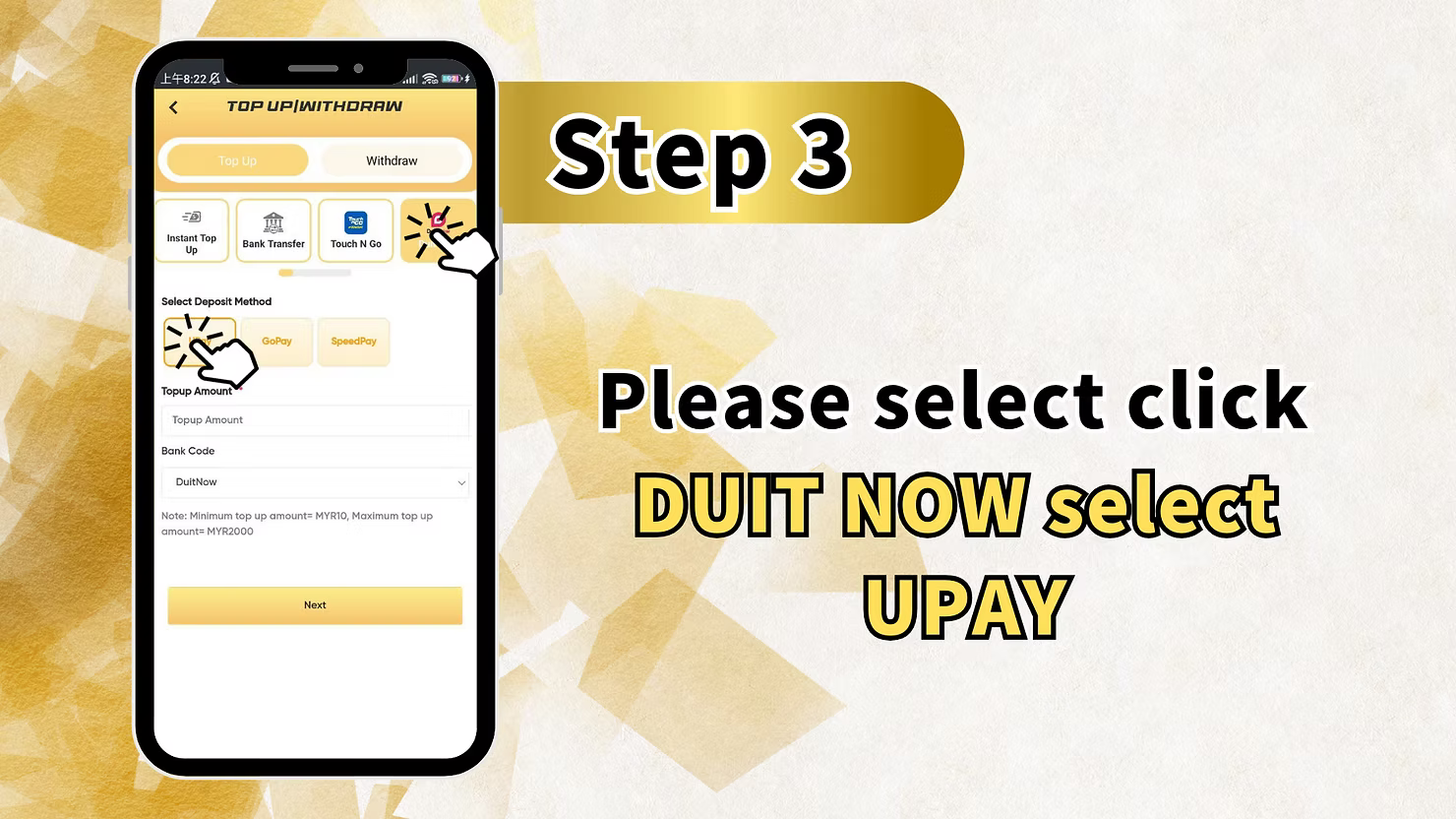
Step 3: Select DUIT NOW and Choose UPay
From the available deposit methods, select "DUIT NOW" to access QR-based deposit options. Then choose "UPay" as your specific payment provider for your LUCKYTOWN PLUS Duit Now topup. UPay offers seamless integration with Malaysia's DuitNow QR payment system, providing a smooth app-to-app transaction experience.
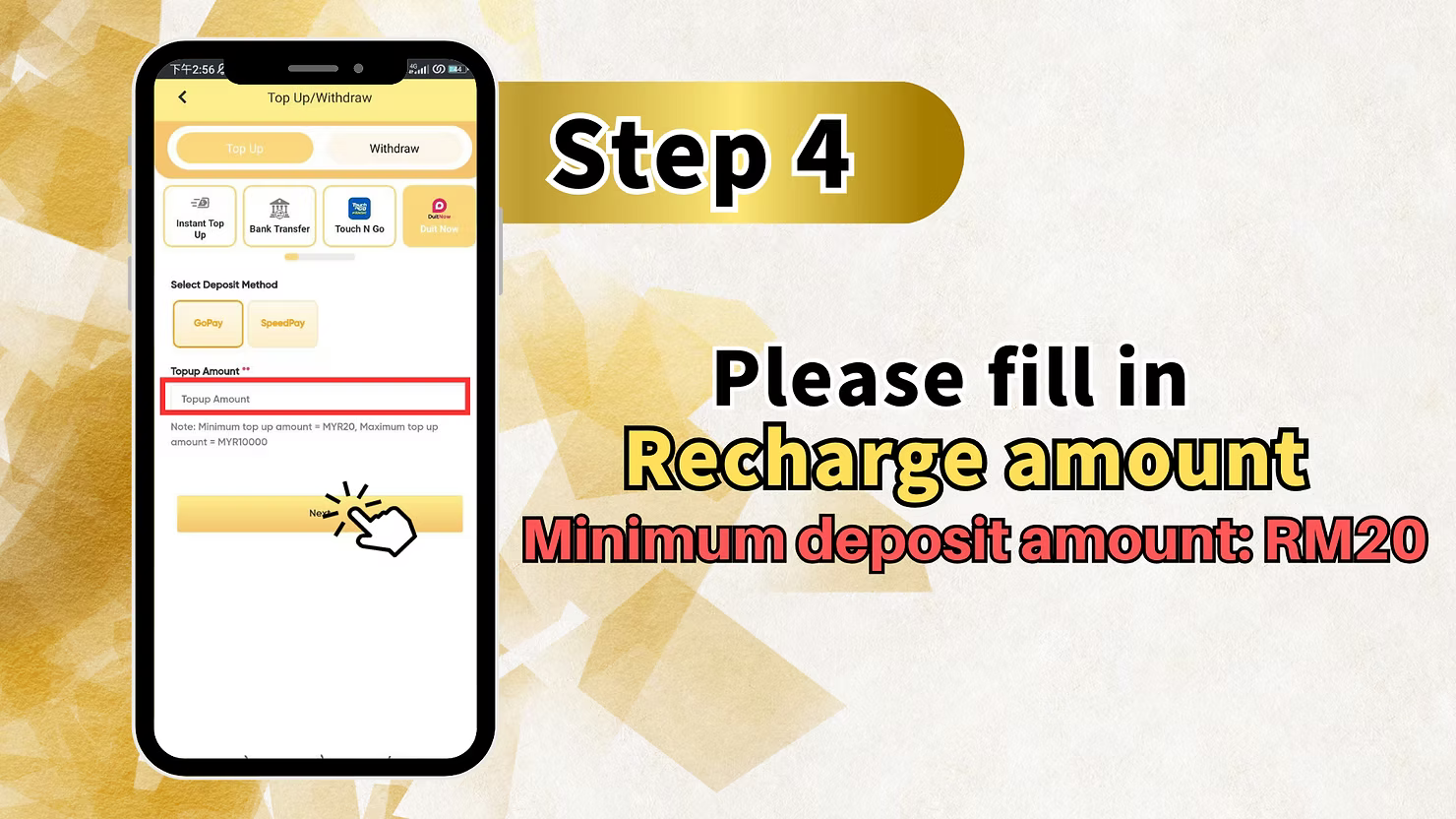
Step 4: Enter Your Deposit Amount
Input the amount you wish to add to your LUCKYTOWN PLUS account. The minimum deposit for UPay Duit Now topup is RM10, making it one of the most accessible deposit methods available. After entering your amount, tap "Recharge" to generate the QR code for payment.
Step 5: Scan the Malaysia National QR Code
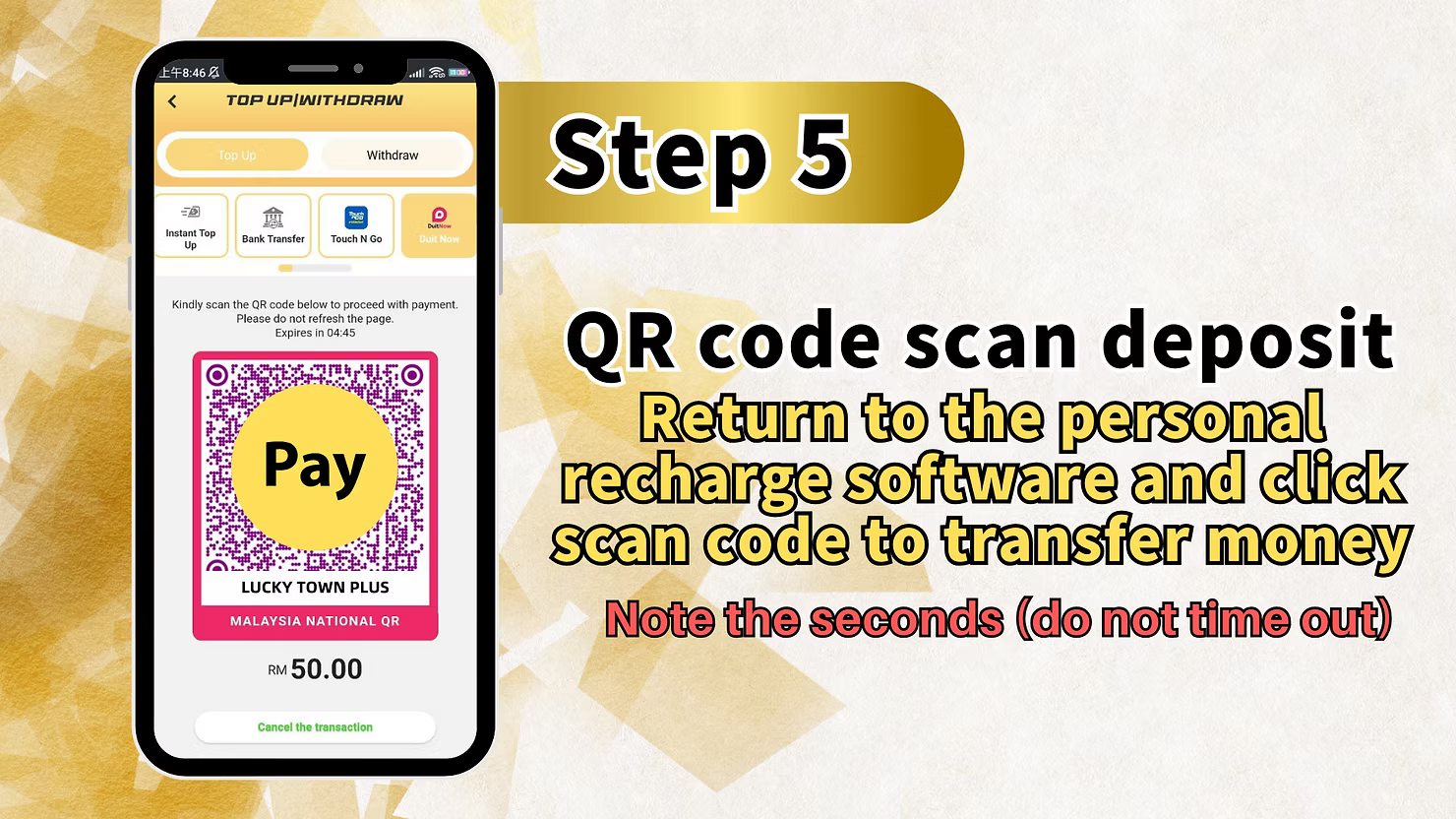
The system generates a Malaysia National QR code for your LUCKYTOWN PLUS Duit Now topup. The screen displays "Pay LUCKY TOWN PLUS MALAYSIA NATIONAL QR RM [your amount]." A countdown timer shows the seconds remaining before the QR code expires. Return to your UPay app, select the scan function, and scan the QR code displayed on your LUCKYTOWN PLUS screen to complete the transfer. Complete the scan before the timer expires. The platform does not recommend using shopping apps for deposits.
Step 6: Return to App and Await Processing
After scanning the QR code and confirming payment in your UPay app, return to the LUCKYTOWN PLUS app. The system will automatically process your Duit Now topup. If you have not received confirmation of payment within 15 minutes, please contact online customer service directly for assistance. Most transactions complete much faster, but the 15-minute guideline tells you when to seek help.
Go Pay Duit Now Topup: LUCKYTOWN PLUS Step-by-Step Guide

Step 1: Access Your Account Dashboard
To begin your LUCKYTOWN PLUS Duit Now topup with Go Pay, open the app and tap the account icon in the bottom right corner of the main screen. This area contains all your account management options and transaction history.
Step 2: Enter the Financial Transaction Center
From your account dashboard, tap "Deposit / Withdrawal" to access LUCKYTOWN PLUS's financial transaction center, where all deposits and withdrawals are managed.
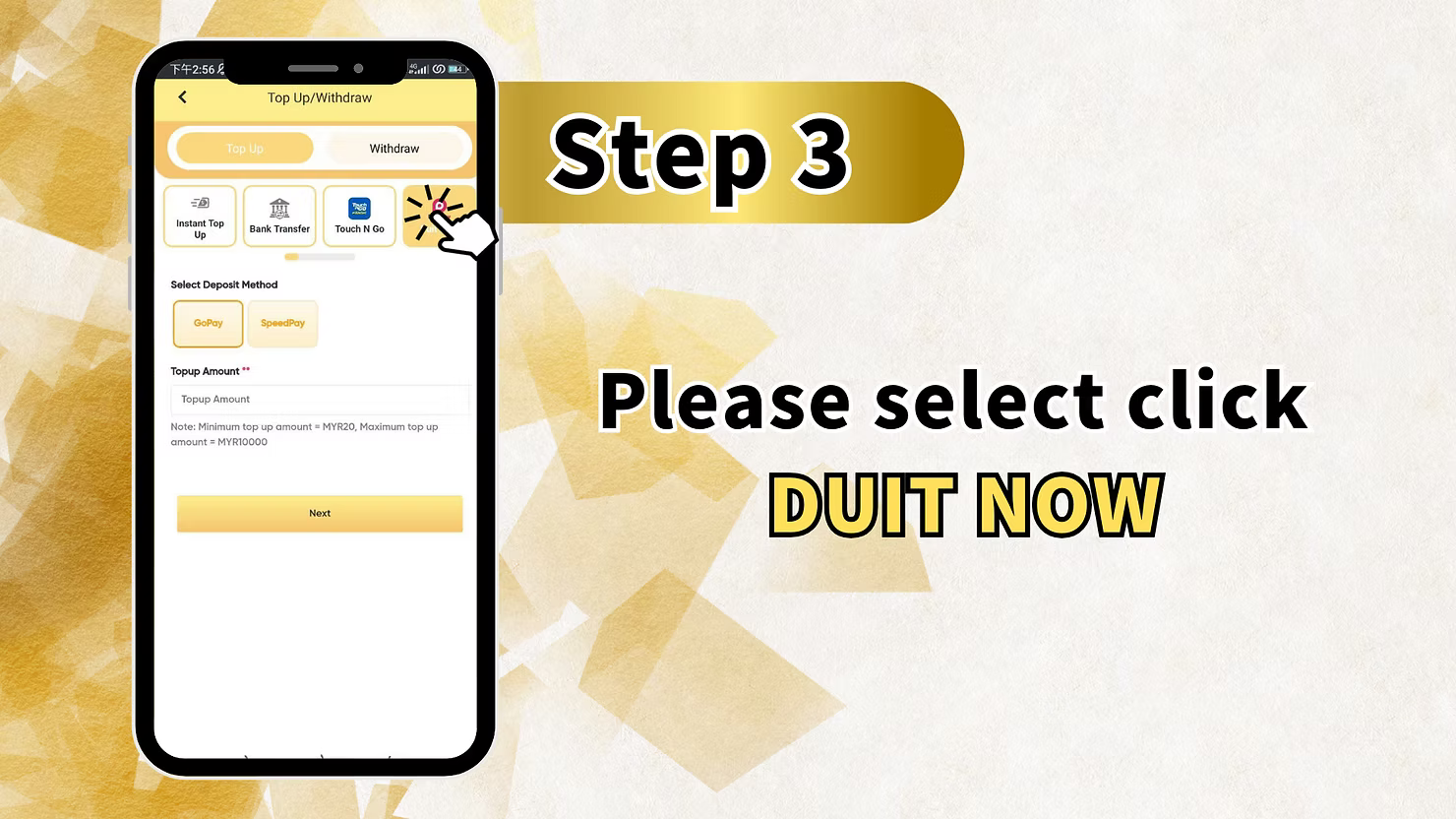
Step 3: Select BUY NOW for Go Pay
From the available deposit methods, select "BUY NOW" to access Go Pay payment options for your LUCKYTOWN PLUS Duit Now topup. This selection connects you to the Go Pay payment gateway, which operates through Malaysia's DuitNow QR standard.
Step 4: Enter Your Deposit Amount
Input the amount you wish to deposit for your LUCKYTOWN PLUS Duit Now topup. The minimum deposit for Go Pay is RM20. Enter your desired amount and prepare for QR code generation.
Step 5: Enter Trading Account Name and Submit
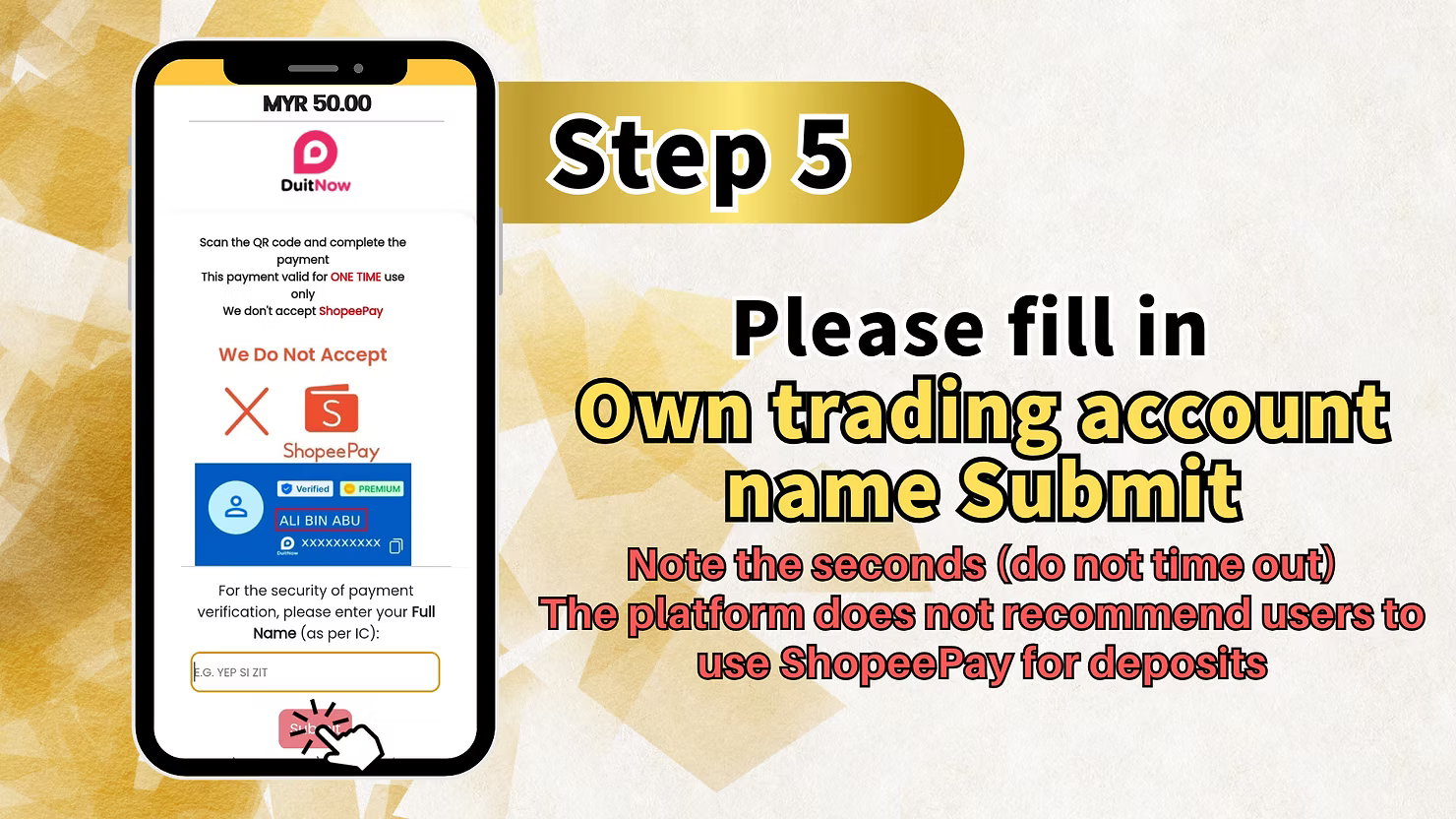
For Go Pay deposits, you will need to enter your own trading account name as registered with LUCKYTOWN PLUS. Complete this field accurately and submit. Pay attention to any countdown timer displayed and do not let the transaction time out. The platform does not recommend using shopping apps for deposits, so make sure you are using the correct Go Pay payment method.
Step 6: Scan the QR Code
After submission, the system generates a QR code for your LUCKYTOWN PLUS Duit Now topup. Open your Go Pay app, select the scan function, and scan the QR code displayed on your LUCKYTOWN PLUS screen. Complete the scan before any timeout to ensure successful deposit processing.
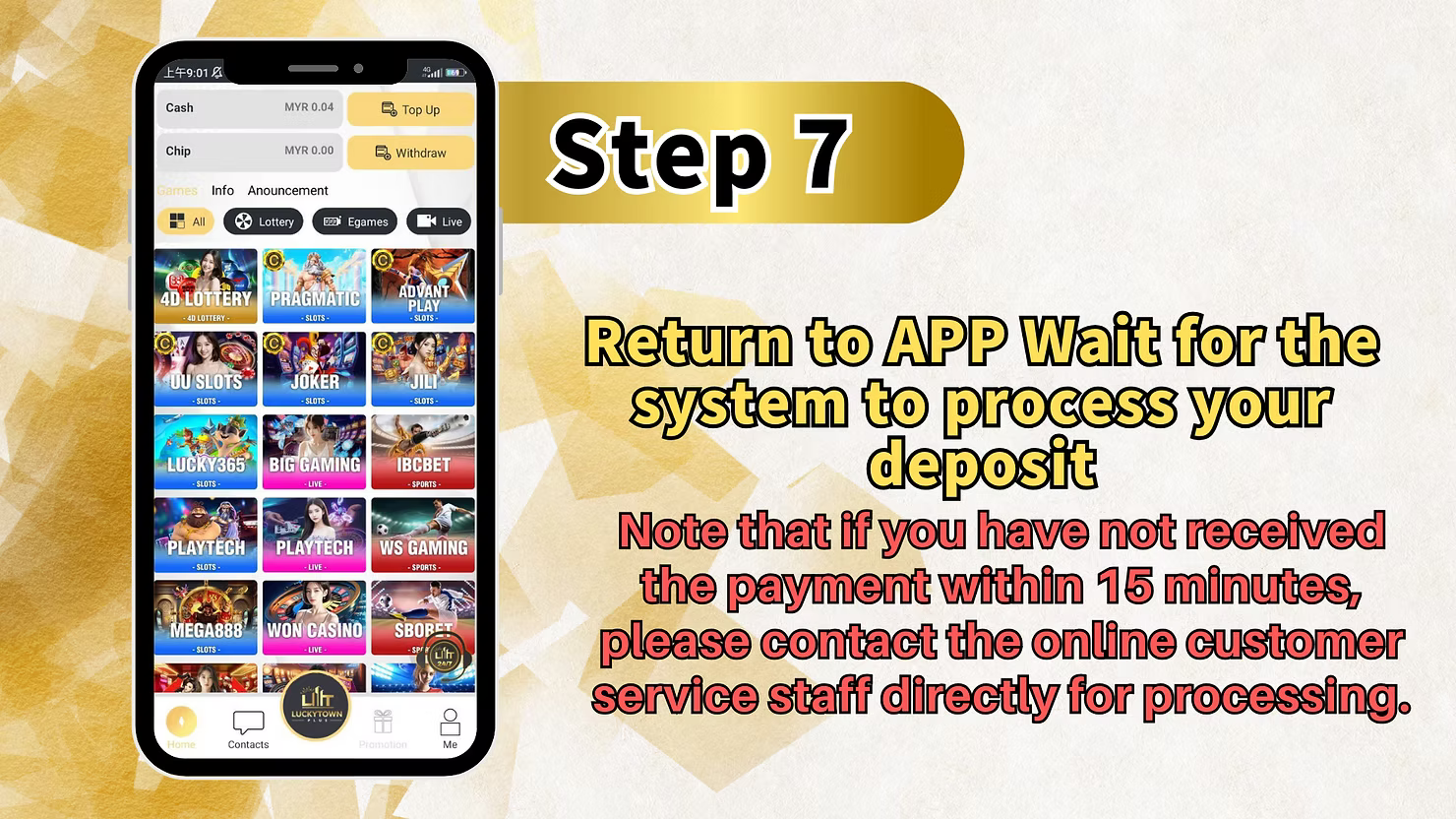
Step 7: Return to App and Await Processing
After scanning the QR code and completing payment in your Go Pay app, return to the LUCKYTOWN PLUS app. The system will process your Duit Now topup automatically. If you have not received confirmation within 15 minutes, contact online customer service for assistance.
LUCKYTOWN PLUS Duit Now Topup: LUCKYTOWN Important Guidelines
Minimum Deposit Amounts
LUCKYTOWN PLUS Duit Now topup offers flexible minimums to suit different budgets. UPay deposits start at just RM10, the lowest minimum on the platform, making it ideal for casual players. Go Pay deposits require a minimum of RM20. Choose the option that best fits your deposit preferences.
QR Code Expiration and Timeout
When completing LUCKYTOWN PLUS Duit Now topup, pay close attention to the countdown timer displayed with your QR code. Each QR code has a limited validity period. If you do not complete the scan before timeout, the code expires and you will need to generate a new transaction. Have your payment app ready before generating the code to ensure timely scanning.
15-Minute Processing Guideline
After scanning and completing payment, return to the LUCKYTOWN PLUS app and wait for system processing. Most Duit Now topups process within minutes. However, if you have not received confirmation within 15 minutes, contact online customer service immediately with your transaction details for assistance.
Malaysia National QR Standard
LUCKYTOWN PLUS Duit Now topup uses Malaysia's official National QR standard, ensuring compatibility with all major DuitNow-enabled payment apps including UPay and Go Pay. This standardized system provides reliable, secure transactions and is recognized across the country's financial infrastructure.
Shopping Deposit Restriction
The platform does not recommend using shopping apps for deposits. For LUCKYTOWN PLUS Duit Now topup, always use designated payment apps like UPay or Go Pay. Attempting to route deposits through shopping transactions may cause delays or transaction failures.
Frequently Asked Questions About LUCKYTOWN PLUS Duit Now Topup: LUCKYTOWN Member Support
What is the minimum deposit for UPay Duit Now?
The minimum deposit amount for UPay LUCKYTOWN PLUS Duit Now topup is RM10. This low minimum makes it one of the most accessible deposit methods available, ideal for players who prefer to start with smaller amounts. LUCKYTOWN offers this flexibility to accommodate all member preferences.
What is the minimum deposit for Go Pay Duit Now?
The minimum deposit amount for Go Pay LUCKYTOWN PLUS Duit Now topup is RM20. This standard minimum applies to Go Pay transactions and aligns with typical e-wallet deposit requirements.
How do I start a Duit Now topup?
To begin your LUCKYTOWN PLUS Duit Now topup, tap the account icon at the bottom right of the main page, select Deposit/Withdrawal, then choose DUIT NOW for UPay or BUY NOW for Go Pay depending on your preferred payment provider. Follow the on-screen instructions to complete your deposit.
What if my QR code expires before I scan?
If the QR code times out during your LUCKYTOWN PLUS Duit Now topup, you will need to generate a new transaction. Pay attention to the countdown timer displayed on screen and have your payment app ready to scan immediately after the code appears to avoid timeouts.
How long does processing take after QR scan?
After completing your QR scan and payment, return to the LUCKYTOWN PLUS app. Most Duit Now topups process within minutes. If you have not received confirmation within 15 minutes, contact customer service immediately with your transaction details.
Can I use shopping apps for Duit Now deposit?
No. The platform does not recommend using shopping apps for deposits. For your LUCKYTOWN PLUS Duit Now topup, use only designated payment apps like UPay and Go Pay to ensure successful processing and avoid delays.
What information do I need to submit for Go Pay?
For Go Pay LUCKYTOWN PLUS Duit Now topup, you will need to enter your own trading account name as registered with LUCKYTOWN PLUS before scanning the QR code. Follow the on-screen instructions carefully to complete this step.
Why Choose LUCKYTOWN PLUS Duit Now Topup: LUCKYTOWN Benefits for Members
Malaysia's National QR Standard
LUCKYTOWN PLUS Duit Now topup uses the official Malaysia National QR system, ensuring compatibility with all major DuitNow-enabled payment apps. This standardized system provides a high level of transaction reliability and security, giving you confidence in every deposit.
Ultra-Low Minimum Deposit with UPay
With UPay minimum deposits starting at just RM10, LUCKYTOWN PLUS Duit Now topup offers the most accessible entry point on the platform. This low threshold makes it easy for new members to try the platform or for existing members to make quick, small deposits without commitment.
Fast QR Code Processing
The QR code system enables near-instant payment confirmation. Once you scan and complete payment, your LUCKYTOWN PLUS Duit Now topup processes quickly. The 15-minute customer service guideline provides peace of mind that your funds will be credited or you will receive support promptly.
Multiple Provider Options
Choose between UPay and Go Pay for your LUCKYTOWN PLUS Duit Now topup based on which app you already use. Both options follow similar, simple processes with slightly different minimums, giving you flexibility in how you fund your account.
Clear Visual Instructions
The detailed step-by-step teaching guides for both UPay and Go Pay ensure even first-time users can complete LUCKYTOWN PLUS Duit Now topup successfully. Each stage includes visual references to the actual interface, eliminating guesswork.
Complete Your LUCKYTOWN PLUS Duit Now Topup Today
Use UPay with a RM10 minimum or Go Pay with a RM20 minimum for fast QR code deposits. Follow the step-by-step guide, scan the Malaysia National QR, and receive processing within 15 minutes. LUCKYTOWN PLUS makes depositing simple and fast.
Start Duit Now Topup