
LUCKYTOWN PLUS Exchange Currency - LUCKYTOWN Complete MYR to THB Conversion Guide
LUCKYTOWN PLUS Currency Exchange: LUCKYTOWN Teaching Step Solutions


Introduction to LUCKYTOWN PLUS Exchange Currency
The LUCKYTOWN PLUS exchange currency feature allows members to convert between MYR (Malaysian Ringgit) and THB (Thai Baht) directly within the app, with no external exchanges or complicated processes required. Whether you're managing funds across regional platforms or preparing to play on different versions of the app, this tool provides a seamless conversion experience. LUCKYTOWN ensures transparent exchange rates and simple one-click confirmations, making cross-currency fund management effortless for all members.
Step-by-Step Guide to LUCKYTOWN PLUS Exchange Currency: LUCKYTOWN Member Instructions
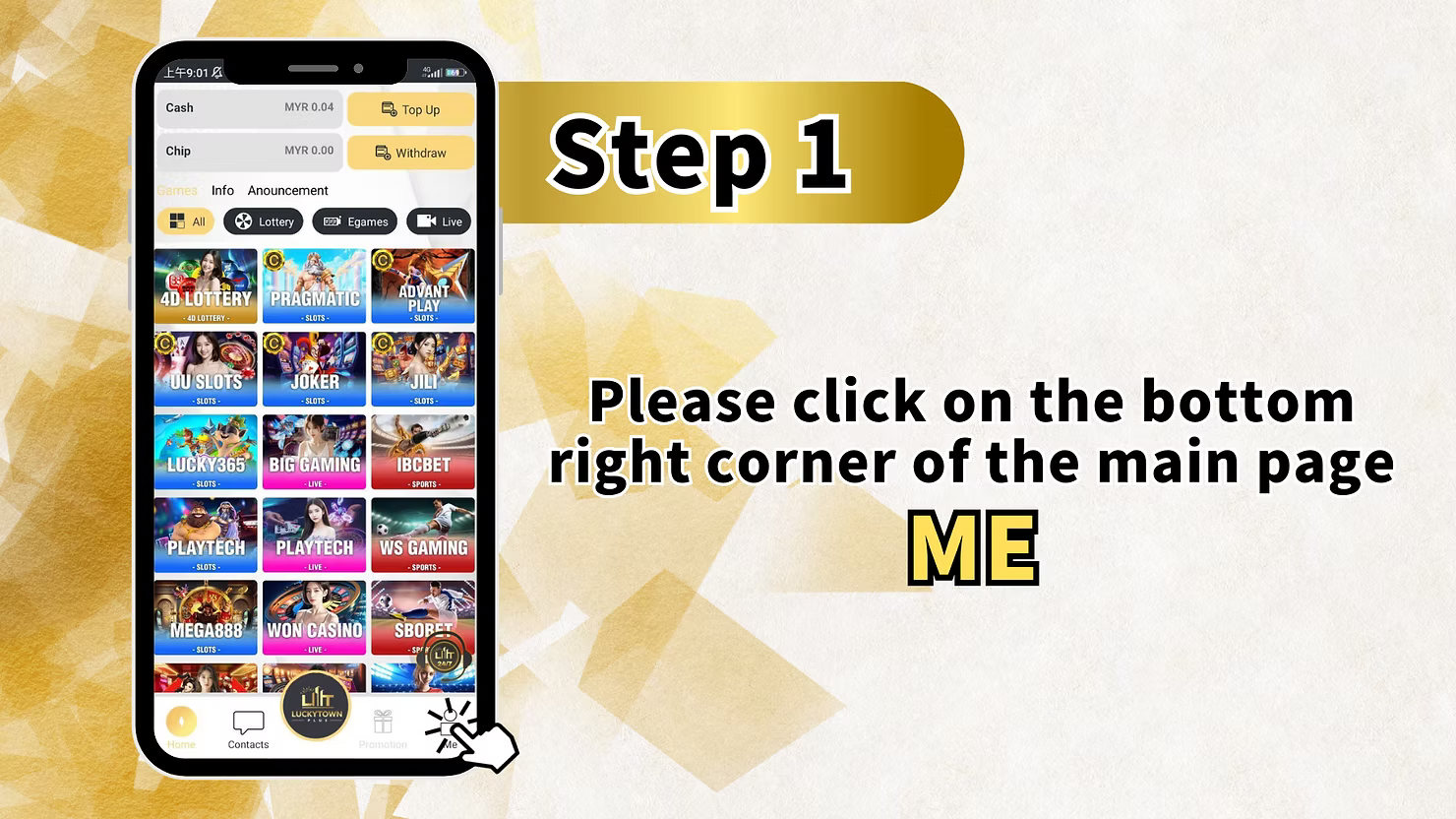
Step 1: Access Your Account Dashboard
To begin your currency exchange, open the LUCKYTOWN PLUS app and tap the account icon in the bottom right corner of the main screen. This section, labeled "ME," contains all your account management options, including your balance information, transaction history, and financial tools like currency exchange.
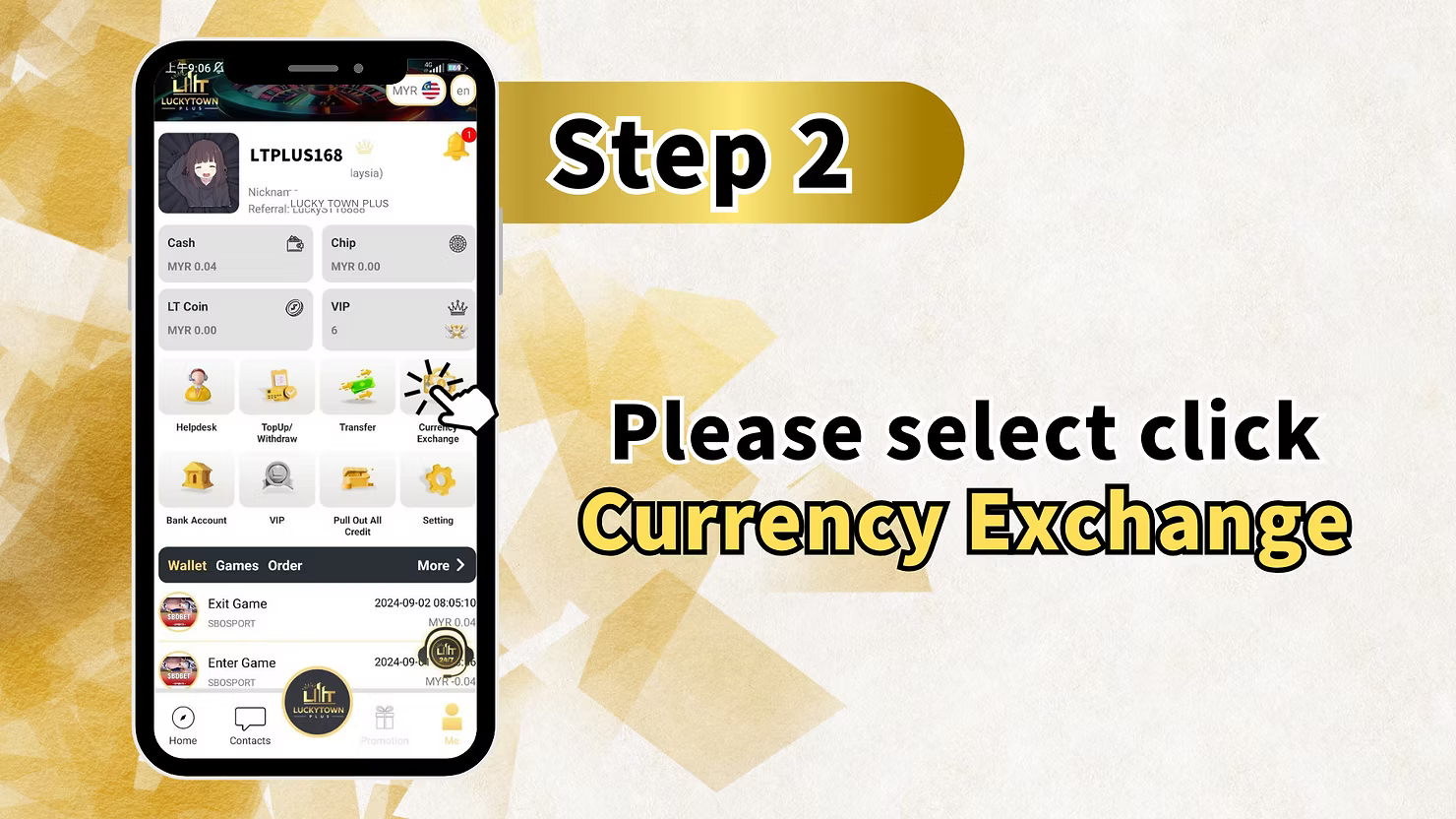
Step 2: Select Currency Exchange
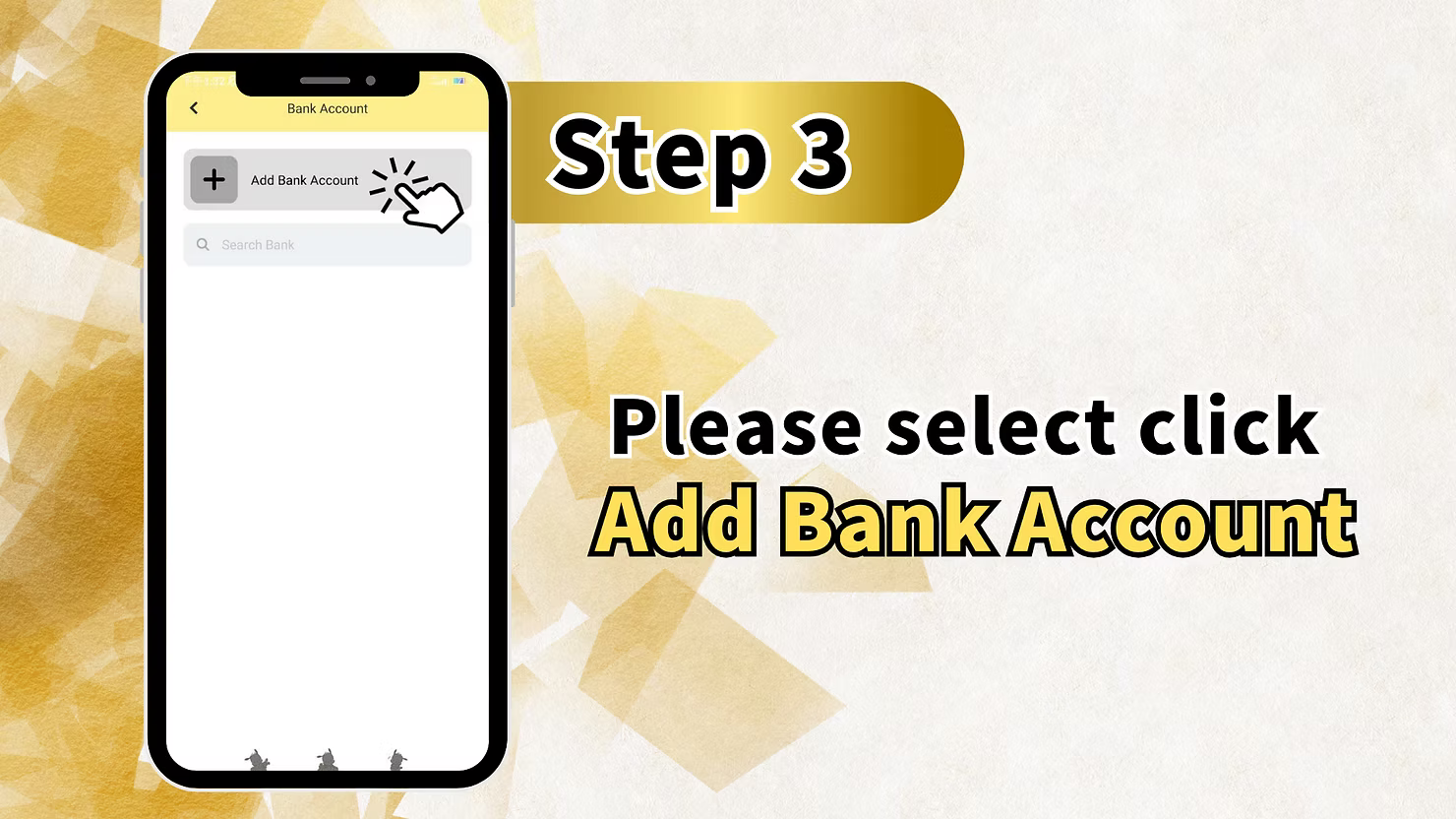
From your account dashboard, locate and tap the "Currency Exchange" option. This takes you to the currency conversion interface, where you can convert between MYR and THB. The screen displays the current exchange rate and the amount fields for conversion.
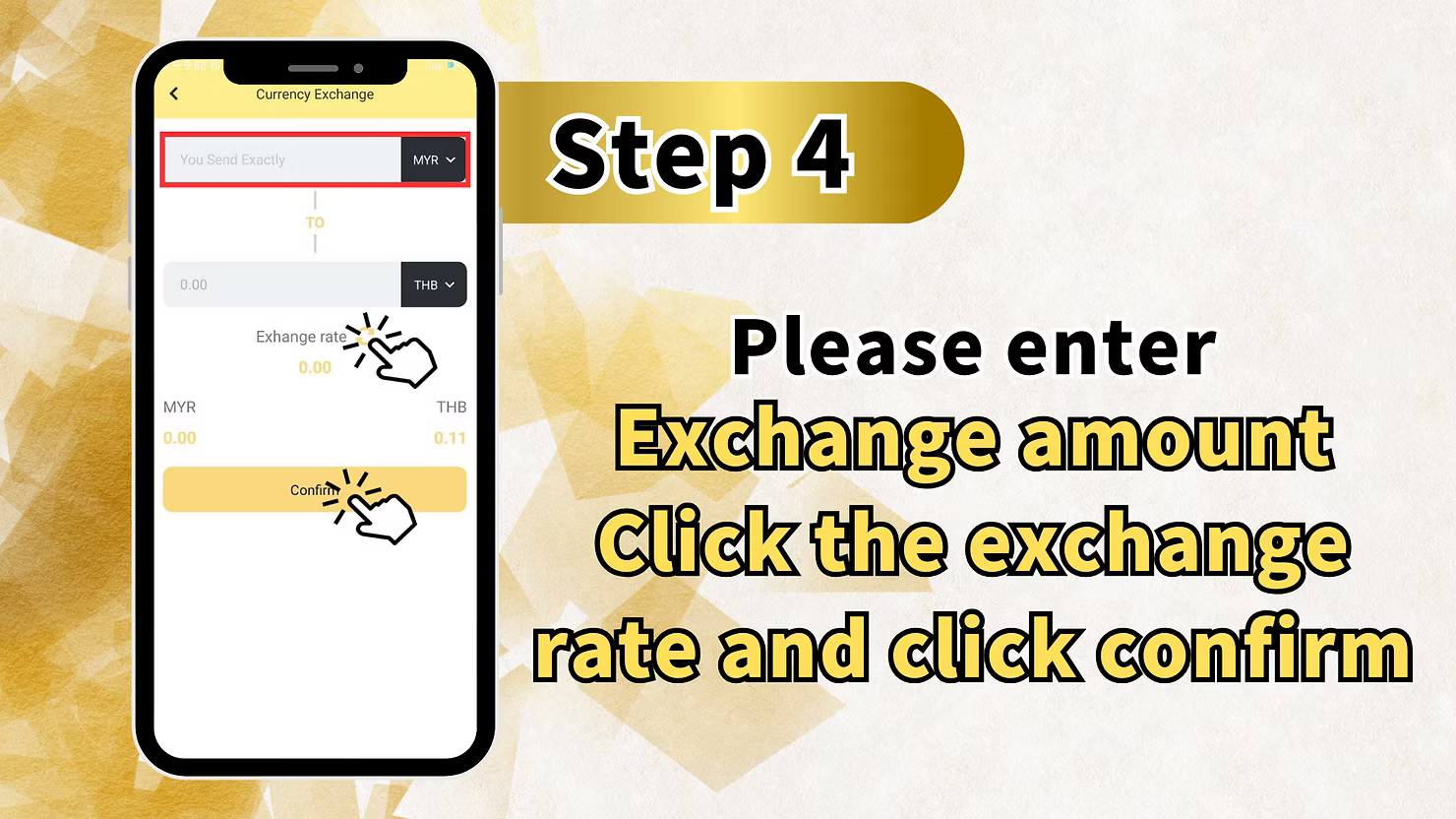
Step 3: Enter Exchange Amount and Confirm
On the Currency Exchange screen, you will see the conversion interface with "You Send Exactly" and a field for entering your amount. Below this, currency selectors show "MYR" on the left and "THB" on the right, indicating you are converting from Malaysian Ringgit to Thai Baht.
Exchange Rate Display
The exchange rate is shown in the center of the screen. Initially displayed as "0.00 MYR 0.00," this will update once you enter an amount. The rate reflects the current market value with any applicable platform adjustments. Click the exchange rate field to verify the current rate before proceeding.
Enter Your Amount and Confirm
Enter the exchange amount you wish to convert. After verifying the displayed rate is accurate, click "Confirm" to process your currency conversion. Your MYR balance will decrease, and your THB balance will increase by the converted amount at the confirmed rate. The transaction processes instantly.
LUCKYTOWN PLUS Exchange Currency: LUCKYTOWN Friendly Reminder
Important Information About Reverse Conversions
After completing your currency conversion, you may need to convert funds back in the future. LUCKYTOWN PLUS provides this important friendly reminder to help you navigate the directional nature of the exchange feature.
To Convert THB Back to MYR
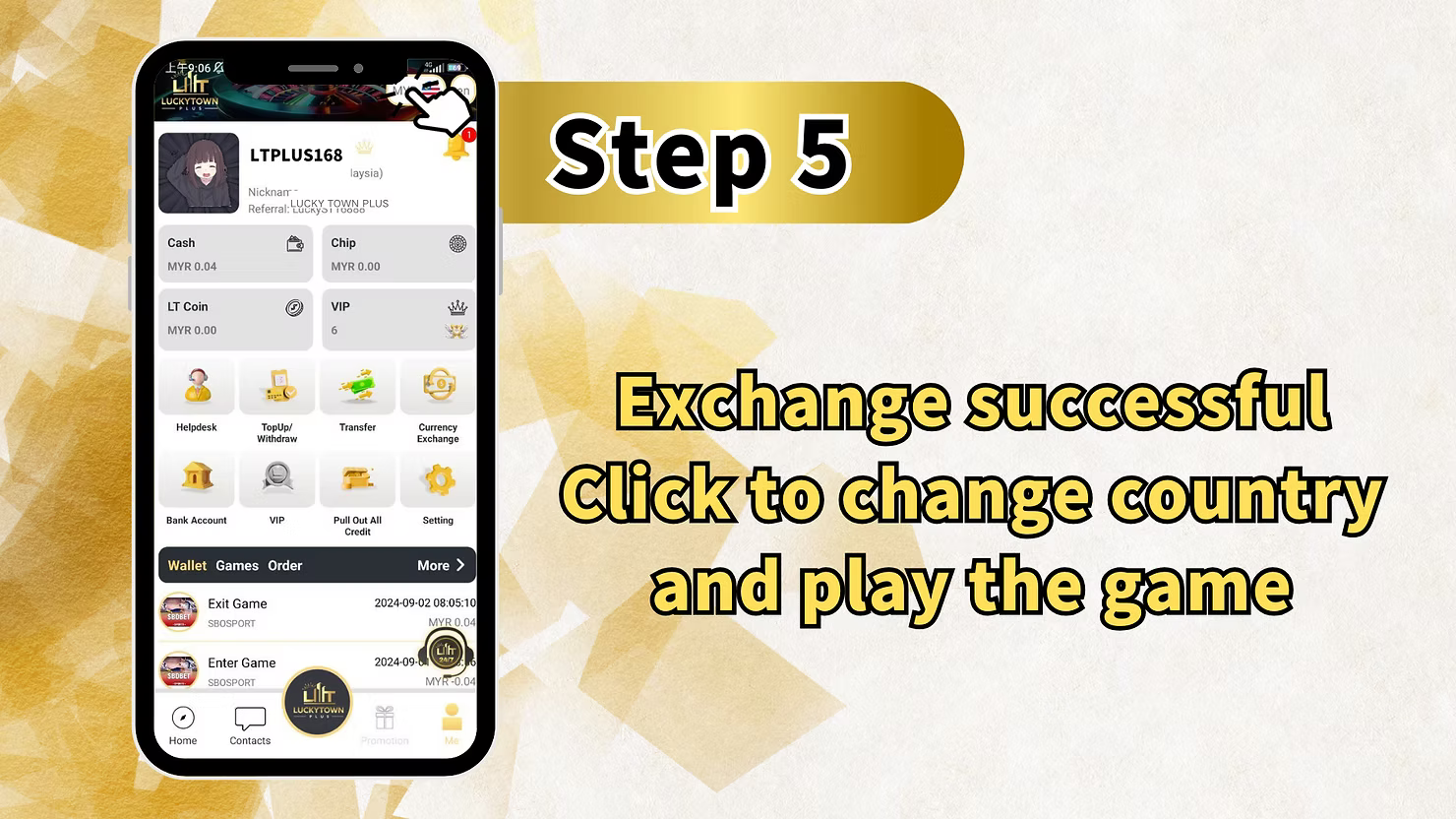
To convert THB back to MYR, please go to (Convert in Thai version). This means you need to switch to the Thai version of the LUCKYTOWN PLUS app to convert Thai Baht back to Malaysian Ringgit. The Thailand version handles THB to MYR conversions, while the Malaysia version handles MYR to THB.
To Convert MYR Back to THB
To convert MYR back to THB, please go to (Malaysia version). You are currently in the Malaysia version, which handles MYR to THB conversions. For additional MYR to THB conversions, remain in the Malaysia version. For the reverse direction, switch to the Thai version.
LUCKYTOWN PLUS Exchange Currency: LUCKYTOWN Important Guidelines
Currency Pairs Supported
The LUCKYTOWN PLUS exchange currency feature currently supports MYR (Malaysian Ringgit) and THB (Thai Baht) conversions. This allows members to move funds between the Malaysian and Thai platforms seamlessly, supporting players who enjoy games across both regional versions.
Version Switching Requirement
A key aspect of currency exchange is that conversions are directional based on app version. MYR to THB conversions occur in the Malaysia version of LUCKYTOWN PLUS. THB to MYR conversions require switching to the Thai version. This design keeps the interface simple and prevents confusion about which direction you're converting.
Exchange Rate Transparency
The currency exchange interface displays the current exchange rate before you confirm your transaction. This transparency ensures you know exactly what rate you're getting before committing to the conversion. Rates reflect current market conditions and are updated regularly.
Simple Confirmation Process
After entering your amount and verifying the rate, one click of the Confirm button completes your currency exchange transaction. The process is designed for speed and simplicity, with no lengthy forms or multiple-step verifications required.
Frequently Asked Questions About LUCKYTOWN PLUS Exchange Currency: LUCKYTOWN Member Support
What currencies can I exchange?
The LUCKYTOWN PLUS exchange currency feature currently supports MYR (Malaysian Ringgit) and THB (Thai Baht). You can convert between these two currencies directly in the app. LUCKYTOWN may introduce additional currency pairs in the future based on member demand.
How do I convert MYR to THB?
To convert MYR to THB, ensure you are in the Malaysia version of the LUCKYTOWN PLUS app. Go to ME, then Currency Exchange, enter your MYR amount, verify the exchange rate, and click Confirm. The conversion processes instantly.
How do I convert THB back to MYR?
To convert THB back to MYR, you need to switch to the Thai version of the LUCKYTOWN PLUS app. As the friendly reminder states: "To convert THB back to MYR please go to (Convert in Thai version)." Once in the Thai version, follow the same Currency Exchange steps.
Where do I find the exchange rate?
The exchange rate is displayed prominently in the center of the Currency Exchange screen. It updates based on the amount you enter and current market rates. Click the rate field to verify the current rate before confirming your transaction.
Is there a fee for currency exchange?
The exchange rate displayed includes any applicable platform adjustments. LUCKYTOWN PLUS aims to provide competitive, transparent rates so you know exactly what you're receiving. There are no hidden fees, the rate shown is the rate applied to your conversion.
What happens after I click Confirm?
After clicking Confirm on your currency exchange transaction, the conversion is processed immediately. Your MYR balance will decrease, and your THB balance will increase by the converted amount at the confirmed rate. You can verify the updated balances in your account dashboard.
Why Choose LUCKYTOWN PLUS Exchange Currency: LUCKYTOWN Benefits for Members
Seamless Cross-Currency Management
LUCKYTOWN PLUS exchange currency allows members with interests in both Malaysian and Thai gaming platforms to manage funds seamlessly without external currency exchanges. Keep your funds in the currency that works best for your gaming preferences.
App Version Integration
The directional conversion system, MYR to THB in Malaysia version and THB to MYR in Thai version, keeps the interface simple and prevents confusion about which direction you're converting. This design reflects the natural flow of funds between regional versions.
Transparent Rate Display
With the exchange rate clearly shown before confirmation, LUCKYTOWN PLUS ensures you always know the rate you're receiving with no surprises. This transparency builds trust and helps you make informed decisions about when to convert.
Simple Three-Step Process
The ME, Currency Exchange, amount entry, and confirm process makes currency exchange accessible to all members, regardless of technical expertise. No complex calculations or external tools required.
Clear Friendly Reminders
The platform's friendly reminder about version switching for reverse conversions demonstrates LUCKYTOWN commitment to helping members navigate the currency exchange feature successfully. These clear instructions prevent confusion and ensure smooth transactions.
Start Your LUCKYTOWN PLUS Exchange Currency Today
Convert MYR to THB instantly with our simple three-step guide. Access the ME menu, select Currency Exchange, enter your amount, and confirm. Need to convert back? Switch to the Thai version. LUCKYTOWN PLUS makes currency exchange easy.
Exchange Currency Now