
LUCKYTOWN PLUS TNG Transfer Topup - LUCKYTOWN Complete Touch N Go Deposit Guide
LUCKYTOWN PLUS TNG Transfer Topup: LUCKYTOWN Teaching Step Solutions
Introduction to LUCKYTOWN PLUS TNG Transfer Topup
The LUCKYTOWN PLUS TNG transfer topup feature offers members a seamless way to add funds using Touch N Go, Malaysia's leading mobile e-wallet. Unlike traditional bank transfers, TNG deposits leverage the convenience of digital wallets while maintaining the same security standards. This guide walks you through each stage from accessing the deposit menu to uploading your payment confirmation. LUCKYTOWN ensures every TNG transaction is accurately processed, with the finance team typically completing verification within 10 minutes of receipt submission.
Step-by-Step Guide to LUCKYTOWN PLUS TNG Transfer Topup: LUCKYTOWN Member Instructions

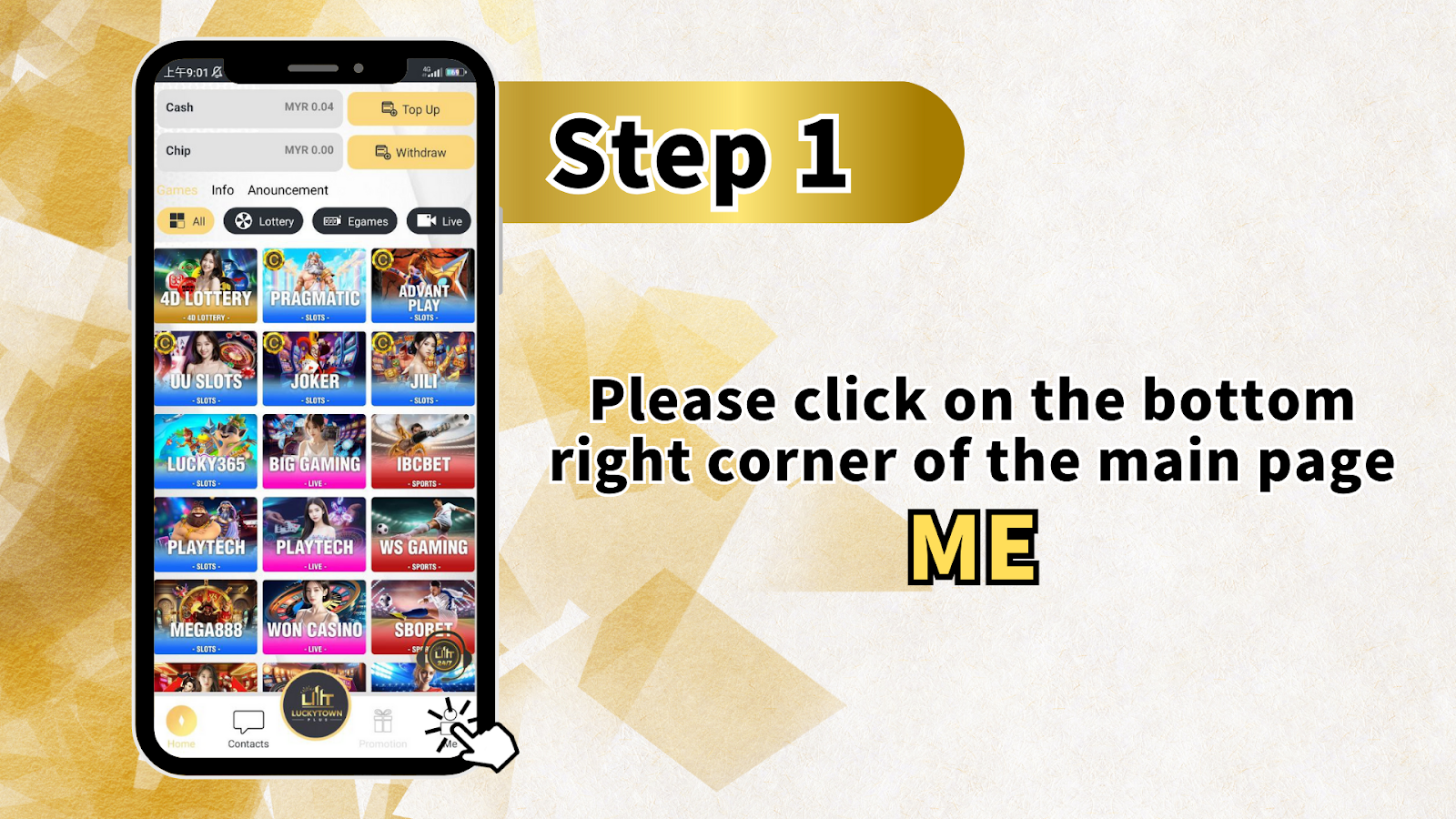
Step 1: Access Your Account Dashboard
To begin your LUCKYTOWN PLUS TNG transfer topup, open the app and locate the account icon in the bottom right corner of the main screen. This section displays your current balance, recent activity, and transaction history. The main dashboard also features quick-access buttons for deposits and withdrawals, along with the full LUCKYTOWN PLUS game library including 4D lottery, slots from Pragmatic and JILI, live casino games, and sportsbook options, all of which become playable once your TNG topup is credited.
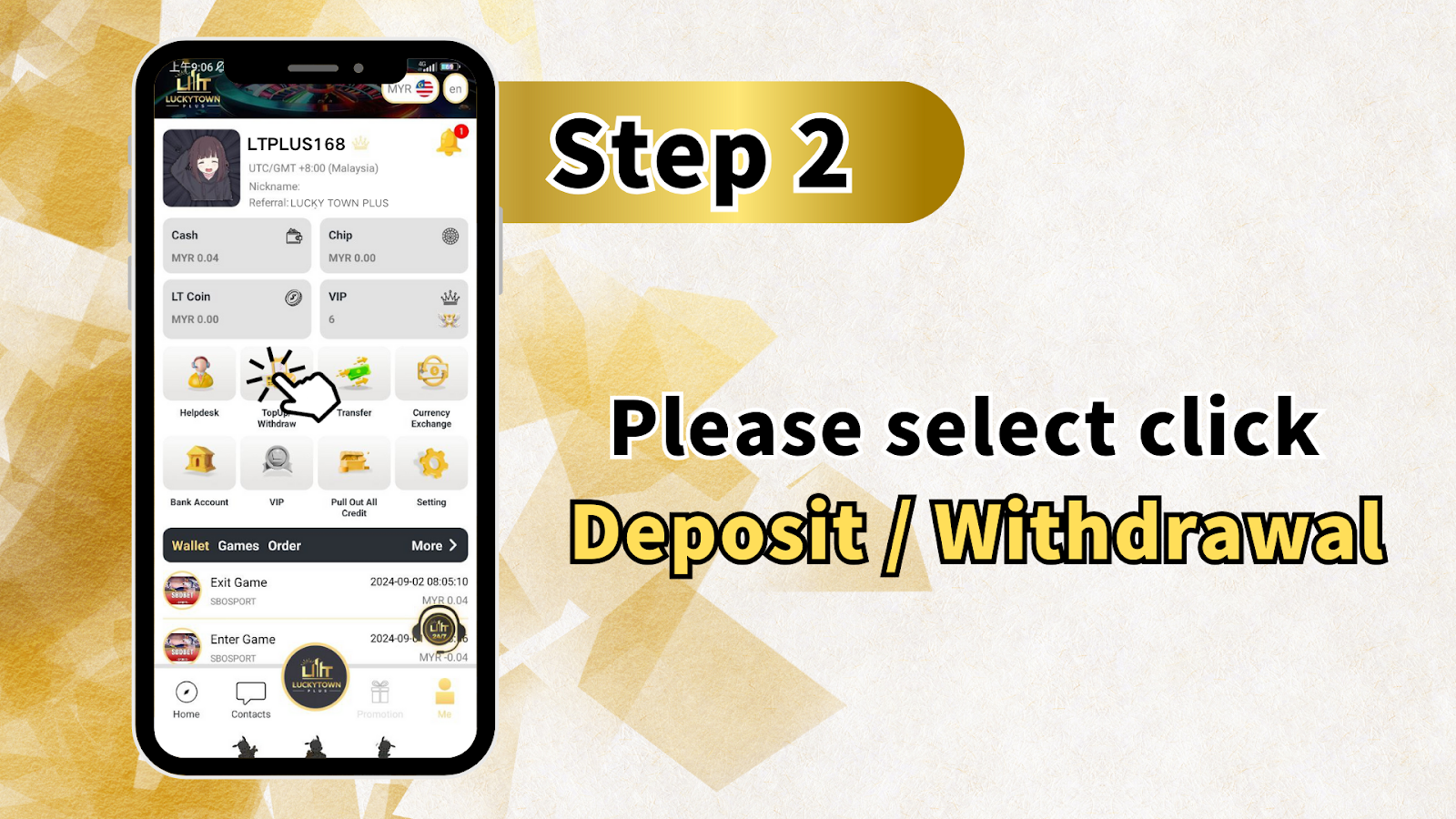
Step 2: Enter the Financial Transaction Center
From your account dashboard, tap the "Deposit / Withdrawal" option. This opens LUCKYTOWN PLUS's centralized transaction hub where all financial activities, deposits, withdrawals, and transfer history are managed. The interface clearly separates deposit and withdrawal functions for intuitive navigation.
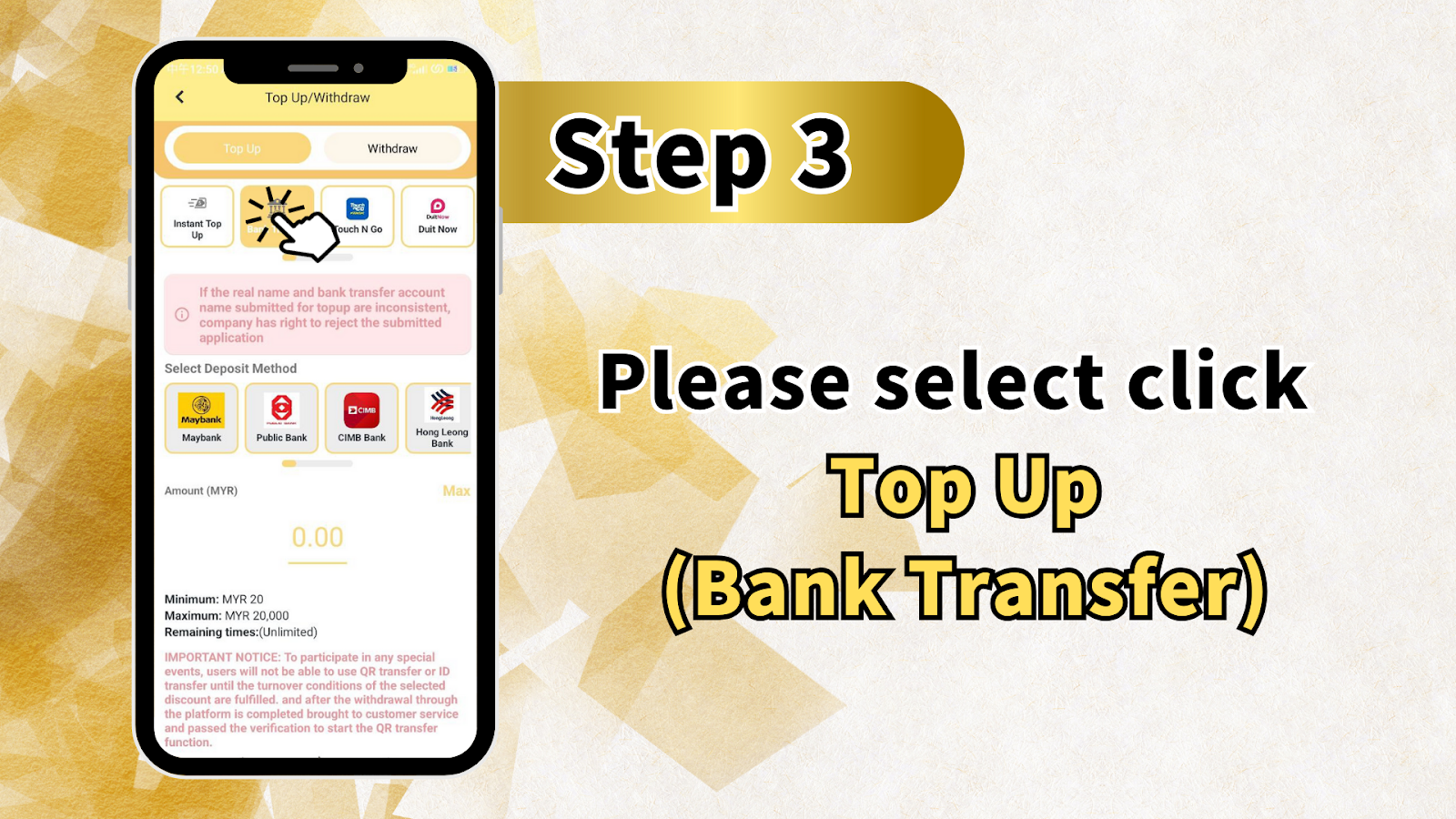
Step 3: Select Top Up and Choose TNG as Your Method
On the transaction screen, choose "Top Up" to begin. LUCKYTOWN PLUS displays a critical notice: if the real name and account name submitted for payment are inconsistent, the company has the right to reject the submitted application. This policy ensures your funds reach only your verified account.
Choose Your Deposit Method
From the available deposit methods, select the option that enables TNG transfers. LUCKYTOWN PLUS supports multiple payment channels including Touch N Go, Duit Now, Maybank, Public Bank, CIMB Bank, Hong Leong Bank, and Mybank. For LUCKYTOWN PLUS TNG transfer topup, the Touch N Go option provides the most direct experience.
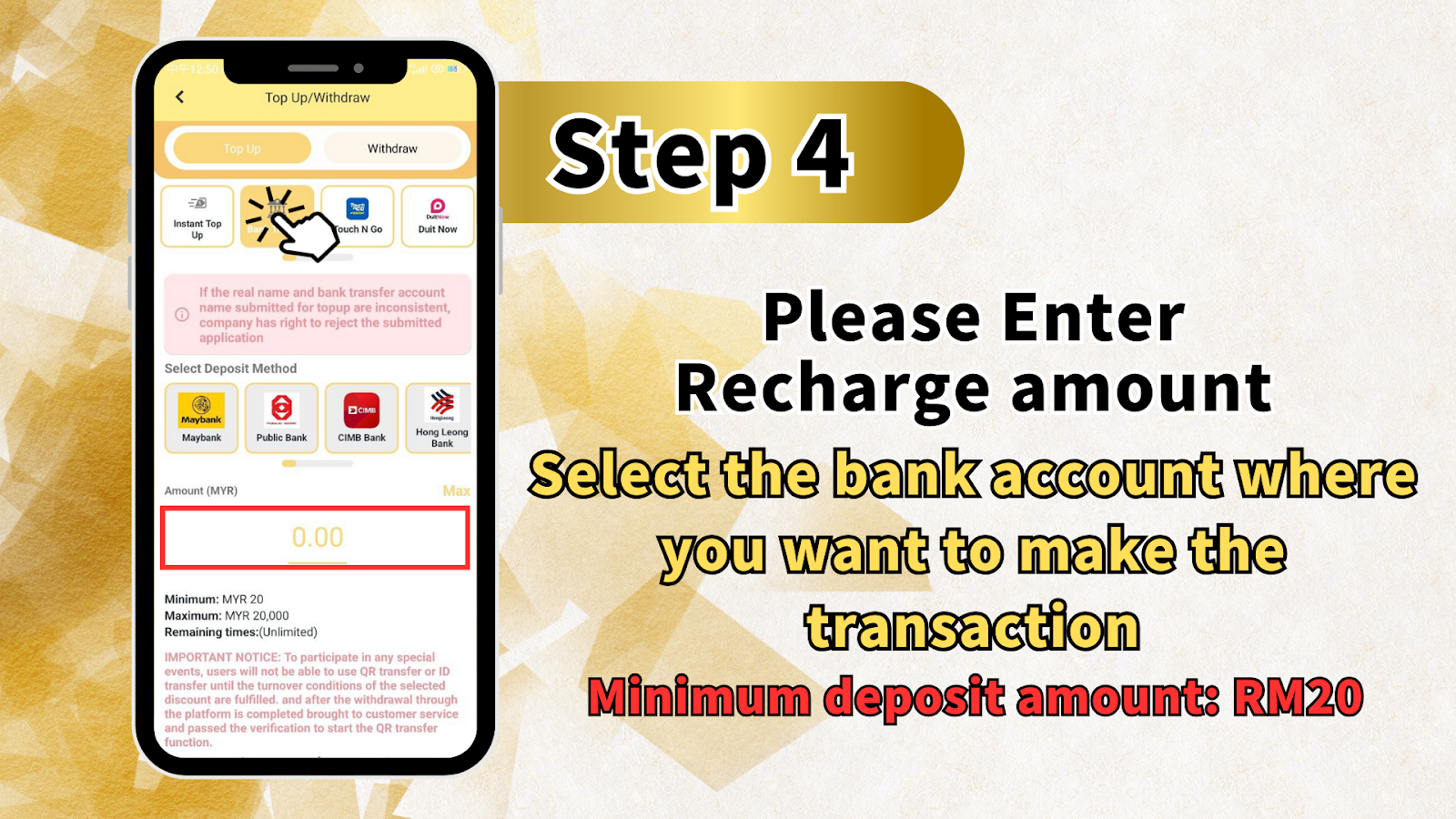
Enter Deposit Amount (MYR)
Input the amount you wish to add to your LUCKYTOWN PLUS account. The minimum deposit is RM20, and the maximum per transaction is RM20,000. The system displays your entered amount in real time, with no time limit for completing the transaction.
Initiate the Deposit Request
After confirming your payment method and deposit amount, tap "Top Up (Bank Transfer)" to generate the payment instructions for your LUCKYTOWN PLUS TNG transfer topup.
Step 4: Confirm Deposit Details
Review the recharge amount and selected payment method on the confirmation screen. Ensure your entries are accurate, particularly the amount, as this cannot be modified after submission. The minimum deposit reminder of RM20 appears again for verification.
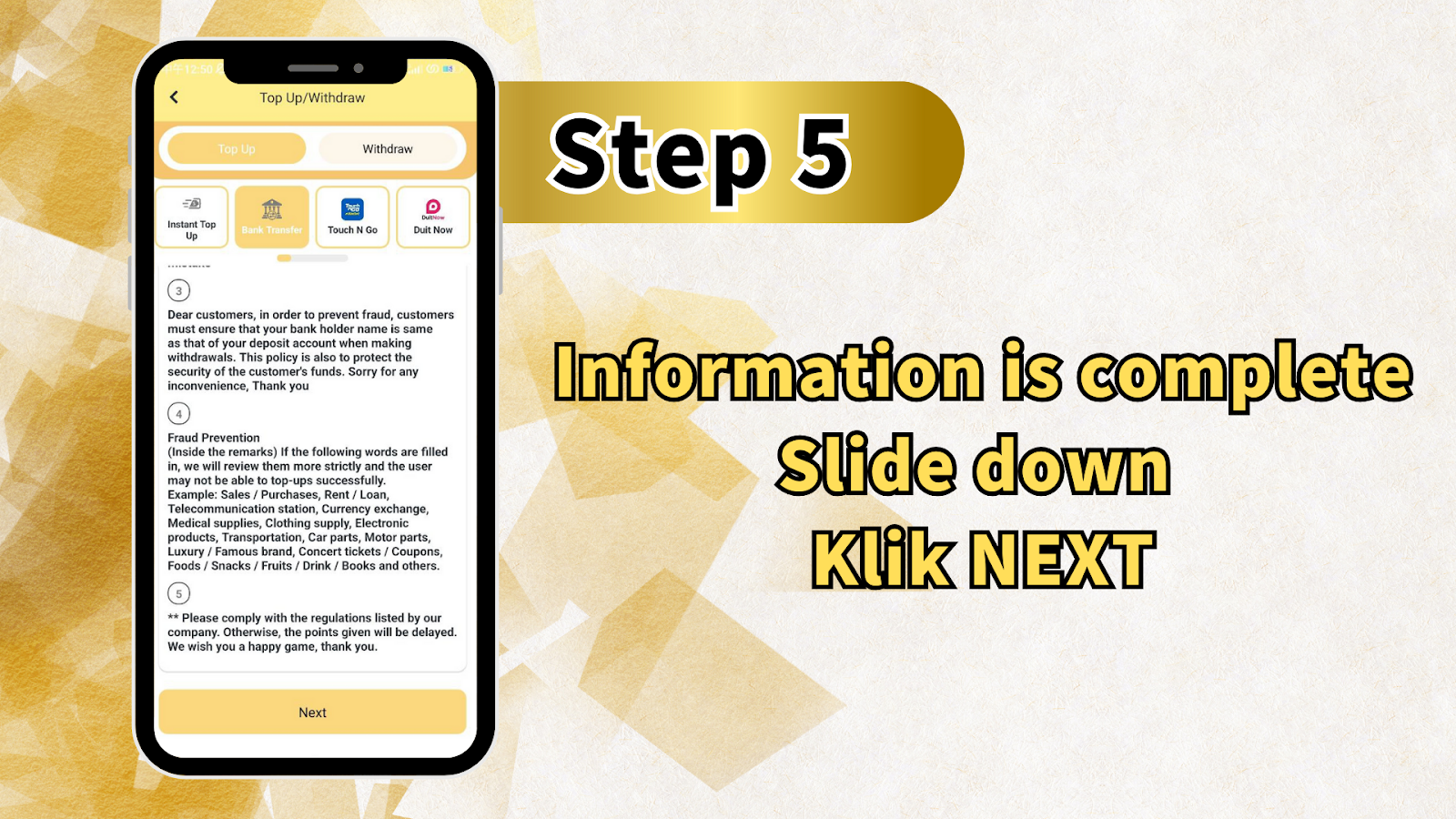
Step 5: Review Security and Fraud Prevention Guidelines
Before proceeding, LUCKYTOWN PLUS presents important fraud prevention information: to protect customers from fraudulent activity, your payment account holder name must match your registered deposit account name. This policy safeguards your funds and complies with financial regulations.
Real Name Consistency Requirement
Dear customers, in order to prevent fraud, customers must ensure that your bank holder name is the same as that of your deposit account when making withdrawals. This policy is also to protect the security of the customer's funds. For LUCKYTOWN PLUS TNG transfer topup, your Touch N Go account name must match your registered real name exactly.
Restricted Keywords in Transfer Remarks
Inside the remarks section of your TNG transfer, if the following words are filled in, LUCKYTOWN will review them more strictly and the user may not be able to top up successfully. Restricted keywords include: Sales / Purchases, Rent / Loan, Telecommunication station, Currency exchange, Medical supplies, Clothing supply, Electronic products, Transportation, Car parts, Motor parts, Luxury / Famous brand, Concert tickets / Coupons, Foods / Snacks / Fruits / Drink / Books, and similar commercial terms.
Compliance Statement
Please comply with the regulations listed by our company. Otherwise, the points given will be delayed. We wish you a happy game, thank you.
Proceed to Next Step
After reviewing all fraud prevention information, ensure your information is complete, slide down, and tap "NEXT" to proceed with your LUCKYTOWN PLUS TNG transfer topup.
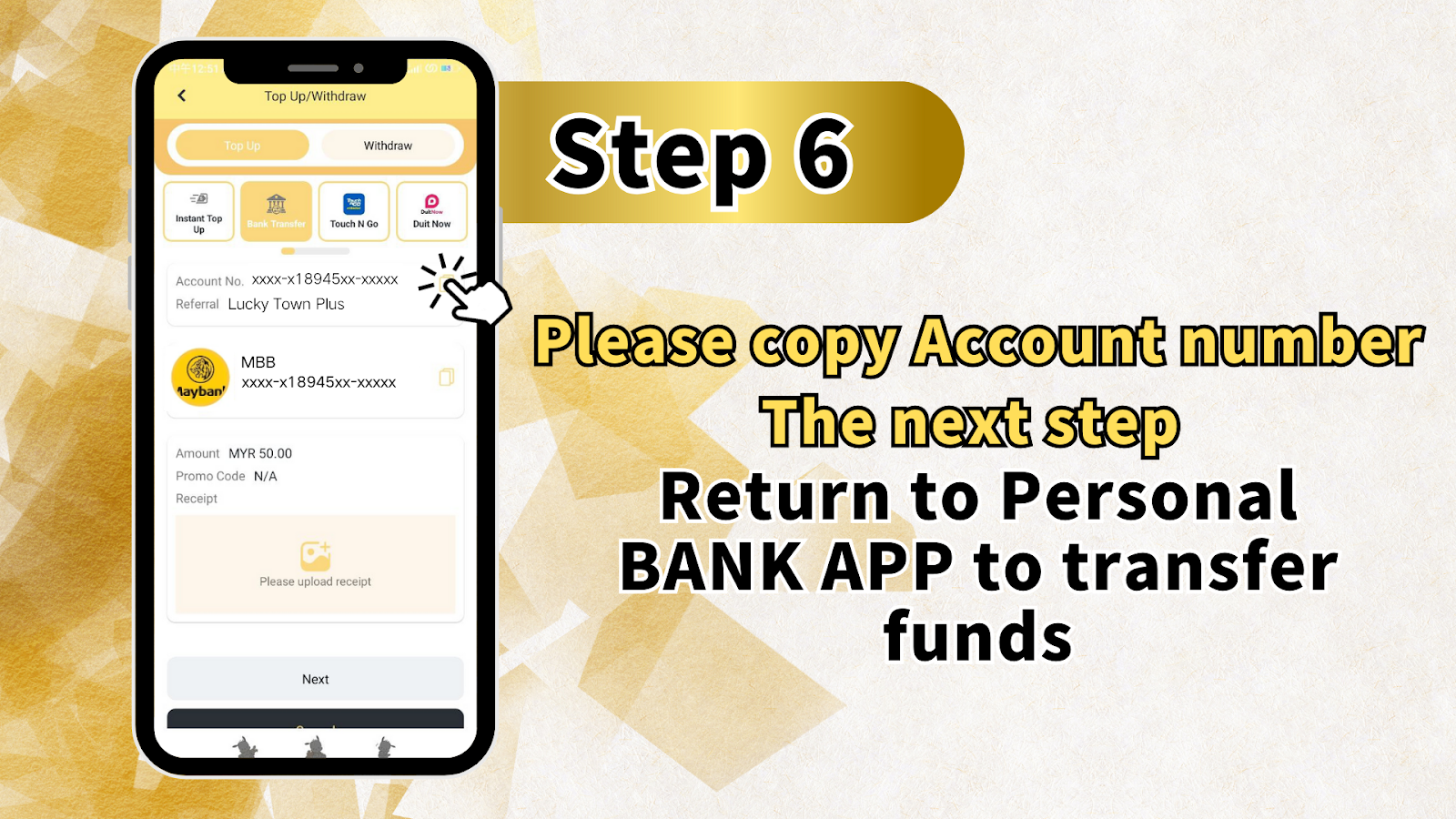
Step 6: Copy Account Details and Transfer via TNG App
The system displays the LUCKYTOWN PLUS account details for your selected payment method, including: Account Number [masked for security] and Reference: Lucky Town Plus. Copy these details, then open your Touch N Go app to initiate the transfer. Use the copied account number and reference exactly as shown.
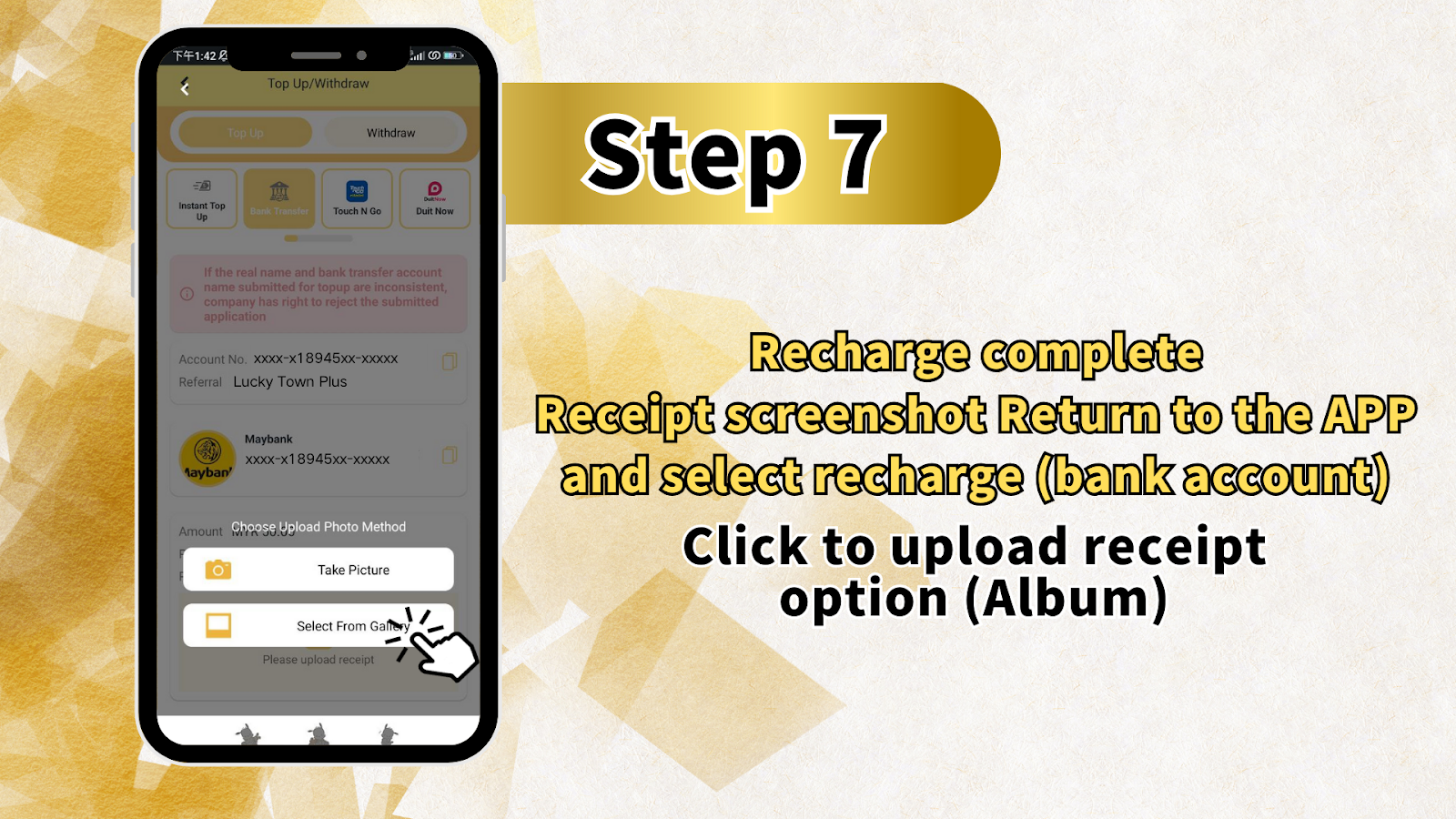
Step 7: Return and Upload Transfer Receipt
After completing the transfer in your TNG app, return to the LUCKYTOWN PLUS app. Select "Recharge (bank account)" and tap the option to upload your payment receipt or screenshot from your device's photo album. Clear, legible receipts showing the transfer amount, date, and reference number help the finance team verify your LUCKYTOWN PLUS TNG transfer topup quickly.
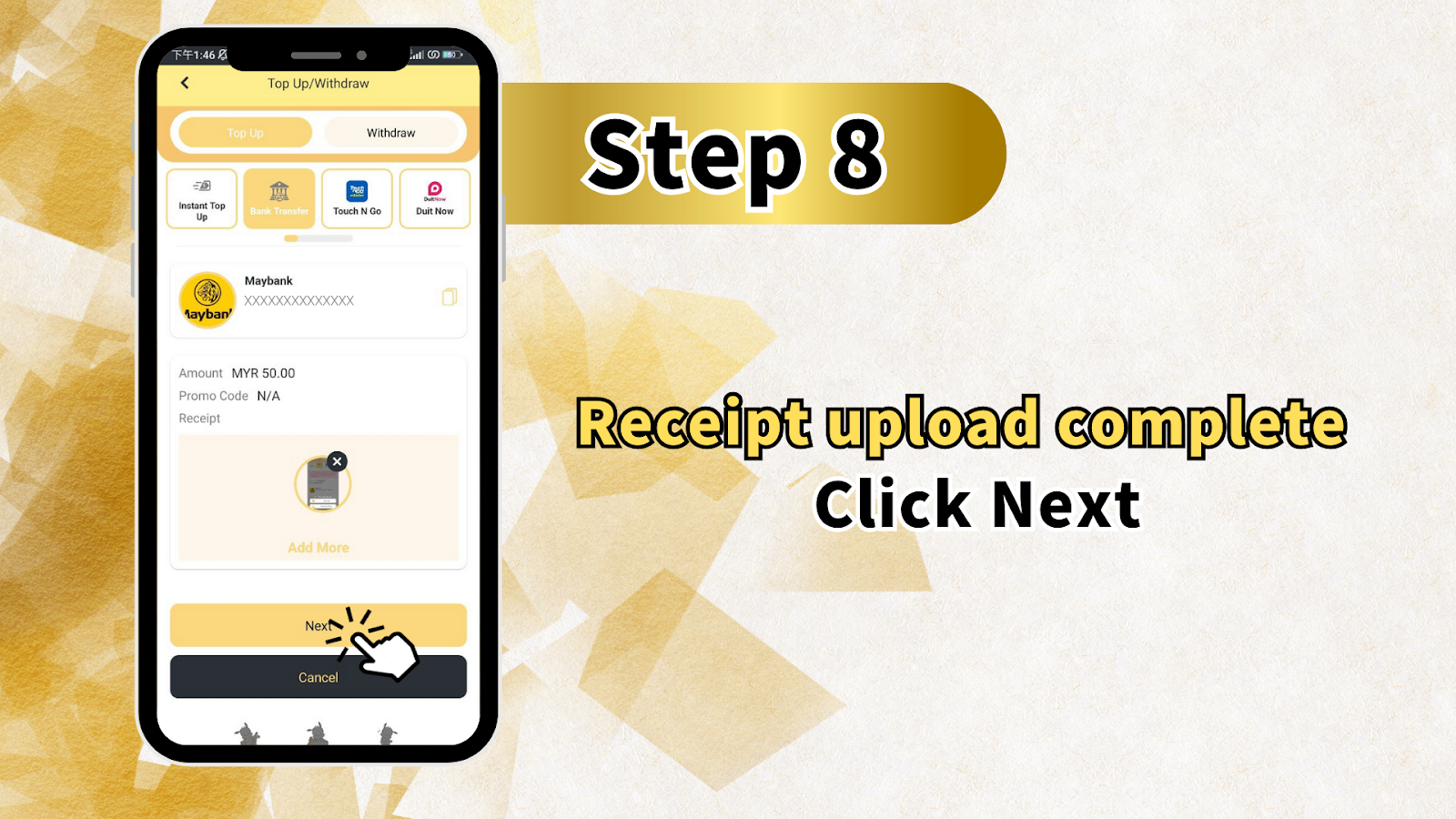
Step 8: Verify Receipt and Amount
The confirmation screen displays your selected payment method, account details, withdraw options including Touch N Go and Duit Now, your amount in MYR, Promo Code as N/A if not applied, and a preview of your uploaded receipt. Verify that the amount shown matches your actual transfer. You may use "Add More receipts" if you have multiple transaction confirmations. Tap "Next" when all details are correct.
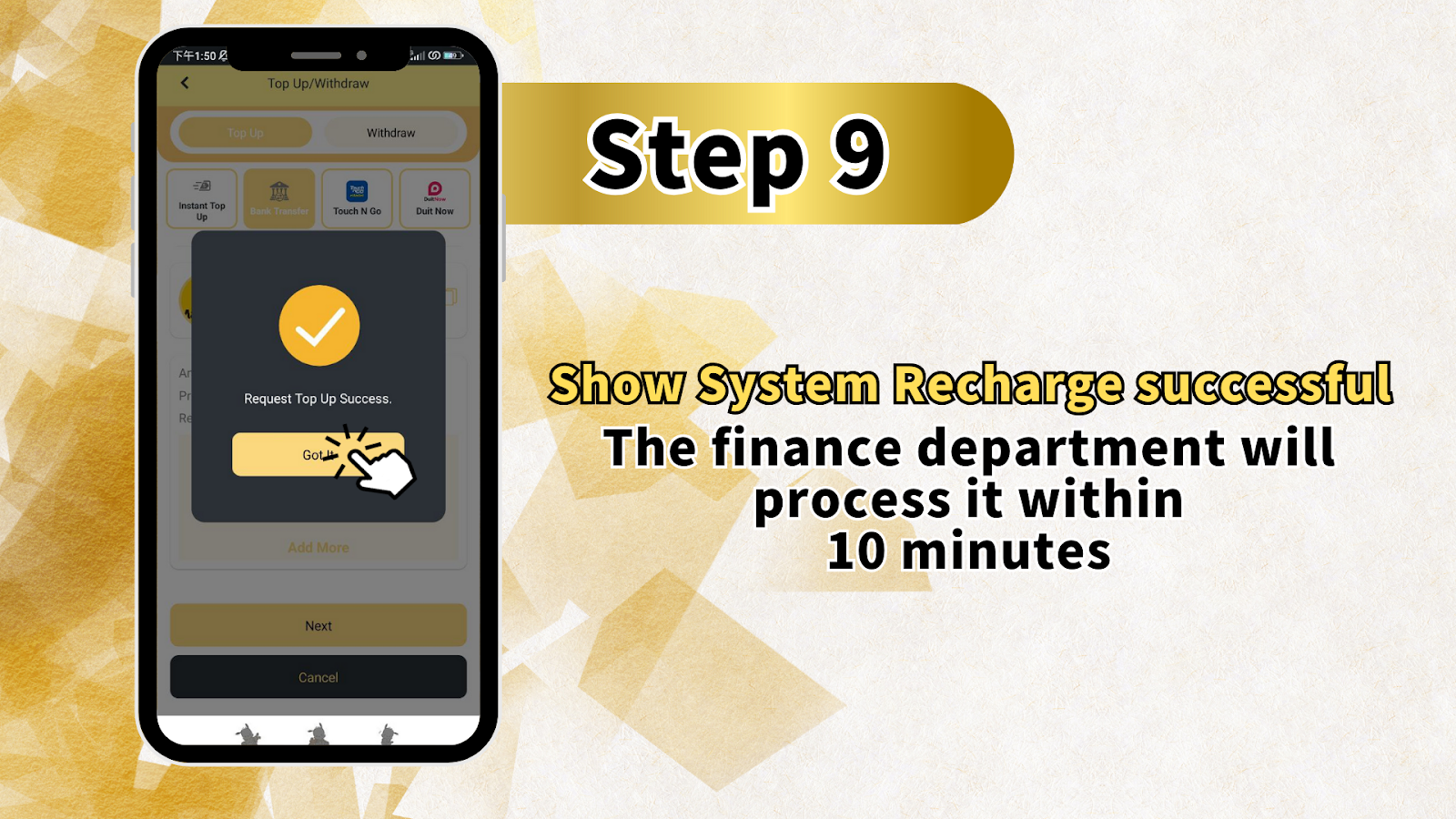
Step 9: Processing Confirmation
After submission, LUCKYTOWN PLUS displays "System Recharge successful." The finance department will process your TNG transfer topup within 10 minutes. Once verified, funds are credited to your account, and you'll receive a confirmation notification. Your LUCKYTOWN PLUS balance updates automatically.
LUCKYTOWN PLUS TNG Transfer Topup: LUCKYTOWN Important Guidelines
Real Name Consistency Requirement
A cornerstone of LUCKYTOWN PLUS TNG transfer topup security: if the real name registered with your account and the Touch N Go account name used for transfer do not match, the company reserves the right to reject the application. This prevents unauthorized deposits and ensures funds are credited to the correct verified member.
Deposit Limits and Transaction Windows
LUCKYTOWN PLUS maintains clear deposit thresholds for TNG transfers: minimum deposit is RM20 per transaction; maximum deposit is RM20,000 per transaction. Unlike some platforms, there is no time limit to complete the transfer after generating instructions, giving you flexibility to complete the payment at your convenience.
Supported Payment Methods for TNG Users
LUCKYTOWN PLUS TNG transfer topup primarily uses Touch N Go, but the platform also supports Duit Now, Maybank, Public Bank, CIMB Bank, Hong Leong Bank, and Mybank for related transfers. This variety ensures members have multiple options when funding their accounts.
Fraud Prevention and Remark Field Restrictions
LUCKYTOWN PLUS employs strict fraud prevention measures for TNG transfers. Beyond name matching, the platform screens transfer remarks for commercial keywords. Using restricted terms, even unintentionally, may delay processing while the finance team conducts additional verification. Always leave the reference field blank or use the provided "Lucky Town Plus" reference to avoid delays.
Processing Timeframe
After receipt upload, the LUCKYTOWN PLUS finance department aims to process verified TNG transfer topups within 10 minutes. During high-volume periods, processing may take slightly longer, but most transactions complete within this window.
Frequently Asked Questions About LUCKYTOWN PLUS TNG Transfer Topup: LUCKYTOWN Member Support
What is the minimum amount for TNG transfer topup?
The minimum deposit amount for LUCKYTOWN PLUS TNG transfer topup is RM20. This low entry point makes it accessible for members who want to start with smaller amounts before increasing their activity. LUCKYTOWN believes in flexible deposit options for all members.
What is the maximum amount per transaction?
Each LUCKYTOWN PLUS TNG transfer topup transaction has a maximum limit of RM20,000. If you need to deposit more than this amount, you may initiate multiple transactions or contact customer support for alternative arrangements.
What payment methods are available for TNG topup?
LUCKYTOWN PLUS TNG transfer topup primarily uses Touch N Go, but the platform also supports Duit Now, Maybank, Public Bank, CIMB Bank, Hong Leong Bank, and Mybank for related transfers. This flexibility allows members to choose their preferred funding source.
What happens if my TNG account name doesn't match my registered name?
If the real name on your LUCKYTOWN PLUS account and the name on your Touch N Go account are inconsistent, the company has the right to reject the submitted application. To avoid delays, ensure your account is verified with your legal name and that you transfer from a TNG account bearing that same name.
How long does it take for funds to appear after receipt upload?
Once you upload your TNG transfer receipt, the LUCKYTOWN PLUS finance department typically processes the transaction within 10 minutes. Funds are credited to your account after successful verification.
What keywords should I avoid in the TNG transfer reference?
Avoid using restricted keywords in your TNG transfer remarks, including: Sales/Purchases, Rent/Loan, Telecommunication station, Currency exchange, Medical supplies, Clothing supply, Electronic products, Transportation, Car parts, Motor parts, Luxury/Famous brand, Concert tickets/Coupons, Foods/Snacks/Fruits/Drink/Books, and similar commercial terms. Using these may delay your LUCKYTOWN PLUS TNG transfer topup.
What if my deposit doesn't process within 10 minutes?
If your LUCKYTOWN PLUS TNG transfer topup exceeds the 10-minute processing window, first verify that you uploaded a clear receipt showing the transaction details. If issues persist, contact customer support with your receipt and transaction reference for assistance.
Why Choose LUCKYTOWN PLUS TNG Transfer Topup: LUCKYTOWN Benefits for Members
Secure and Convenient E-Wallet Deposits
LUCKYTOWN PLUS TNG transfer topup leverages Malaysia's most popular mobile e-wallet for instant, secure deposits. Touch N Go integration means you can fund your LUCKYTOWN PLUS account using funds already in your TNG wallet, without needing to log into separate banking portals.
Clear, Visual Step-by-Step Instructions
The nine-step guide mirrors the actual LUCKYTOWN PLUS interface, with each stage clearly explained. Whether you're a first-time TNG user or an experienced depositor, the structured walkthrough eliminates guesswork and reduces errors.
Fast Finance Department Processing
With the finance team processing verified TNG transfer topups within 10 minutes of receipt upload, your funds become available quickly. This speed means less waiting and more time enjoying LUCKYTOWN PLUS games.
Low Minimum Deposit
The RM20 minimum for LUCKYTOWN PLUS TNG transfer topup makes it accessible for players at all budget levels to enjoy the platform's full range of games, from 4D lottery to slots and live casino.
Proactive Fraud Protection
LUCKYTOWN PLUS's name-matching policy and restricted keyword screening protect both the platform and its members from fraudulent activities. These measures ensure your TNG deposits are credited correctly and that your account remains secure.
Complete Your LUCKYTOWN PLUS TNG Transfer Topup Today
Follow the complete step-by-step guide to add funds using Touch N Go to your LUCKYTOWN PLUS account. Minimum RM20, maximum RM20,000. Finance processing within 10 minutes of receipt upload. Fast, secure, and convenient.
Start TNG Transfer Topup Now