
LUCKYTOWN PLUS Real-name Verification - LUCKYTOWN Complete KYC Guide for Members
LUCKYTOWN PLUS Real-name Verification: LUCKYTOWN Teaching Step Solutions
Introduction to LUCKYTOWN PLUS Real-name Verification
LUCKYTOWN PLUS real-name verification is a mandatory process designed to protect your account, ensure regulatory compliance, and enable full platform features including withdrawals. All members must complete this one-time verification to establish their identity within the LUCKYTOWN PLUS ecosystem. This guide walks you through every step, from accessing the setting menu to submitting your request and receiving approval, ensuring a smooth, error-free experience. LUCKYTOWN prioritizes security and transparency, making verification straightforward for all members.
Step-by-Step Guide to LUCKYTOWN PLUS Real-name Verification: LUCKYTOWN Member Instructions

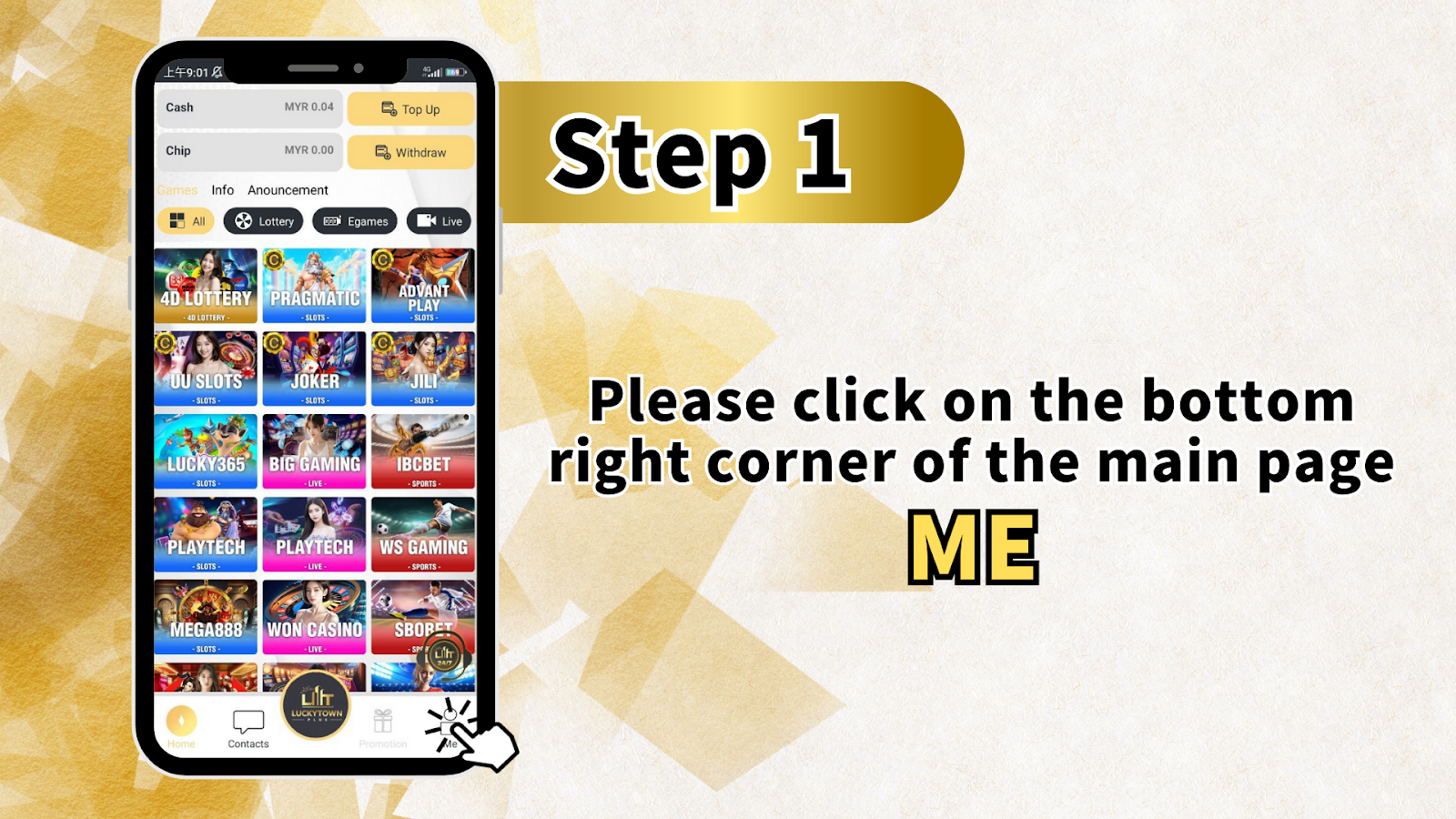
Step 1: Access the Profile Section from the Main Dashboard
To begin your LUCKYTOWN PLUS verification, open the app and look toward the bottom of the main dashboard. Tap on the profile icon located in the lower right corner. This section displays your account summary, available balance, and quick-action buttons. From here, you can manage deposits, withdrawals, and view your gaming history. The dashboard also showcases the full range of LUCKYTOWN PLUS entertainment options, including lottery, slot games, live casino, and sportsbook categories, all of which become fully accessible once verification is complete.
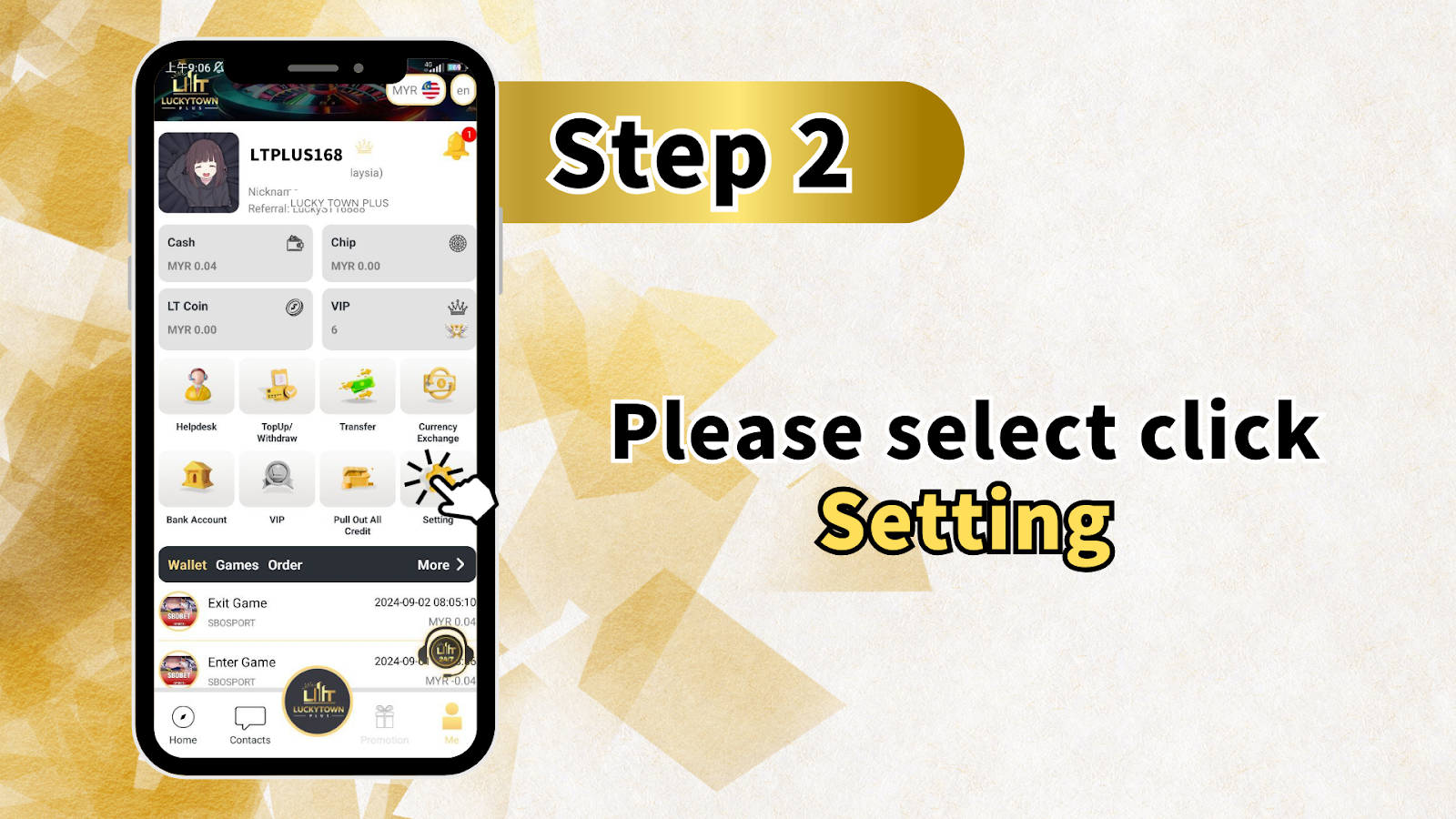
Step 2: Enter the Account Settings Menu
Once inside the profile section, locate and tap the "Settings" option. This menu houses all critical account management tools for LUCKYTOWN PLUS members. Here you can adjust security preferences, update contact details, and, most importantly, begin the real-name verification process. The settings area is designed for easy navigation, grouping related functions together for intuitive access.
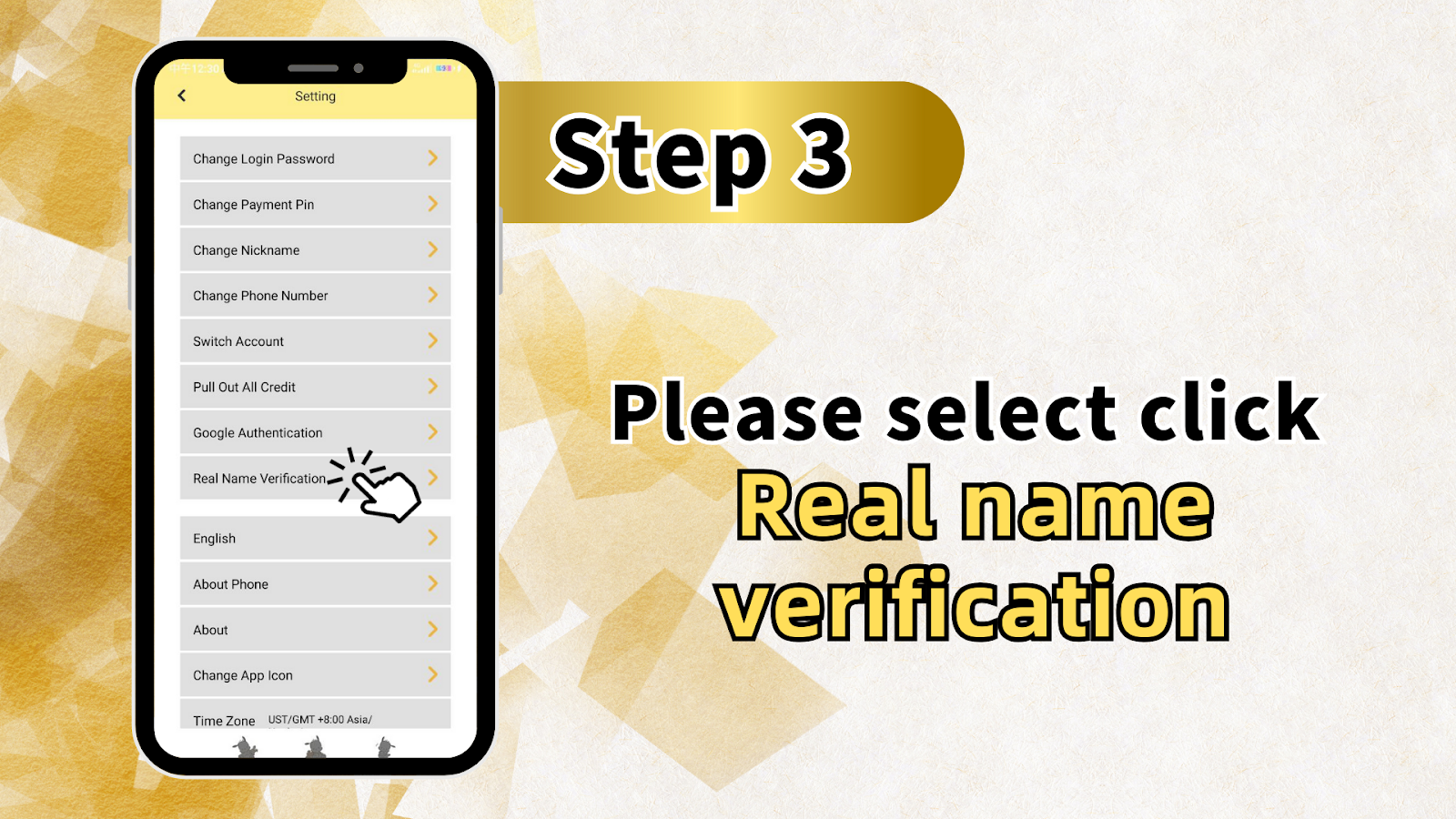
Step 3: Select Identity Verification
Within the Settings menu, scroll to find the option labeled "Identity Verification" or "Real-name Verification." Tapping this opens the dedicated verification interface. Other settings available here include password updates, payment PIN changes, nickname adjustments, phone number updates, multi-account switching, credit withdrawal options, two-factor authentication via Google Authenticator, language preferences, device information, platform details, and time zone configuration (default GMT+8 Asia). Each function supports your overall LUCKYTOWN PLUS account management.
Step 4: Complete the Verification Submission Form
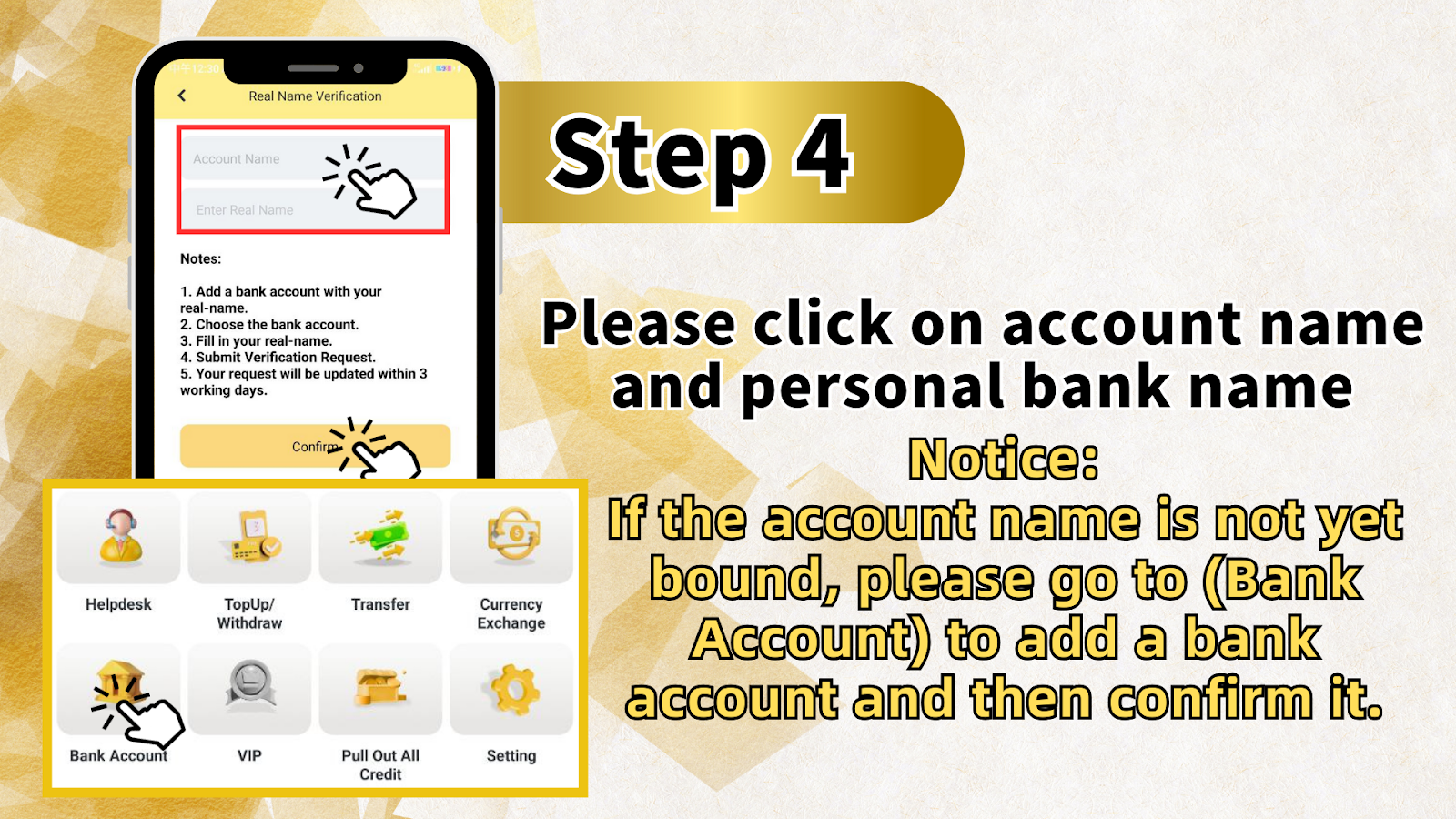
The verification screen presents a straightforward form requiring accurate information. Follow these five essential steps to ensure successful LUCKYTOWN PLUS verification:
1. Link a Bank Account Using Your Legal Name
Before submitting your verification request, you must add a bank account that bears your full legal name. The name on this account must match exactly what you will enter during verification. If you have not yet added a bank account, navigate to the "Bank Account" section within your profile, enter your account details, and confirm the binding. This step establishes the financial link necessary for future withdrawals.
2. Select the Correct Bank Account
From the dropdown menu in the verification form, choose the bank account you just added. LUCKYTOWN PLUS uses this selection to cross-reference your identity with the financial institution's records. Selecting the wrong account may delay or reject your verification request.
3. Enter Your Full Legal Name
Input your name exactly as it appears on your bank account and official identification documents. LUCKYTOWN PLUS requires precise name matching. Any variation, including omitted middle names or alternate spellings, can result in verification failure. Double-check your entry against your bank statement or ID card before proceeding.
4. Submit Your Verification Request
After confirming that all information is accurate, click the submit button to forward your request to the LUCKYTOWN PLUS verification team. Once submitted, your request enters the processing queue. You will receive confirmation that your information is under review.
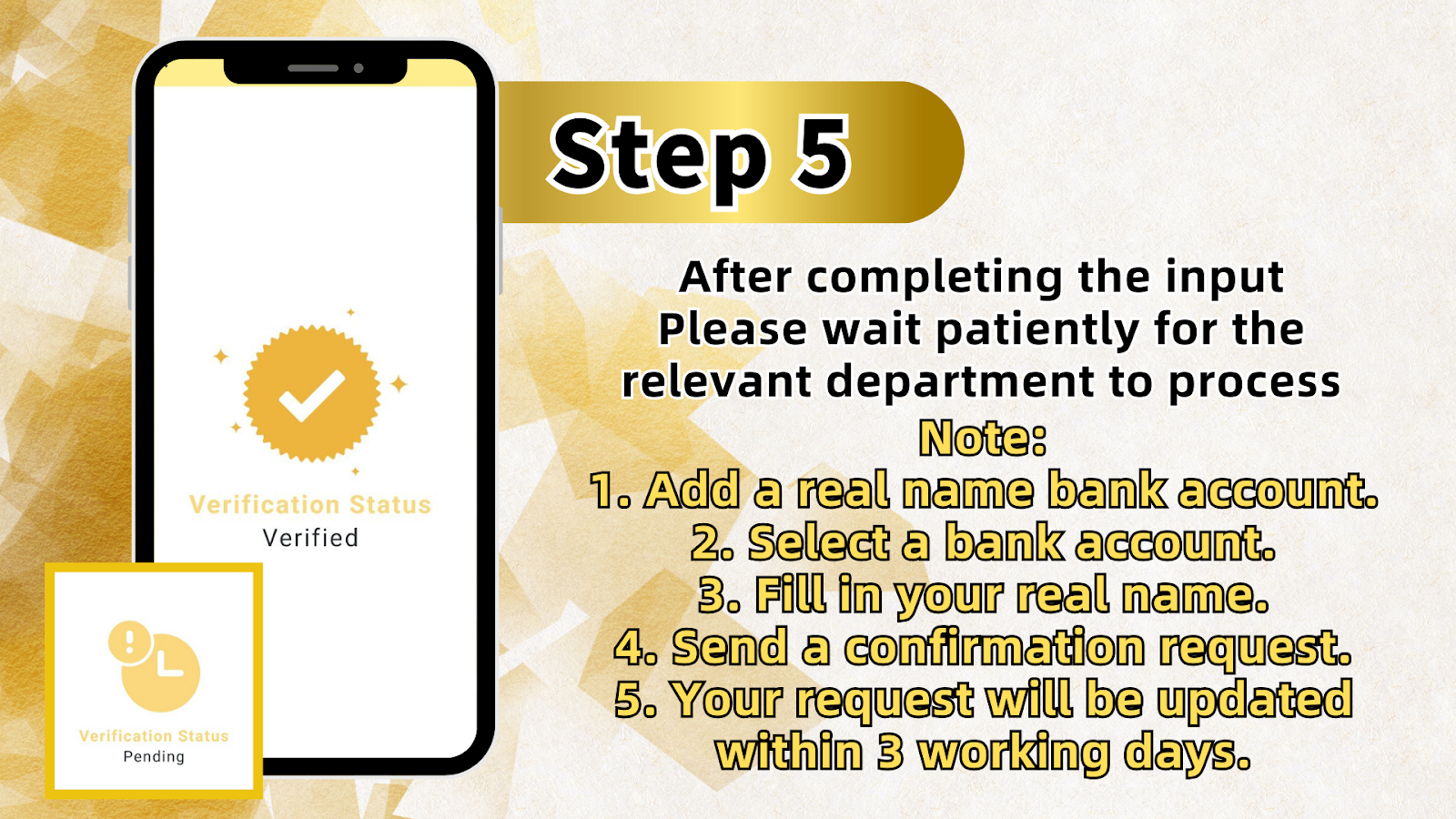
5. Allow Up to 3 Business Days for Processing
LUCKYTOWN PLUS processes verification requests within 3 business days. The dedicated team reviews each submission carefully to ensure compliance with security protocols. During this period, no further action is required from you. Your account status will update automatically once verification is approved.
Step 5: Await Final Confirmation
After submitting your request, allow time for the LUCKYTOWN PLUS verification team to complete their review. Processing typically concludes within 3 business days. You will receive a notification once your account status changes to "Verified." While waiting, you may continue exploring platform features, though withdrawal functionality remains restricted until verification completes.
Important Notes for LUCKYTOWN PLUS Real-name Verification: LUCKYTOWN Member Guidance
Note 1: Link a Bank Account with Your Legal Name Before Starting
The single most critical prerequisite for LUCKYTOWN PLUS verification is having a bank account already bound to your profile using your legal name. If your account is not yet linked, visit the "Bank Account" section, add your details, and confirm the binding. Verification cannot proceed without this step completed.
Note 2: Verify You Have Selected the Correct Linked Account
When completing the verification form, ensure you select the bank account you have just added from the dropdown options. LUCKYTOWN PLUS uses this selection to match your identity. Choosing an account that does not belong to you or selecting incorrectly will cause verification failure.
Note 3: Match Your Real Name Exactly to Bank Records
Your name entry must mirror the name on your bank account exactly. Even minor discrepancies, such as "Mohd" versus "Mohammad" or missing initials, can lead to rejection. Review your bank statement to confirm the exact formatting before submitting.
Note 4: Processing Takes Up to 3 Business Days
LUCKYTOWN PLUS verification requests are processed within 3 business days. This timeframe allows the team to conduct thorough reviews. Processing times may vary based on submission volume, but rest assured your request will be addressed in order.
Note 5: Avoid Contacting Support During the Processing Window
While awaiting verification, please allow the full 3-day processing period before reaching out to customer support. Contacting support during this window does not expedite review and may slow response times for other members. Your patience ensures efficient processing for everyone.
Understanding the LUCKYTOWN PLUS Settings Menu: LUCKYTOWN Account Management Overview
Complete Settings Menu Functions
The LUCKYTOWN PLUS Settings menu offers comprehensive account management tools beyond identity verification. Familiarizing yourself with these options helps you maintain full control over your profile:
Change Login Password
Update your account password regularly to maintain strong security. This option allows you to set a new password following LUCKYTOWN PLUS requirements for account protection.
Change Payment PIN
Modify the PIN used to authorize transactions within your LUCKYTOWN PLUS account. Keeping this PIN secure prevents unauthorized withdrawals or transfers.
Change Display Nickname
Customize the name visible to other members within community features. This does not affect your legal name used for verification.
Change Registered Mobile Number
Update the phone number associated with your account for OTP verification and security alerts. Ensure your number remains current to receive important notifications.
Switch Between Accounts
For members managing multiple LUCKYTOWN PLUS profiles, this option allows seamless switching without repeated logins.
Withdraw All Available Credit
Initiate a complete withdrawal of your account balance in a single transaction, available only after verification is approved.
Google Two-Factor Authentication
Enable an additional layer of security by linking your LUCKYTOWN PLUS account to Google Authenticator, requiring a time-based code for login and sensitive actions.
Identity Verification
Access the verification form described in this guide to complete your KYC requirements.
Language Selection
Choose your preferred interface language for a personalized LUCKYTOWN PLUS experience.
Device Information
View details about your current device and app version for troubleshooting purposes.
About LUCKYTOWN PLUS
Access platform information, terms of service, and version details.
Time Zone Settings
Adjust your time zone preferences to align with your location (default GMT+8 Asia).
Frequently Asked Questions About LUCKYTOWN PLUS Real-name Verification: LUCKYTOWN Member Support
Why does LUCKYTOWN PLUS require real-name verification?
LUCKYTOWN PLUS requires verification to protect member accounts, comply with regulatory standards in Malaysia, and ensure secure transactions. Verified accounts prevent fraud, guarantee that withdrawals reach the correct individual, and allow the platform to maintain a safe environment for all members. LUCKYTOWN takes these measures seriously to safeguard your interests.
How long does the verification process take?
LUCKYTOWN PLUS verification requests are typically processed within 3 business days. The team reviews each submission carefully to ensure accuracy and compliance. You will receive a notification once your account status updates to "Verified."
What happens if my entered name does not match my bank account?
LUCKYTOWN PLUS verification requires exact name matching between your submission and your linked bank account. If names differ, the request will be rejected. To avoid delays, confirm your bank account's exact name format before submitting.
Can I verify my account without linking a bank account first?
No. LUCKYTOWN PLUS verification requires a bank account already bound to your profile using your legal name. If you have not yet added an account, visit the "Bank Account" section to link one before starting verification.
What should I do if my verification request is rejected?
If your LUCKYTOWN PLUS verification is rejected, review the information you submitted. Confirm that your bank account name matches your entry exactly, ensure you selected the correct account, and verify that your bank account was properly linked. Then submit a new request with corrected details.
Can I use platform features while waiting for verification?
You can browse LUCKYTOWN PLUS, explore games, and make deposits while verification is pending. However, withdrawals and certain promotions require a verified account. Completing verification early ensures uninterrupted access when you're ready to withdraw.
Is my personal information secure during verification?
Yes. LUCKYTOWN PLUS uses industry-standard encryption and security protocols to protect all personal data submitted during verification. Your information is used only for identity confirmation and account security purposes.
Why Complete LUCKYTOWN PLUS Real-name Verification: LUCKYTOWN Benefits for Verified Members
Unlock Full Platform Functionality
Verified LUCKYTOWN PLUS members gain access to all platform features, including withdrawals, higher transaction limits, VIP program participation, and exclusive promotions reserved for verified accounts.
Strengthen Account Protection
Verification adds a critical layer of security to your LUCKYTOWN PLUS account, ensuring that only you can authorize withdrawals or make significant account changes. This protects your balance from unauthorized access.
Meet Regulatory Requirements
LUCKYTOWN PLUS operates in compliance with Malaysian regulations, and real-name verification ensures the platform maintains this compliance. Your cooperation helps sustain a safe, legal environment for all members.
Enable Faster Future Transactions
Once your LUCKYTOWN PLUS account is verified, subsequent withdrawals and financial transactions process more smoothly since your identity is already confirmed in the system.
Enjoy Peace of Mind
Knowing your LUCKYTOWN PLUS account is fully verified provides confidence that your funds and personal information are protected according to the platform's highest security standards.
Complete Your LUCKYTOWN PLUS Real-name Verification Today
Follow the step-by-step guide to verify your LUCKYTOWN PLUS account. Link your bank account, submit your legal name, and complete KYC within 3 business days. Essential for withdrawals and full platform access.
Start Verification Now