
LUCKYTOWN PLUS Change Password & Forgot User - LUCKYTOWN Complete Account Recovery Guide
LUCKYTOWN PLUS Forgot User / Forgot Password / Change Password: LUCKYTOWN Teaching Step Solutions


Introduction to LUCKYTOWN PLUS Change Password and Account Recovery
The LUCKYTOWN PLUS change password and account recovery features ensure you never lose access to your account. Whether you need to update your password for security reasons, forgot your login credentials, or cannot remember your username, this guide covers every scenario. LUCKYTOWN offers multiple recovery paths: change password while logged in through the settings menu, reset a forgotten password using OTP verification, or retrieve your username through your registered mobile number. Follow the instructions that match your situation to regain access quickly and securely.
Method 1: LUCKYTOWN PLUS Change Password While Logged In
Step 1: Access Your Account Dashboard
Open the LUCKYTOWN PLUS app and tap the account icon in the bottom-right corner of the main screen. The ME area contains your balance, transaction history, and account management options.
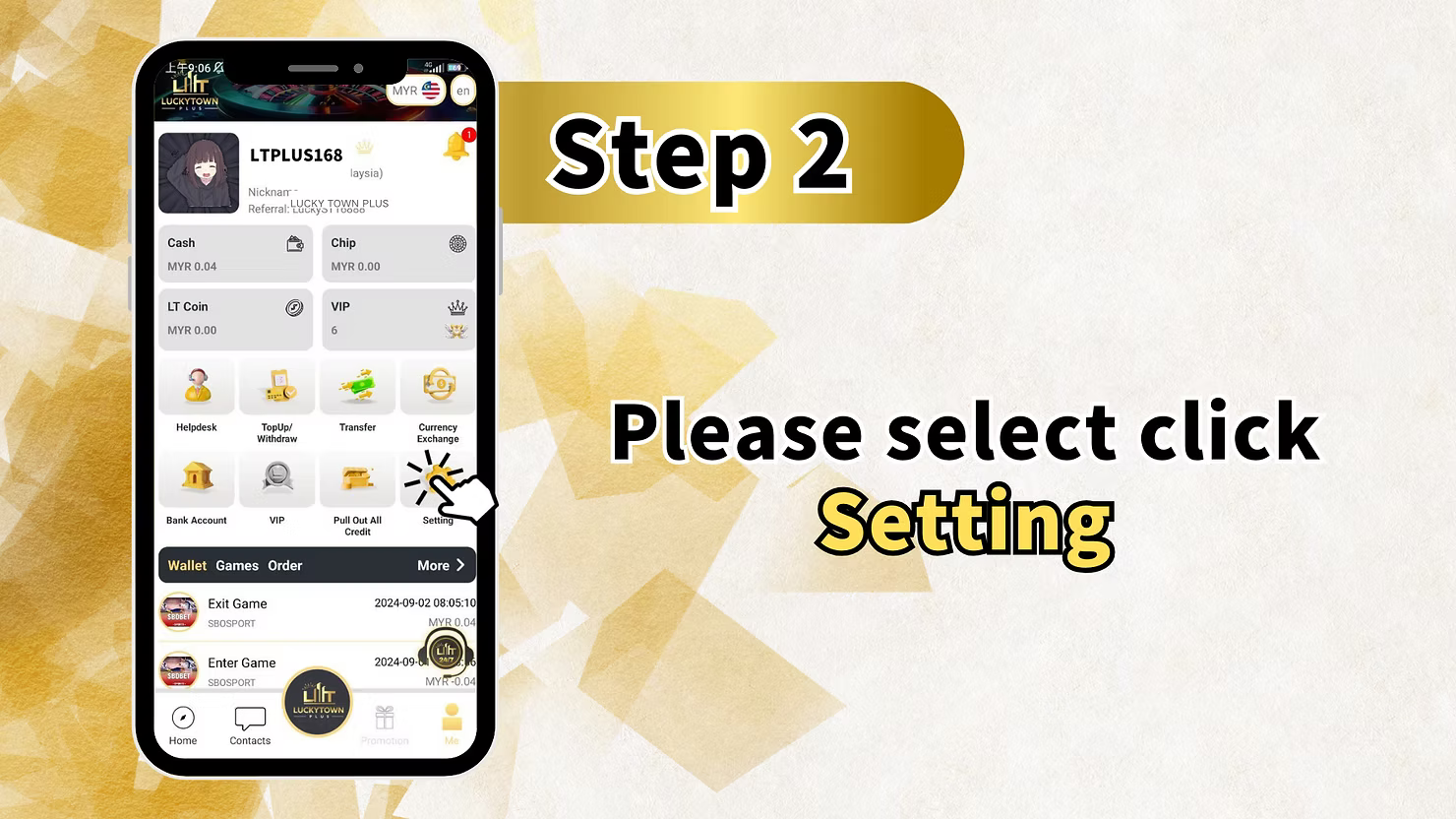
Step 2: Enter the Settings Menu
From your dashboard, tap the Setting option. This opens the settings menu where you can manage login credentials, payment PIN, nickname, phone number, Google authentication, device details, and related account preferences.
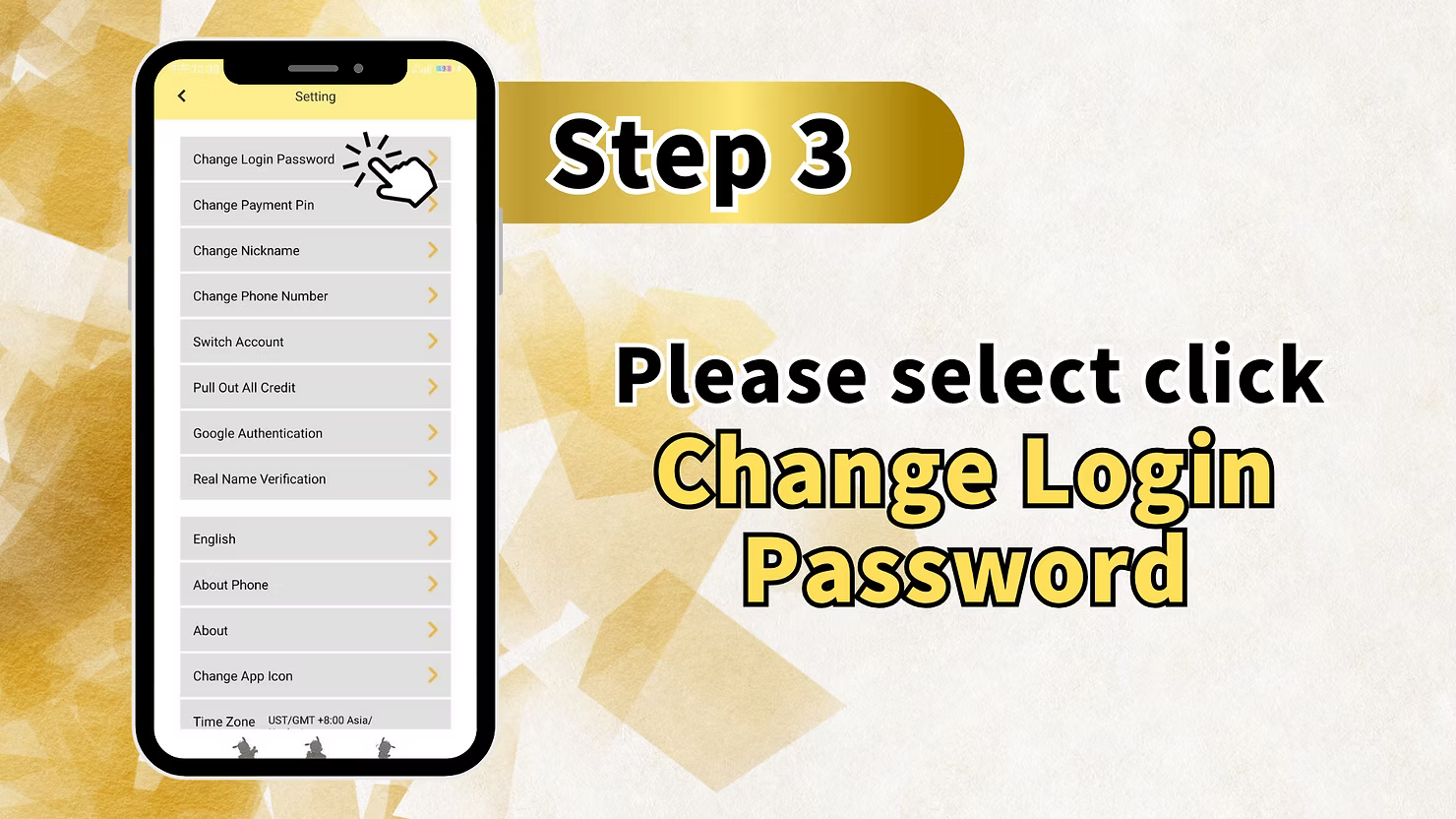
Step 3: Select Change Login Password
Scroll inside the settings menu and tap Change Login Password. This option is used specifically to update your main login password.
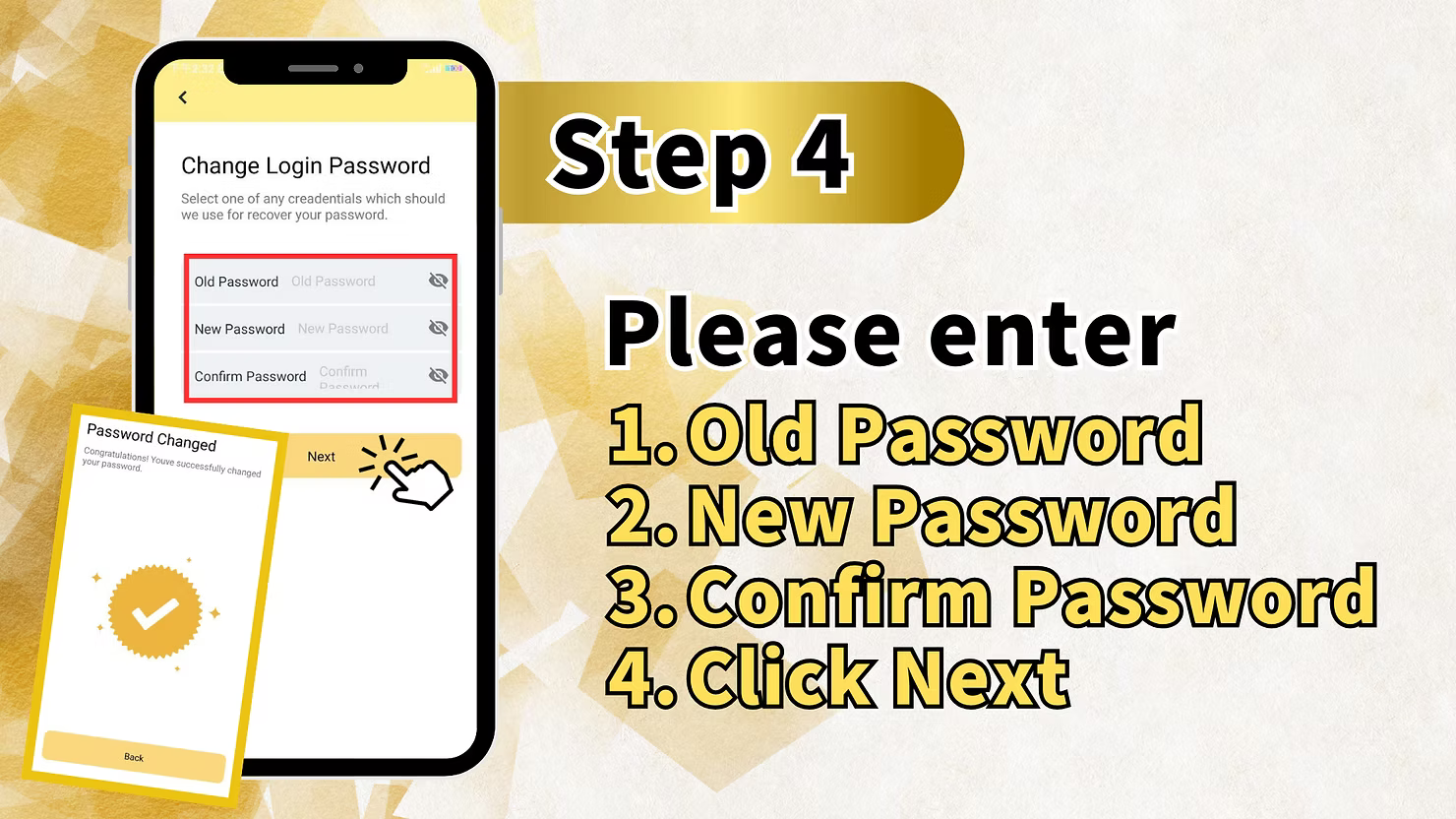
Step 4: Enter Old Password and New Password
On the Change Login Password screen, fill in Old Password, New Password, and Confirm Password. Enter your current password first, then type the same new password twice so the system can verify the match.
Step 5: Confirm Password Change
Tap Confirm after all fields are completed correctly. The system will show a Password Changed confirmation, and your new login credentials will be active for future sign-ins.
Method 2: LUCKYTOWN PLUS Forgot Password Recovery
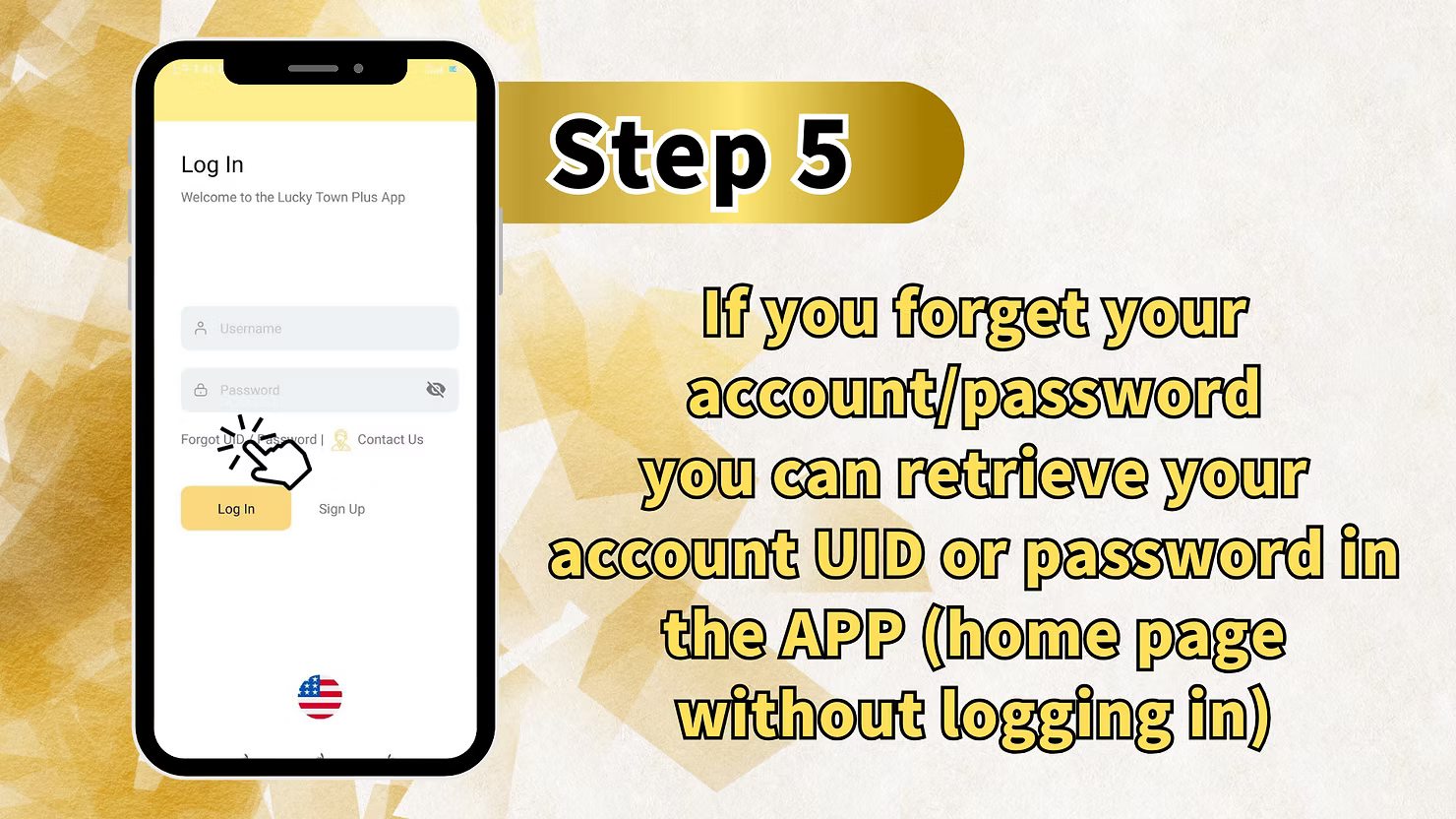
Step 1: Access the Login Page Recovery Options
Start from the LUCKYTOWN PLUS login page if you cannot sign in. Below the Username and Password fields, tap the Forgot UID / Password link to enter the account recovery flow.
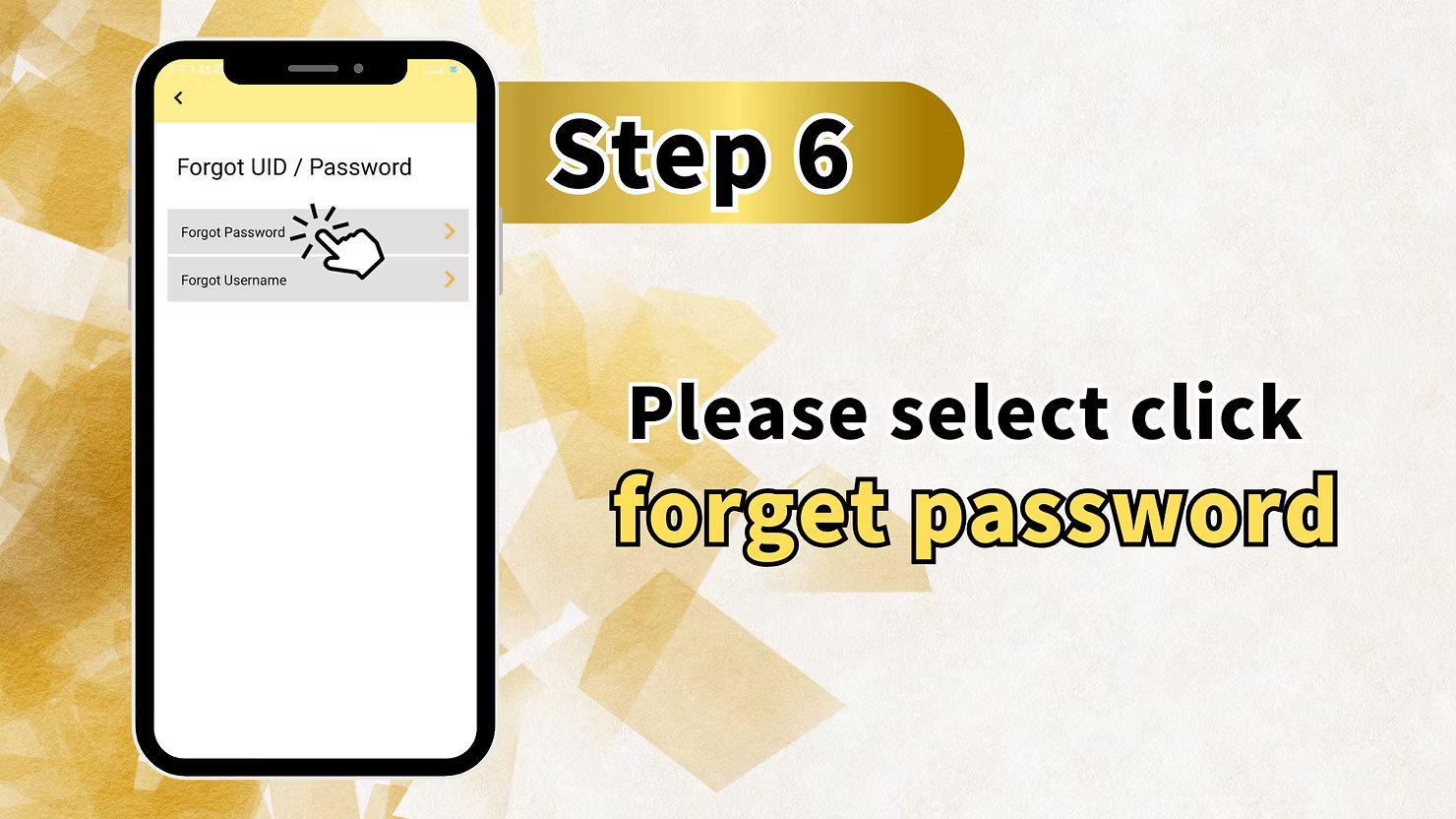
Step 2: Select Forgot Password
On the recovery options screen, choose Forgot Password. This opens the password reset path for members who are not logged in.
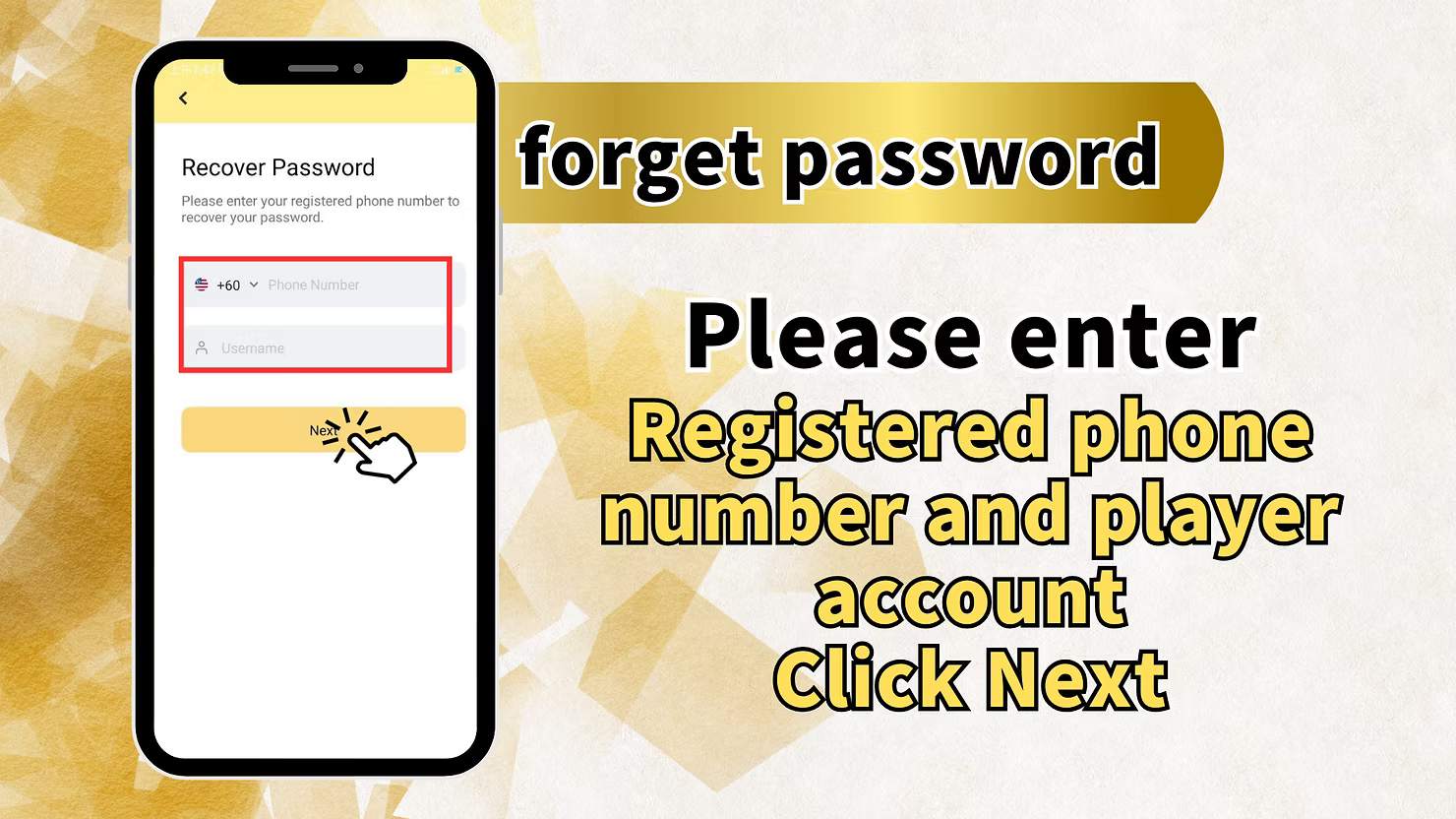
Step 3: Enter Registered Phone Number and Username
Provide the +60 mobile number registered to your LUCKYTOWN PLUS account together with your username. These details are used to verify that the request belongs to the correct account.
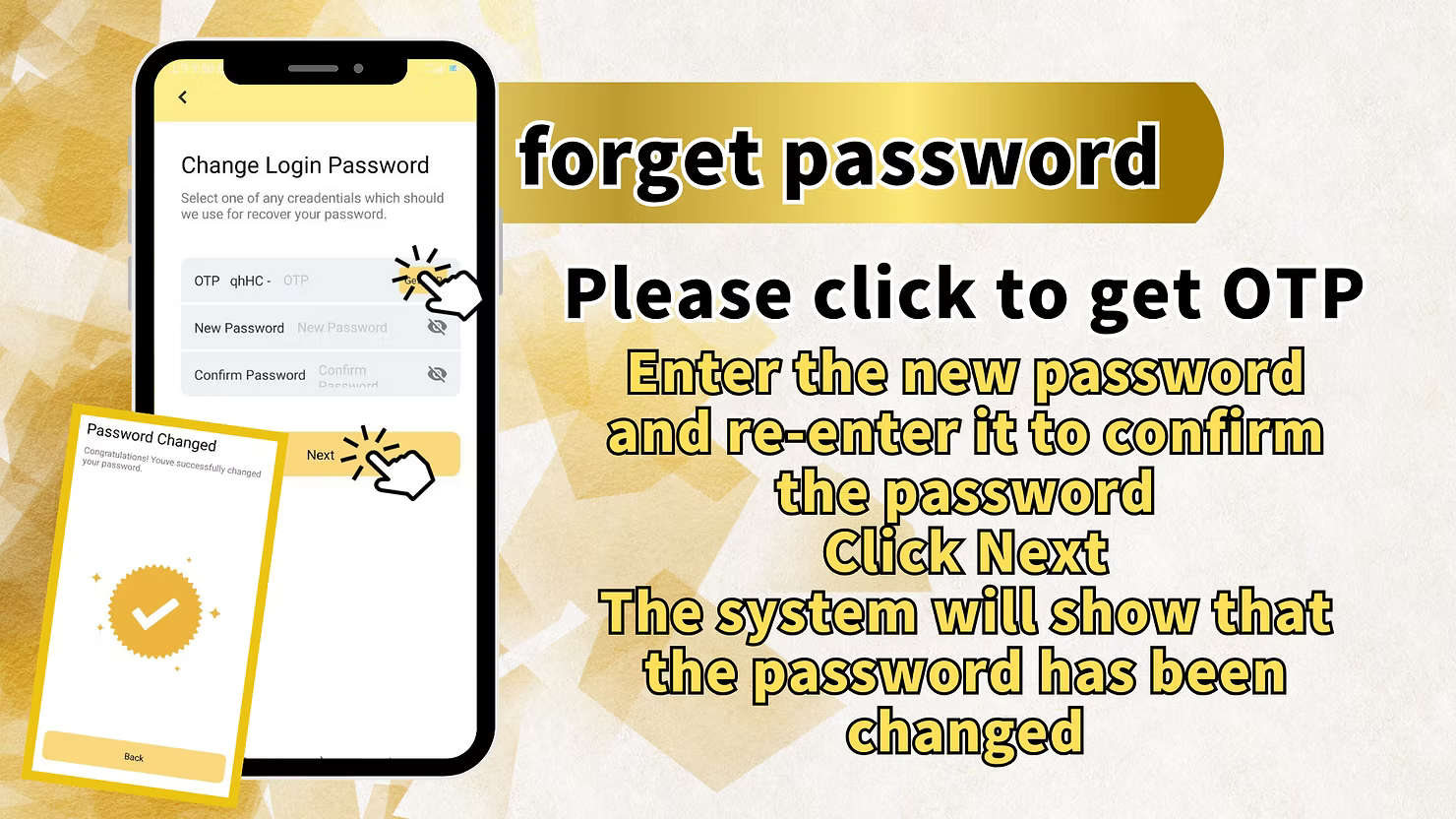
Step 4: Get OTP and Enter New Password
Request an OTP by SMS, enter the code in the verification field, then create a new password and confirm it in both password fields. Make sure the new password follows the platform's security rules.
Step 5: Complete Password Reset
Tap Next after entering the OTP and confirming the new password. Once the success message appears, return to the login page and sign in with your updated password.
Method 3: LUCKYTOWN PLUS Forgot Username Recovery
Step 1: Access the Login Page Recovery Options
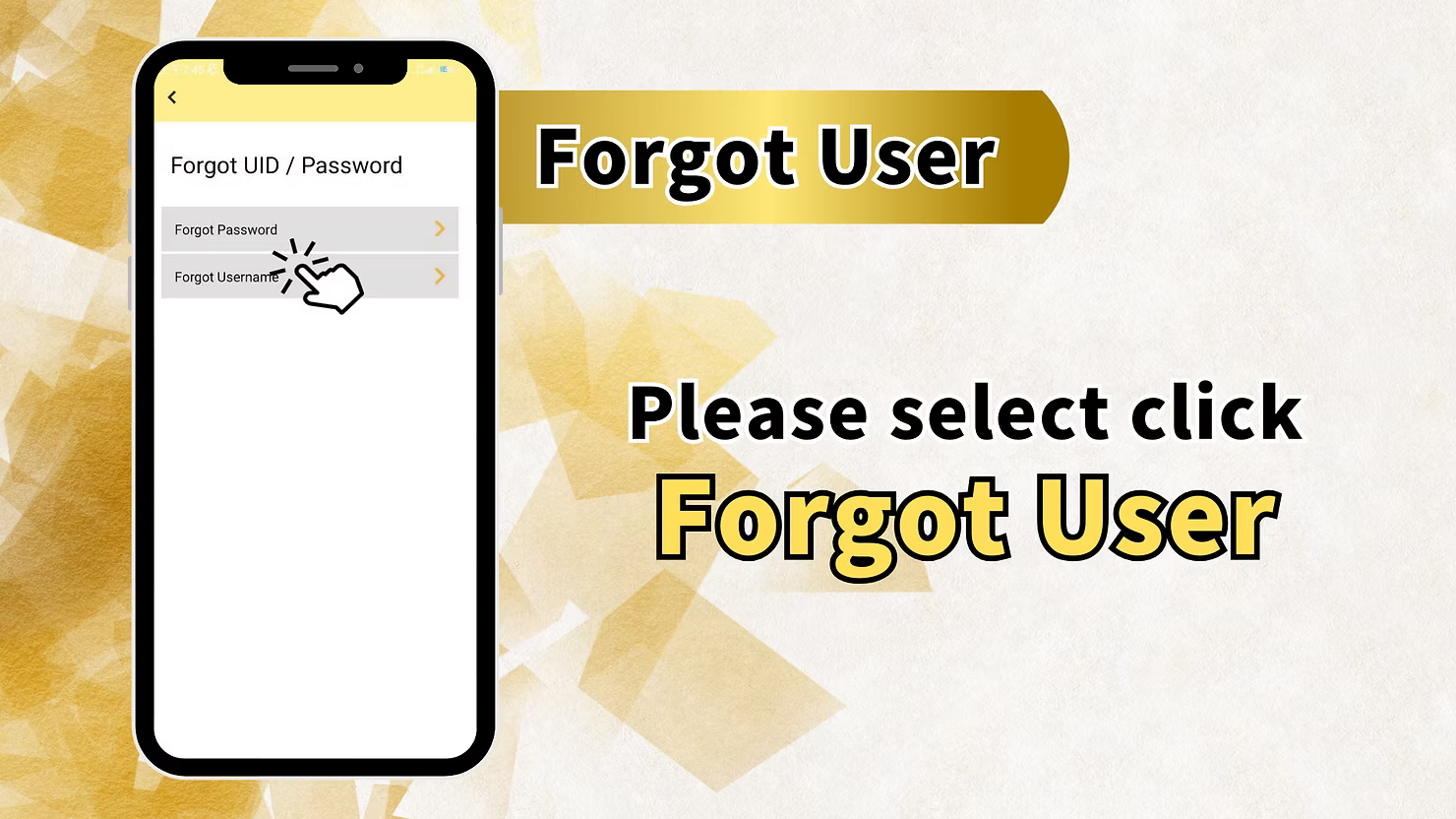
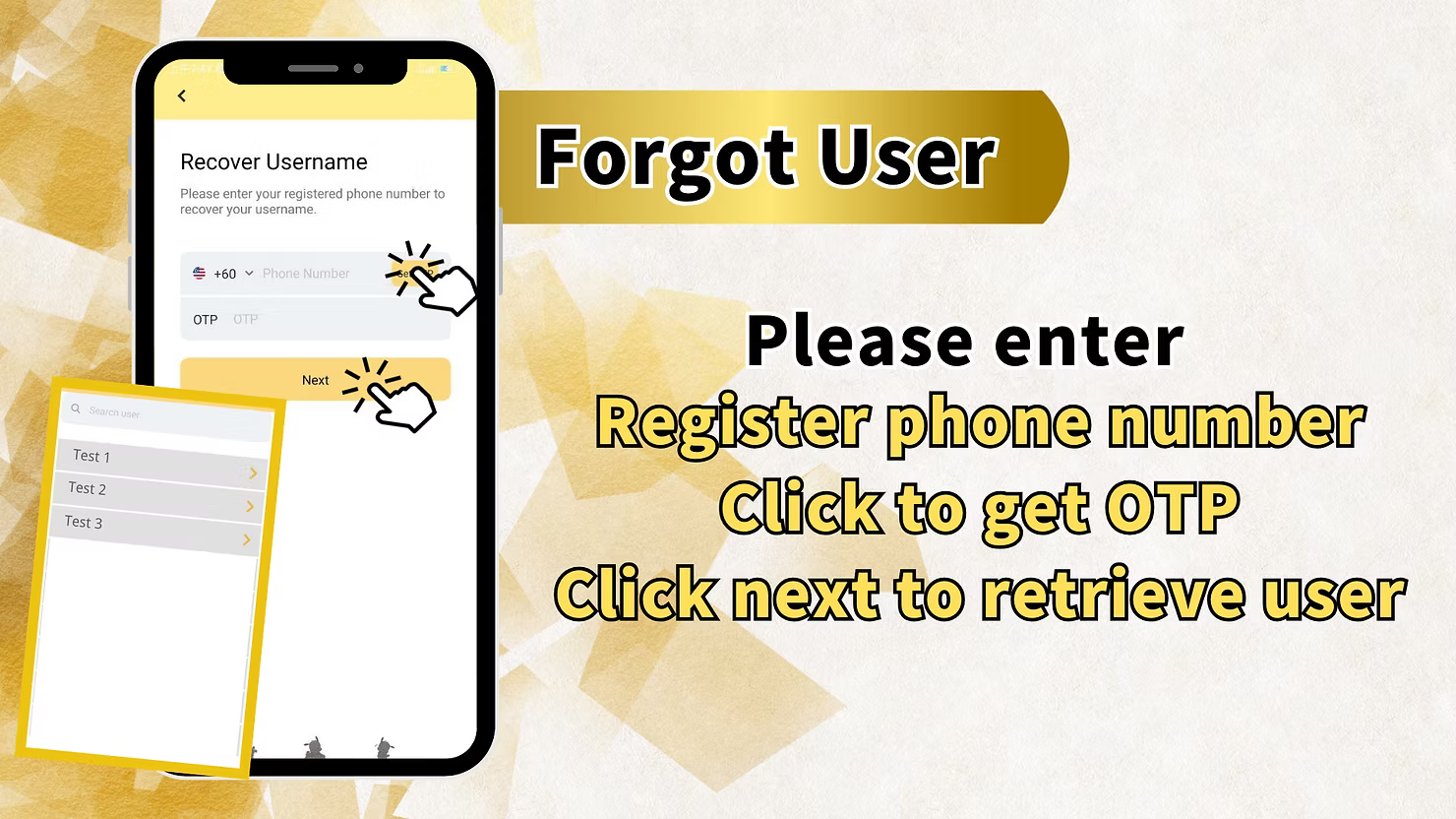
From the login page, tap Forgot UID / Password, then choose Forgot Username on the next screen.
Step 2: Enter Registered Phone Number for Username Recovery
Enter the +60 phone number registered with your LUCKYTOWN PLUS account on the Recover Username screen.
Step 3: Get OTP for Username Recovery
Request the OTP sent to your registered mobile number and enter the code in the verification field. This confirms ownership of the number tied to the account.
Step 4: Retrieve Your Username
Tap Next after entering the OTP. The system will search for accounts linked to that number and display the username or usernames associated with it.
LUCKYTOWN PLUS Account Recovery Important Guidelines
Multiple Recovery Paths Available
LUCKYTOWN PLUS supports three recovery methods: logged-in password change, forgot-password recovery by OTP, and forgot-username recovery by OTP. Choose the path that matches your current access level.
Phone Number Requirement for Recovery
For forgot-password and forgot-username recovery, you must still have access to the +60 number registered to your account. OTP verification protects the account from unauthorized reset requests.
OTP Verification Process
Recovery OTP codes are sent to your registered mobile number and expire after a short period. If a code expires before use, request a fresh OTP and complete the process promptly.
Password Security Best Practices
Create a strong password that you have not used before, avoid predictable personal information, and never share your password or OTP with anyone.
Frequently Asked Questions About LUCKYTOWN PLUS Change Password and Recovery
How do I change my password while logged in?
Go to ME, open Setting, tap Change Login Password, then enter your old password and the new password twice before confirming.
What if I forgot my password and cannot log in?
Use Forgot UID / Password on the login page, choose Forgot Password, enter your registered phone number and username, request OTP, and set a new password.
What if I forgot my username?
Use Forgot UID / Password, choose Forgot Username, enter your registered phone number, request OTP, and retrieve the username tied to that number.
How do I get OTP for account recovery?
During recovery, tap the OTP request button. The code will be sent by SMS to your registered +60 phone number for identity verification.
What if I do not have access to my registered phone number?
Use the Contact Us option from the login page and ask customer support for further assistance with alternative verification steps.
Can I recover my account without OTP?
OTP is the main security method for password and username recovery. If you cannot receive OTP, contact customer service through the official support path.
Why Choose LUCKYTOWN PLUS Account Recovery System
Multiple Recovery Paths
Members can recover access through three distinct methods, so the account is still recoverable whether you remember your password, forgot it, or forgot your username.
Secure OTP Verification
OTP verification adds a direct security check against your registered mobile number before passwords are reset or usernames are retrieved.
Guided Member Flow
The recovery flow is structured step by step, making it easier to finish the process correctly without guesswork.
Fast Access Restoration
Once verification succeeds, you can update your password or recover your username quickly and return to the platform with minimal delay.
Support Backup When Needed
If standard recovery is blocked, the Contact Us path gives members an official escalation route for additional help.
Recover Your LUCKYTOWN PLUS Account Today
Use the appropriate recovery path to change your password, reset a forgotten password, or retrieve your username through your registered mobile number. Follow the official LUCKYTOWN PLUS account recovery steps and keep your account access secure.
Start Account Recovery